Ingesting live market data from Databento into QuestDB
Stream every US equity quote and trade from Databento into QuestDB with one config file, query it with SQL, and keep every row through restarts and failover.



In a previous post we ingested Databento market data into QuestDB with Python code and visualized it in Grafana. On QuestDB open source that's still the way to do it, and the Databento with Python guide covers it. On QuestDB Enterprise there's now a better option: a Databento connector that replaces that code with a config file and keeps your history complete across restarts and failover, with dashboards that run directly in the QuestDB Web Console.
Below, we stream every US equity quote and trade from Databento's EQUS.MINI
dataset into QuestDB, query it with SQL, and then stop both the connector and
the database mid-stream to check that nothing goes missing. Everything comes
from real runs on October 16th, 2026, and the full example is in our
blog-examples repository.
It's a long post, so here's what's in it:
- Databento and the EQUS.MINI dataset: what the data is, and what you need to follow along
- Configuring and running the Databento connector: one config file and one long-running process
- What the connector writes to QuestDB: the table schema and the order book arrays
- Querying Databento quotes and trades with SQL:
LATEST ON,SAMPLE BY,ASOF JOIN, and a live Web Console dashboard - Spreads, microbursts and nanosecond timestamps: what three pre-market minutes contain
- Restarting the connector without a gap: Databento intraday replay, and handling duplicates
- High availability: QuestDB outages, upgrades, and failover to a replica
- Retention and cold storage: storage policies that move history to Parquet in object storage
Databento and the EQUS.MINI dataset
Databento is a market data provider. It takes direct
feeds from exchanges and trading venues, normalizes them into one format, and
serves them live or historically through a single API. Each source is a
dataset, such as CME Globex futures (GLBX.MDP3), and each dataset comes in
schemas of increasing detail: trades, top of book (mbp-1), ten levels of
depth (mbp-10), or every individual order (mbo).
This post uses
Databento US Equities Mini,
dataset ID EQUS.MINI. It blends direct feeds from several US exchanges and
alternative trading systems into a single composite best bid and offer per
stock, along with the trades. It's top of book only, with no depth beyond the
best level, but one subscription covers the whole US equities market, and it's
Databento's lowest-cost real-time equities feed. We subscribe to two of its
schemas: mbp-1, which carries every change to the best bid and offer plus
trade events, and trades, which carries trades only.
To follow along you need QuestDB Enterprise 4.0.0 or later, and a Databento account with a paid subscription that includes live data. As of writing, Databento doesn't offer usage-based live access to its US equities data, and the free credits you get on sign-up only apply to historical data. See Databento pricing for the current plans.
Without live access, you can still use the sign-up credits with the connector's Historical mode to load a past window into the same tables and run the queries. The restart experiments need a live session.
Configuring the Databento connector
The connector reads a single config file, connector.toml in the example. It
names the dataset and, for each Databento schema, the symbols and the QuestDB
table to write to: mbp-1 goes to equs_orderbook and trades to
equs_trades, both for ALL_SYMBOLS. It also sets a state directory for
checkpoints and turns on replay_dedup, both covered in the restart sections
below. Credentials come from environment variables, not the file. The
connector writes with QWP,
QuestDB's binary protocol over WebSocket.
Running the Databento connector against live US equities
You need QuestDB Enterprise 4.0.0 or later, a Databento API key with Live
access to EQUS.MINI, and the databento-questdb binary, which you get
through your QuestDB Enterprise contact. The
connector docs
cover installing it.
Set your credentials, pointing QDB_CLIENT_CONF at your QuestDB, and start
the connector:
export DATABENTO_API_KEY='db-your-key-here'export QDB_CLIENT_CONF='ws::addr=localhost:9000;token=<your-token>;'databento-questdb --config connector.toml
The token belongs to a
service account
with HTTP and CREATE TABLE grants, so the connector's access doesn't
depend on any person's permissions.
The connector is a long-running process. In production you'd run it under
systemd, Docker or Kubernetes and leave it alone. For this example, it streams
until you press Ctrl+C. ALL_SYMBOLS is a heavy stream during market hours,
so stop it once you have enough data. On Ctrl+C or SIGTERM it stops reading,
drains the rows in flight, waits for QuestDB to acknowledge them, and saves its
checkpoint.
The connector logs a progress line every 60 seconds by default, and every 30 in the example. This one is from our first run:
INFO databento_questdb: progress connector=equs-mini status=Running received=34732 published=34727 confirmed=34727 confirmation_lag=mbp-1=0.1s,trades=2.0s
received counts records from Databento, published counts rows written to
QuestDB, and confirmed counts rows QuestDB has acknowledged. The checkpoint
only moves with confirmed, so a restart never skips data that was received
but not yet stored.
That run was US pre-market, 07:49 to 07:53 in New York, and three minutes produced about 37,000 top-of-book updates across a few hundred symbols, around 200 a second. At the 10:00 open, the dashboard further down shows the same feed at 20,000 to 65,000 book updates a second, two orders of magnitude more.
What the connector writes to QuestDB: nanosecond tables and order book arrays
There's no DDL step. The connector creates both tables on first write,
partitioned by day, with WAL enabled, nanosecond timestamps, and Databento's
receive time ts_recv as the
designated timestamp. This is the
table it created for mbp-1:
CREATE TABLE 'equs_orderbook' (dataset SYMBOL,symbol SYMBOL,publisher_id INT,instrument_id LONG,ts_event TIMESTAMP_NS,price DOUBLE,size LONG,action SYMBOL,side SYMBOL,flags SHORT,depth SHORT,ts_recv TIMESTAMP_NS,ts_in_delta LONG,sequence LONG,bids DOUBLE[][],asks DOUBLE[][],bid_ct DOUBLE[],ask_ct DOUBLE[]) timestamp(ts_recv) PARTITION BY DAY;
Every row carries dataset, publisher_id, instrument_id and the resolved
symbol, so the instrument-ID dictionary from the old script is gone. The
other change is how the book is stored. Bids and asks are
two-dimensional arrays of shape [2, N], best
level first: row 1 holds prices and row 2 sizes. bids[1][1] is the best bid
and bids[2][1] its size. For mbp-1, N is 1. Subscribe to a deeper schema
such as mbp-10 and the same columns hold ten levels, so none of the queries
below change shape.
An empty side of the book is NULL. In our pre-market sample 27% of book
updates had an empty bid or ask, which is normal for thinly traded names
before the open.
The mbp-1 table also contains trade events, with action = 'T', next to
adds (A), cancels (C) and modifies (M). The separate trades
subscription is there for convenience: smaller scans when you only want
prints.
If you want different partitioning, symbol capacity or retention, create the table yourself before starting the connector. It uses an existing compatible table as it is.
Querying Databento quotes and trades with SQL
All the queries are in sql/queries.sql in the example, and
python3 run_sql.py sql/queries.sql <name> runs any of them over the REST
API. They also run as they are in the Web Console. The results below are from
the pre-market run.
Latest top of book per symbol with LATEST ON
LATEST ON returns the most recent row per
symbol without a self-join or a window function:
SELECT ts_recv, symbol,bids[1][1] AS bid_px, bids[2][1] AS bid_sz,asks[1][1] AS ask_px, asks[2][1] AS ask_szFROM equs_orderbookWHERE symbol IN ('AAPL', 'MSFT', 'NVDA', 'TSLA', 'SPY', 'QQQ')LATEST ON ts_recv PARTITION BY symbol;
| ts_recv | symbol | bid_px | bid_sz | ask_px | ask_sz |
|---|---|---|---|---|---|
| 2026-10-16T11:50:02.171043697Z | TSLA | 373.5 | 92 | 376.77 | 60 |
| 2026-10-16T11:52:44.511284405Z | SPY | 772.33 | 146 | 772.44 | 100 |
| 2026-10-16T11:52:44.544151599Z | QQQ | 726.19 | 200 | 726.27 | 200 |
Three of the six symbols are missing. AAPL, MSFT and NVDA didn't update their
quotes once in those three pre-market minutes, and LATEST ON only returns
symbols that have data. During regular hours all six show up.
OHLC bars from raw trades with SAMPLE BY
SAMPLE BY buckets rows by time, which turns raw
trades into one-minute bars:
SELECT ts_recv, symbol,first(price) AS open, max(price) AS high,min(price) AS low, last(price) AS close,sum(size) AS volume, count() AS tradesFROM equs_tradesSAMPLE BY 1mORDER BY trades DESCLIMIT 10;
To keep bars like these current as trades arrive, without recomputing them on every read, put the query in a materialized view.
Each trade against the prevailing quote with ASOF JOIN
ASOF JOIN matches each trade with the latest
quote for the same symbol at or before the trade's timestamp:
SELECT t.ts_recv, t.symbol, t.price, t.size,q.bids[1][1] AS bid_px, q.asks[1][1] AS ask_px,CASEWHEN q.bids[1][1] = NULL OR q.asks[1][1] = NULLTHEN 'no two-sided quote'WHEN t.price >= q.asks[1][1] THEN 'at or above ask'WHEN t.price <= q.bids[1][1] THEN 'at or below bid'ELSE 'inside spread'END AS trade_locationFROM equs_trades tASOF JOIN equs_orderbook q ON (symbol)LIMIT -10;
| ts_recv | symbol | price | size | bid_px | ask_px | trade_location |
|---|---|---|---|---|---|---|
| ... | ||||||
| 2026-10-16T11:52:33.813857415Z | NBIS | 182.75 | 60 | 182 | 186 | inside spread |
| 2026-10-16T11:52:35.558939201Z | ZTG | 0.7606 | 500 | 0.7467 | 0.7606 | at or above ask |
| 2026-10-16T11:52:39.022430815Z | TCRT | 2.8 | 25 | 2.79 | 2.8 | at or above ask |
| 2026-10-16T11:52:43.827566173Z | RUBI | 0.436 | 28 | 0.436 | 0.5231 | at or below bid |
The = NULL comparison is deliberate: QuestDB doesn't accept IS NULL on an
array element. Aggregating the same join over every trade shows what thin
early trading looks like:
| trade_location | trades | shares |
|---|---|---|
| no two-sided quote | 62 | 13009 |
| inside spread | 52 | 9233 |
| at or below bid | 38 | 2066 |
| at or above ask | 11 | 1657 |
62 of 163 pre-market trades printed while that symbol's book was one-sided. Keep only trades and you'd never know.
For transaction cost analysis, note that the matched quote occasionally
already reflects the trade itself, because both carry the same nanosecond. An
LT JOIN avoids that; the
time-series joins guide covers the
difference, and our
TCA post adds markouts with
HORIZON JOIN.
A live dashboard in the Web Console, no Grafana needed
Grafana still works with QuestDB, but you don't need it for this. The Web
Console has
notebooks that work as live dashboards,
with charts, auto-refresh and variables. The example ships one as
questdb-databento-dashboard.json. Open the menu at the right end of the Web
Console tab bar, choose Import tabs, and it opens as a new notebook in a
2x2 grid.
It has four cells:
- Trades: OHLC (5s) and Volume. Candles from raw trades with
SAMPLE BY 5s, volume on a second axis. - Top of Book: Bid, Ask and Spread (1s). Best bid and ask read straight
from the arrays, with the spread in basis points from the native
spread()andmid()functions. - Most Active Symbols (last 60s). The ten symbols with the most quote
updates, their latest quote from
LATEST ON, spread, trades and last price. - Feed Activity: Updates and Trades per Second. The whole feed, all symbols.
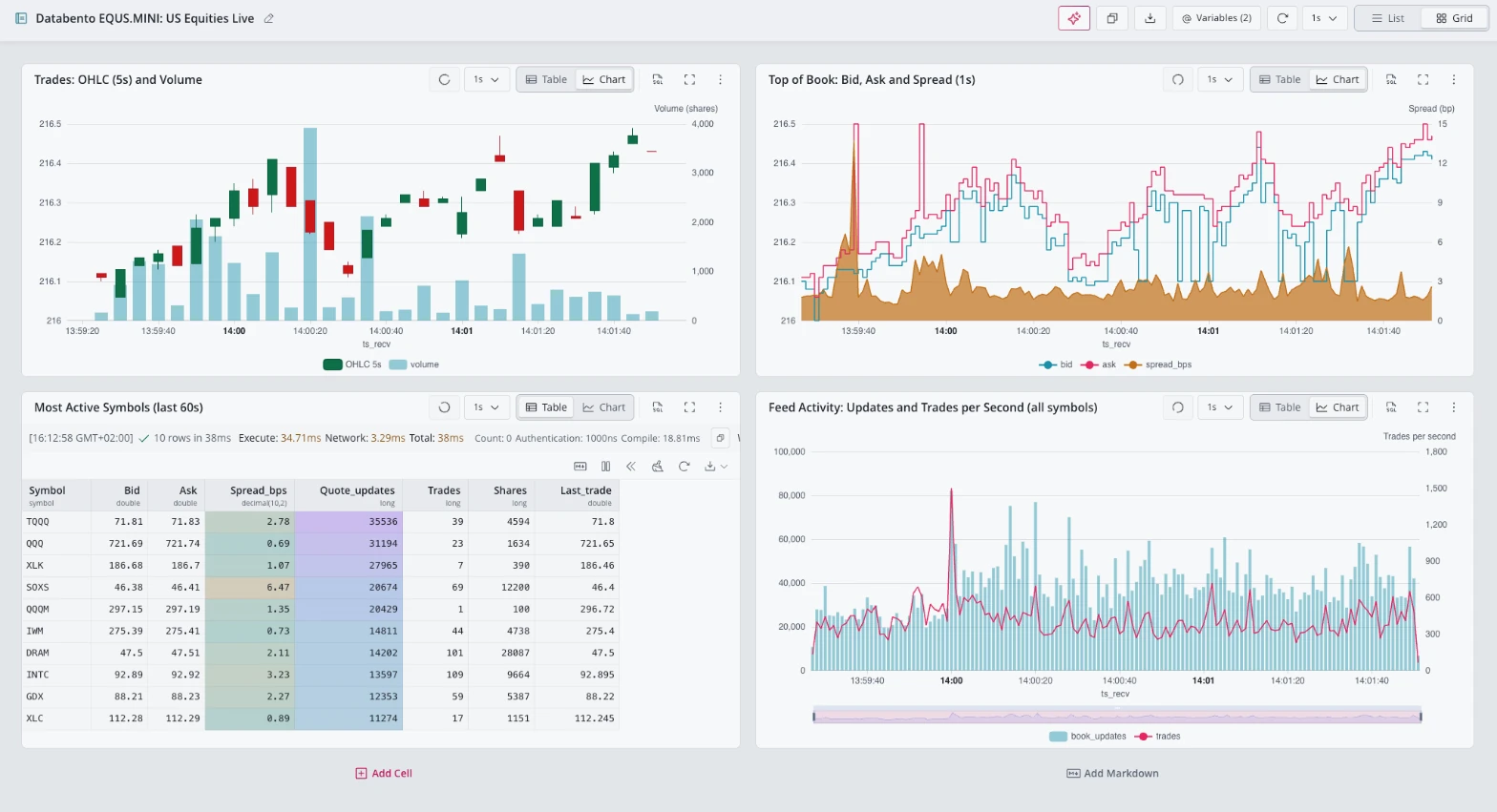
Two notebook variables parameterize it: @symbol ('NVDA' by default) and
@asof (now()). Each cell anchors its window to the newest data up to
@asof, so the dashboard still renders after the connector stops, and setting
@asof to an earlier instant replays that window.
At the open, NVDA's spread mostly sat between 1 and 3 basis points with spikes past 12, QQQ and IWM quoted under 1, and TQQQ, the busiest quote stream, updated 35,536 times in a single minute.
Spreads, microbursts and nanosecond timestamps in three pre-market minutes
A quiet session still has plenty in it once every update is stored. These all run over the same pre-market sample: 37,321 book updates across 393 symbols.
Bid-ask spread percentiles per symbol
QuestDB has native spread() and mid() functions, which shorten the basis
point formula:
SELECT symbol,min(spread(bids[1][1], asks[1][1])/ mid(bids[1][1], asks[1][1]) * 10000) AS min_bps,approx_percentile(spread(bids[1][1], asks[1][1])/ mid(bids[1][1], asks[1][1]) * 10000, 0.5, 3) AS p50_bps,max(spread(bids[1][1], asks[1][1])/ mid(bids[1][1], asks[1][1]) * 10000) AS max_bps,count() AS updatesFROM equs_orderbookWHERE bids[1][1] > 0 AND asks[1][1] > 0ORDER BY updates DESCLIMIT 8;
| symbol | min_bps | p50_bps | max_bps | updates |
|---|---|---|---|---|
| QQQ | 0.826 | 1.239 | 3.029 | 4134 |
| SQQQ | 2.742 | 2.744 | 5.495 | 2064 |
| TQQQ | 2.726 | 4.092 | 230.629 | 1553 |
| QLD | 2.175 | 3.266 | 61.069 | 1516 |
| SLV | 3.834 | 3.834 | 9.585 | 1349 |
| IVV | 0.644 | 1.160 | 2.578 | 1308 |
| SPY | 0.647 | 1.036 | 7.251 | 1217 |
| USO | 1.901 | 3.171 | 334.331 | 1035 |
The most actively quoted names before the open are all ETFs, and SPY, IVV and QQQ sit around a basis point at the median. The maximums are another story: TQQQ and USO each quoted more than 200 basis points wide at some point, and you only see that if you kept every update.
One detail if you reuse the query: approx_percentile needs the precision
argument, 3 here. With the default, SQQQ's median came out below its
minimum.
Nanosecond timestamps: event time vs receive time
Each Databento record carries two timestamps, ts_event and ts_recv, and
the connector stores both at nanosecond precision:
SELECT approx_percentile((ts_recv - ts_event) / 1000.0, 0.5, 3) AS p50_us,approx_percentile((ts_recv - ts_event) / 1000.0, 0.99, 3) AS p99_us,approx_percentile((ts_recv - ts_event) / 1000.0, 0.999, 3) AS p999_us,max((ts_recv - ts_event) / 1000.0) AS max_us,count() AS updatesFROM equs_orderbookWHERE ts_recv >= ts_event;
| p50_us | p99_us | p999_us | max_us | updates |
|---|---|---|---|---|
| 18.383 | 25.539 | 33.867 | 42.207 | 37321 |
The gap is about 18 microseconds at the median and 42 at the worst. Round those timestamps to microseconds and much of that distribution turns into noise.
Finding microbursts with SAMPLE BY
SELECT max(n) AS peak_per_second, avg(n) AS avg_per_second,approx_percentile(n, 0.99, 3) AS p99_per_second,count() AS secondsFROM (SELECT ts_recv, count() AS n FROM equs_orderbook SAMPLE BY 1s);
| peak_per_second | avg_per_second | p99_per_second | seconds |
|---|---|---|---|
| 1089 | 200.651 | 865 | 186 |
The average was 200 updates a second and the busiest second carried more than
five times that. SAMPLE BY goes down to milliseconds with 1T, so we can
look inside that second:
SELECT ts_recv, count() AS updates, count_distinct(symbol) AS symbolsFROM equs_orderbookSAMPLE BY 1TORDER BY updates DESCLIMIT 5;
| ts_recv | updates | symbols |
|---|---|---|
| 2026-10-16T11:51:30.682000000Z | 350 | 178 |
| 2026-10-16T11:51:35.228000000Z | 185 | 77 |
| 2026-10-16T11:51:30.683000000Z | 137 | 55 |
| 2026-10-16T11:51:40.179000000Z | 131 | 52 |
| 2026-10-16T11:51:40.178000000Z | 78 | 51 |
A single millisecond at 11:51:30.682 carried 350 updates across 178 symbols. Breaking those two milliseconds down by action and side:
SELECT action, side, count() AS updates,count_distinct(symbol) AS symbols,min(ts_event), max(ts_event)FROM equs_orderbookWHERE ts_recv BETWEEN '2026-10-16T11:51:30.682Z'AND '2026-10-16T11:51:30.684Z';
| action | side | updates | symbols | min(ts_event) | max(ts_event) |
|---|---|---|---|---|---|
| C | B | 161 | 100 | 2026-10-16T11:51:30.682328257Z | 2026-10-16T11:51:30.683970175Z |
| C | A | 260 | 160 | 2026-10-16T11:51:30.682330164Z | 2026-10-16T11:51:30.683776869Z |
| A | A | 37 | 25 | 2026-10-16T11:51:30.682351205Z | 2026-10-16T11:51:30.683965004Z |
| A | B | 28 | 18 | 2026-10-16T11:51:30.682363467Z | 2026-10-16T11:51:30.683971474Z |
| T | A | 1 | 1 | 2026-10-16T11:51:30.682512172Z | 2026-10-16T11:51:30.682512172Z |
421 cancels on both sides of the book, across well over a hundred symbols, in 1.7 milliseconds, followed by a handful of new quotes. It looks like a liquidity provider pulling quotes across many names at once, though the data can't say who. It's also why ingestion has to be sized for the peak, not the average.
Restarting the connector without a gap: Databento intraday replay
The first question I got when I showed this internally was: if the connector is down for five minutes, how do you get those five minutes back?
The connector saves the position of the last record QuestDB acknowledged into
state_dir, once a second by default and again on shutdown. When it starts
with the same state directory, it asks Databento's Live gateway to replay from
just before that point using
intraday replay,
then carries on with live data. Databento generally keeps 24 hours of replay.
We stopped the connector at 11:51:39 UTC and started it again at 11:51:44. It logged a recovery start for each schema, and Databento reported the replay complete about a second later. Counting book updates in 30-second buckets across the stop and restart:
SELECT ts_recv, count() AS book_updatesFROM equs_orderbookSAMPLE BY 30s;
| ts_recv | book_updates |
|---|---|
| 2026-10-16T11:49:30.000000000Z | 3556 |
| 2026-10-16T11:50:00.000000000Z | 5810 |
| 2026-10-16T11:50:30.000000000Z | 5169 |
| 2026-10-16T11:51:00.000000000Z | 6569 |
| 2026-10-16T11:51:30.000000000Z | 7964 |
| 2026-10-16T11:52:00.000000000Z | 4725 |
| 2026-10-16T11:52:30.000000000Z | 3528 |
The 11:51:30 bucket contains the outage and is the fullest in the run. An earlier test with about 38 seconds of downtime gave the same result. I haven't yet tested a five-minute stop, but the mechanism doesn't depend on the length of the outage as long as it fits inside Databento's replay window.
For an outage longer than the replay window, the connector has a Historical mode that backfills a bounded range into the same tables. Databento bills Historical data separately.
Duplicates, replay_dedup, and why not DEDUP keys
Delivery is at least once. The replay deliberately starts a few seconds before the checkpoint, 5 by default, to cover records that were in flight, so without filtering those seconds are written twice. We measured both ways:
| Run | Rows in the replay overlap | Distinct rows | Duplicates |
|---|---|---|---|
replay_dedup = false | 2,367 | 1,224 | 1,143 |
replay_dedup = true | n/a | n/a | 0 |
replay_dedup = true drops those replayed records inside the connector,
before they reach QuestDB. Along with each checkpoint, the connector saves, for
every instrument, the timestamp of the last record it wrote and how many
records it wrote at exactly that timestamp. During the replay it skips every
record for that instrument with an earlier timestamp, skips the first N
records at the saved timestamp, and writes everything after that, following
Databento's guidance on
recovering after a disconnection.
It counts records instead of comparing them, so two genuine records that
happen to be identical are both kept.
In our run it skipped about 2,150 replayed records, and the only identical
rows left in either table were single genuine prints that match in every
field. The filter assumes that ts_event never goes backwards for a given
instrument, and that records sharing a timestamp always arrive in the same
order. We checked the first across 33,263 EQUS.MINI book updates and it
never went backwards.
The obvious alternative is QuestDB's own
DEDUP UPSERT KEYS, which makes repeated
writes idempotent. It needs a key that's unique per real record, and
EQUS.MINI doesn't have one. sequence is always 0 in this dataset, and
(ts_recv, instrument_id) isn't unique: 233 of 34,409 book rows and 14 of 324
trades shared that pair with another genuine record. Even a key over every
scalar column left four identical genuine rows per table. A DEDUP key here
would collapse those genuine twins into one row and silently drop real data.
The connector's count-based filter doesn't have that problem, so for this
dataset it's the right place to remove replay duplicates. On datasets that
publish venue sequence numbers, a DEDUP key that includes sequence becomes
an option.
High availability: keeping the Databento feed when QuestDB goes away
QuestDB can also become unreachable while the connector keeps running: a
planned stop such as an upgrade, a network hiccup, or a primary that fails for
good. The connector treats that as a temporary condition, not a failure. It
keeps the Databento session open and keeps receiving. Rows QuestDB hasn't
acknowledged stay in memory, in the QuestDB client's
store-and-forward buffer
and in the connector's own queue, and the writer retries until QuestDB is back,
then sends everything. Because every row carries Databento's ts_recv as its
designated timestamp, rows that arrive late are still stored at the moment
they happened, not at the moment QuestDB came back.
We stopped QuestDB with docker stop for 2 minutes and 12 seconds in the
middle of a run. The connector's progress log, times in UTC:
12:00:06 progress status=Running received=11433 published=11433 confirmed=11433 unconfirmed_batches=0 retries=0(QuestDB stopped at 12:00:26)12:00:36 progress status=Running received=20856 published=18158 confirmed=17518 confirmation_lag=mbp-1=10.2s unconfirmed_batches=64 retries=012:01:36 progress status=Running received=38510 published=18158 confirmed=17518 confirmation_lag=mbp-1=70.2s unconfirmed_batches=64 retries=012:02:36 progress status=Running received=56099 published=18158 confirmed=17518 confirmation_lag=mbp-1=130.3s unconfirmed_batches=64 retries=0(QuestDB started at 12:02:38)12:03:06 progress status=Running received=63144 published=63144 confirmed=63144 confirmation_lag=mbp-1=0.1s unconfirmed_batches=0 retries=0
status=Running holds throughout: the task never failed and the process never
restarted. received keeps climbing while published and confirmed stand
still, which is the connector holding the live feed in memory. retries=0
means the Databento session never dropped, so no replay was needed. Within 30
seconds of QuestDB coming back, confirmed had caught up with received and
the lag was back to 0.1 seconds.
In QuestDB, the outage is fully populated, each row at its original Databento timestamp:
| ts_recv | book_updates | QuestDB |
|---|---|---|
| 2026-10-16T12:00:00.000000000Z | 10698 | up |
| 2026-10-16T12:00:30.000000000Z | 10288 | down from 12:00:26 |
| 2026-10-16T12:01:00.000000000Z | 7804 | down |
| 2026-10-16T12:01:30.000000000Z | 8764 | down |
| 2026-10-16T12:02:00.000000000Z | 8276 | down |
| 2026-10-16T12:02:30.000000000Z | 6966 | back at 12:02:38 |
| 2026-10-16T12:03:00.000000000Z | 7737 | up |
The duplicate check afterwards found nothing beyond the single genuine identical print per table that shows up in every run.
Failover to a new primary with replication
With replication, the same mechanism covers losing the primary for good. Give
the connector every node of the cluster in QDB_CLIENT_CONF:
export QDB_CLIENT_CONF='wss::addr=node-a:9000,node-b:9000;token=<your-token>;target=primary;request_durable_ack=on;'
target=primary sends the connector's table-creation queries to the primary.
Changing the endpoints or the acknowledgement level needs a new state_dir,
so set this up before the first run.
While the primary is unreachable, the client cycles through the addresses.
Replicas refuse writes, so it keeps buffering until you, or a watchdog of
your own,
promote a replica
to primary, and then sends everything to the new primary.
request_durable_ack=on makes the connector count rows as confirmed only once
they're durably uploaded to object storage, not when the old primary first
accepted them, so rows it already considered safe aren't lost with that node.
Limits of buffering during a QuestDB outage
The buffer is memory, so it's bounded. Our test ran before the open at about 260 records a second. At the open the same subscription runs at tens of thousands a second, and the buffers fill in a fraction of the time. When they do, the connector pauses reading from Databento rather than dropping data or failing.
While reads are paused, Databento queues the records instead of skipping
ahead, and the connector logs a SlowReaderWarning. Only a backlog that
outlives Databento's replay window fails the task, and then a
Historical backfill
fills the gap. We haven't tested that path yet, on regular hours data with a
long QuestDB outage, so treat it as designed rather than measured.
For a planned QuestDB stop, keep the connector running rather than restarting both. If QuestDB is down when the connector starts, its first connection fails by default.
Retention and cold storage for market data in QuestDB
Three pre-market minutes say nothing about the size of a trading day, so I won't put a storage number on this.
Partitioning by day, the connector's default, means retention works on whole days. A storage policy decides how long each partition stays on local disk and can send it to cold storage: S3, Google Cloud Storage, Azure Blob Storage, or a filesystem store such as an NFS mount:
ALTER TABLE equs_orderbook SET STORAGE POLICY(TO REMOTE 1 DAY,DROP LOCAL 7 DAYS);
TO REMOTE 1 DAY uploads each daily partition as Parquet once all of it is
more than a day old, so Monday's order book is in your data lake shortly
after midnight on Wednesday, ready for any tool that reads Parquet. QuestDB
still serves queries from the local copy until DROP LOCAL 7 DAYS removes it,
and after that the same SQL reads the Parquet files in cold storage, fetching
only the row groups and columns a query needs.
DROP LOCAL also seals a partition read-only, and later writes to it are
skipped. Seven days is well beyond Databento's 24-hour replay window, but keep
it longer than any Historical backfill or correction you might run.
Wrapping up: Databento market data in QuestDB
The pipeline is one config file. The connector creates the tables and the order
book arrays, LATEST ON, SAMPLE BY and ASOF JOIN work on nanosecond data
from the first minute, and the dashboard runs in the Web Console. A connector
restart backfills itself from Databento's replay, and a QuestDB outage, or a
failover to a replica, loses nothing and keeps the original timestamps.
Getting data in is half of it. Research and replay also need the data back out, and in a future post we'll look at reading these tables from QuestDB as Arrow.
The example code has everything above, and the connector docs cover the configuration options this post skipped: authentication and TLS, multiple datasets in one process, metrics, Historical backfills, and materialized and live views over the connector's tables. If you run it during market hours, come and tell us what your feed looks like on the community forum.