QuestDB Enterprise 4.0: cold storage, QWP, and restart-free failover
Cold storage moves old partitions out to object storage without taking them out of the table. QWP replaces the two-client setup and keeps working when a node goes down. And failover finally stops needing a restart.



High-ingress architectures rarely stay simple for long. As data volumes or feed counts grow, new modules start accumulating around the database: a job moves old partitions into object storage when local disks fill up; a queuing system buffers writes when the primary goes down; a stream processor keeps rolling calculations current; an export pipeline gets data into a dataframe for analysis or Parquet for storage.
Each addition solves a real problem. But each also becomes another system you run, pay for, and get woken up by. In most cases, the added infrastructure exists simply to cover something the database could not do itself.
QuestDB Enterprise 4.0 brings three of those jobs back into QuestDB.
Cold storage moves old partitions to object storage on a schedule you set, while they stay part of the same table. Same SQL, same queries. At half a petabyte, keeping the data on S3 Standard costs roughly $11,000 a month. In a replicated deployment, retaining that same history on attached gp3 volumes across a primary and a single replica would cost roughly $80,000 a month before compute and other operational overhead. That makes object storage roughly 85% cheaper on raw capacity alone and removes cost as a reason to throw data away. The files in S3 are ordinary Parquet, so Databricks, Snowflake and other tools can read them where they sit. The export job that used to feed them is one less thing to run.
Failover no longer requires a restart or filesystem changes. Promotion becomes a switch, clients can find the new primary themselves, and nobody has to edit files at two in the morning. You still have to pull the trigger today; the coordinator that will do that automatically is coming next.
QWP is our new binary protocol, and the first native client: one dependency that writes and reads instead of an ingestion library plus somebody else's PostgreSQL driver. It also holds on to unacknowledged data when a server disappears, covering the gap while a new primary becomes available. If the queue in front of your database exists mainly to protect writes during that gap, you may no longer need it.
There's more: live views on a replicated cluster, Parquet tables that skip the conversion step, and a Web Console with notebooks, which one customer is already using instead of Grafana.
But the pattern is the same: fewer add-on modules wrapped around the database, and more of the high-ingress, low-latency lifecycle handled inside QuestDB itself.
QuestDB Enterprise 4.0 is built on QuestDB 10.0.1, so it carries both its own features and the ones that arrived in QuestDB 10.0:
| Capability | Edition | Status |
|---|---|---|
| Cold storage tiering | Enterprise | GA |
| Restart-free failover | Enterprise | GA, you supply the trigger |
| Automatic failover | Enterprise | In development |
| Replicated live views | Enterprise | Beta |
| QWP clients | Both | GA, varies by language |
| Live views | Both | Beta |
| Parquet tables | Both | GA |
| Web Console notebooks | Both | GA |
It's a long post, so here's what's in it:
- Cold storage for history that outgrew the disk: partitions tiered to your own bucket, still queryable, and readable by everything else
- When the primary goes away: durable acknowledgement, hot replica promotion, and upgrades nobody has to stay up for
- One driver instead of two: writes and reads in one client, and a query that survives its own server
- Aggregates that are already computed: live views on a replicated cluster
- Dashboards without the dashboard server: notebooks, and an agent working in your session
- One bug, and everything else: the ACL fix, query limits, breaking changes
- What comes next: the coordinator, and subscriptions
Cold storage for history that outgrew the disk
Every time-series deployment eventually reaches the same point: the volume is filling up, a retention window goes in, and months later someone needs the data that was displaced.
The usual workaround is to export old partitions to a lake or warehouse before dropping them. That creates a second copy of the same rows and a pipeline to keep in sync. You pay for both, maintain the export, and accept that the copy may lag behind or drift as the schema changes.
Cold storage brings that part of the data lifecycle into QuestDB.
Older partitions move to remote storage on a schedule you set while remaining part of the same table. This removes the capacity limit of a single attached volume and lets one remote copy serve the whole cluster instead of storing the same history on every node. Each node queries those partitions in place, so the SQL does not change. The target can be S3, GCS, Azure Blob, or an NFS mount visible to every instance.
A storage policy is a set of TTLs attached to a table, one for each stage of a partition’s life. QuestDB Enterprise 4.0 enables the remote stage:
ALTER TABLE trades SET STORAGE POLICY(TO REMOTE 1h,DROP LOCAL 30d,DROP REMOTE 5y);
Here a partition goes up to the object store an hour after it ages out. The local copy stays where it is and keeps answering queries. Thirty days later that copy is deleted and queries start reading the bucket instead. After five years the partition goes from the bucket too. There is no tier after the bucket, so that last TTL is what caps the storage bill.
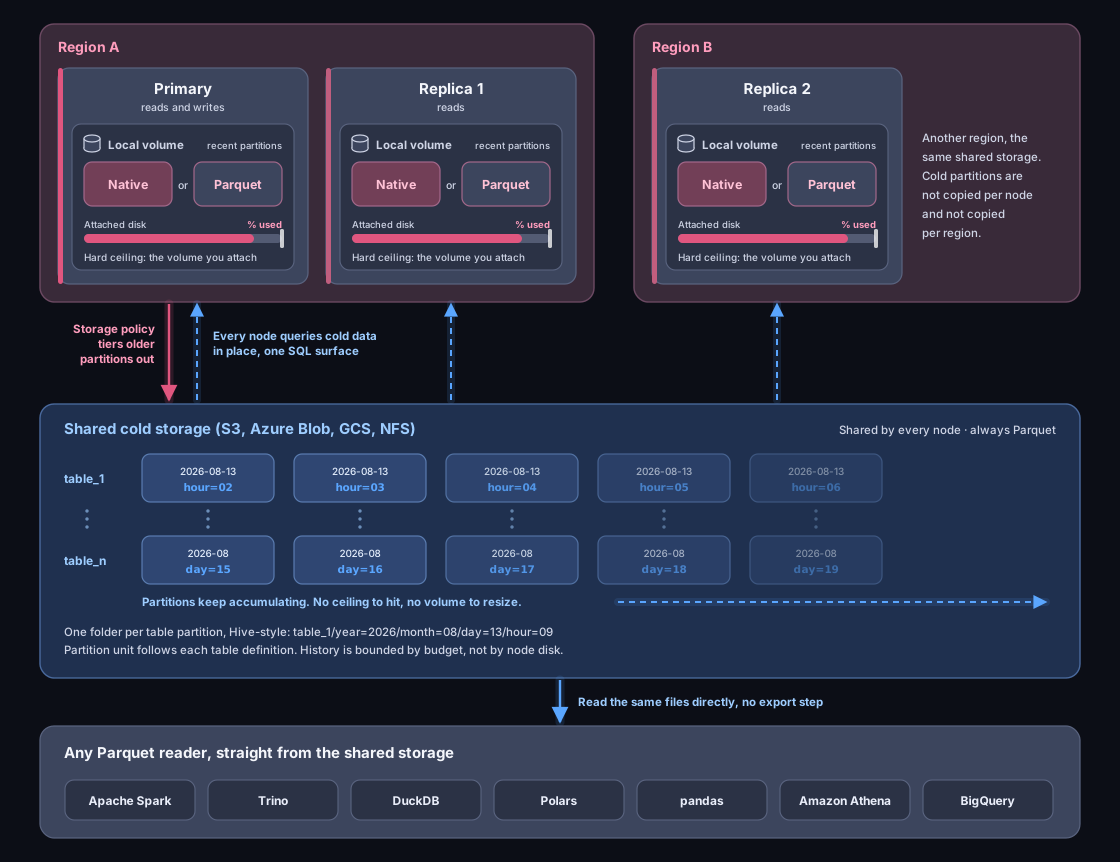
Once TO REMOTE fires the partition is in the bucket, where anything with
access can read it. Queries don't notice, because the local copy is still there
and still serving them.
DROP LOCAL removes that copy. The partition is gone from disk but not from the
table, and queries that reach it get served from the bucket. A two-year window
plans and runs the way it always did, reading native partitions, local Parquet
and remote ones in a single scan.
Cold storage is off by default, covers WAL tables, and needs a few lines of config pointing at a bucket. Which instance does the uploading, how to see what's where, and the full list of settings are all in the cold storage docs.
It gets cheaper while it sits there
Once a partition is in the bucket we never touch it again. Nothing compacts it. Nothing rewrites it on a schedule. Nothing reads it unless a query asks for it.
That matters more than the price per gigabyte. Object storage charges partly on access, and lifecycle rules move cold objects down into cheaper classes on their own, but only if they're genuinely cold. A system that rewrites its files every so often resets that clock each time, and the data never gets old enough to get cheap. This one leaves it alone, so history nobody queries drifts into the cheapest tier your bucket offers without anyone doing anything about it.
Databricks and Snowflake can read it where it is
QuestDB writes Hive-partitioned Parquet to the bucket, one folder per partition, with the compression and bloom filters the format comes with. No wrapper, no manifest that only we understand.
So point a Unity Catalog external location at the bucket, or define a Snowflake
external table over a stage, and your data platform is reading the same files
QuestDB is still serving queries from. Iceberg takes them with add_files,
DuckLake with ducklake_add_data_files.
Nothing gets copied, which is the part that matters. One set of bytes, in one bucket, read by whoever wants it. No export job to write, no second copy to pay for, and nothing that breaks the next time somebody adds a column.
Two caveats. Only aged-out partitions are up there, so with TO REMOTE 1h the
last hour is still on the cluster. And while there's no pipeline to build,
there's still setup: an external location, a stage, or a catalog registration,
depending on what you run.
Parquet and Iceberg walks through the registration end to end, and DuckLake and QuestDB does the same for DuckLake.
Parquet on local disk too
Cold storage isn't the only place Parquet shows up. Tables are created in QuestDB's native columnar format by default, and they can now be created directly as Parquet on the local volume instead. It compresses better and any tool that reads Parquet files can read them off the disk. The trade-off is on the write path, where native tables are faster, especially with deduplication or out-of-order ingestion.
CREATE TABLE trades (timestamp TIMESTAMP,symbol SYMBOL,price DOUBLE,amount DOUBLE) TIMESTAMP(timestamp)PARTITION BY DAYFORMAT PARQUET;
New partitions in that table are written as Parquet directly, with no conversion
step.
ALTER TABLE ... SET FORMAT PARQUET
does the same to an existing table, from its next partition onwards.
When the primary goes away: failover without a restart
Think about the last time you upgraded. Probably a date agreed with two other teams, a runbook, someone on a call at two in the morning, and a rollback plan nobody wanted to use. Upgrades that expensive don't happen often, which is why so many clusters are still running something from two years ago.
Failing over used to be the same kind of event. Promoting a replica meant stopping it, editing files on its disk, and starting it again as a primary. And nothing covered the gap while that happened, so you put a queue in front of the database to hold the writes nobody could accept yet.
Both of those are gone.
Nothing sits in one place
QWP clients hang on to every row the server hasn't confirmed. It's called
store-and-forward.
Nothing leaves the buffer until the server says it has the row safely, so
there's always a copy in two places at once. If the connection drops, the client
reconnects and sends the buffer again while your code carries on calling row()
without ever waiting on the network. Put the buffer on disk rather than in
memory and the rows survive your own process dying too.
Delivery is at-least-once, so a reconnect can replay rows the server had already
committed and never got to acknowledge. Give the table
DEDUP keys that cover the row's identity and
those replays collapse on write, so the table ends up holding one copy of
everything. That's a duplicate-free table rather than exactly-once semantics
across whatever else your pipeline does downstream, but for the table itself
it's the same result.
The failure this rules out is the quiet one. A row that never arrives doesn't raise anything. There's no error, and no gap to spot, because a gap looks the same as an hour when nothing happened. You find out six months later when the numbers in a report don't add up, and by then there's nothing to go back to.
Promotion is a switch
Turning a replica into the primary needs no restart and no touching the local filesystem. You do still run a SQL command, from a client library, from the Web Console, or over the REST API. That's what makes a watchdog possible: something you run notices the primary is gone and promotes a replica.
The clients sort themselves out
Give a client all of the peers and it handles a disconnect on its own:
addr=node-a:9000,node-b:9000,node-c:9000
It keeps track of which hosts are healthy and moves to the next one when the node it's on stops answering. If nothing is ready to take writes yet, store-and-forward covers the gap and those rows go out as soon as a promoted primary is there to take them. No load balancer in the middle, and no redeploying every application that writes.
You can steer it, too. target says whether the client wants the primary or a
replica, and zone keeps queries inside one location.
Readers don't wait for any of this. Any healthy replica can answer a query, so reads carry on while the write path moves.
See client failover for the whole model.
The same trick works for upgrades
Once promotion is cheap it stops being an emergency measure. Upgrade a replica, promote it, upgrade the node that used to be the primary, carry on. Writers follow the promotion and buffer across the switch, readers move to a healthy replica without waiting for it, and nobody has to agree a date with anybody.
The usual upgrade order applies: replicas before the primary. Sealing a partition is a new WAL event type, and an older build suspends WAL apply rather than skipping it.
You still pull the trigger
To be straight about where this stops. 4.0 takes away the restart, the filesystem work and the queue in front. It doesn't take away you. Something has to notice the primary is gone and run the command, and today that something is a watchdog you wrote yourself.
That part is in progress: a coordinator process that watches the cluster and does the failover on your behalf.
One driver instead of two: QWP for writes and queries
Using QuestDB from an application used to mean two libraries. One to write, a PostgreSQL driver to read. Two connect strings, two authentication setups, two sets of errors. The write path and the read path behaved differently because they weren't really the same product.
QWP is the QuestDB Wire Protocol: binary, columnar, over WebSocket, and the first client that's actually ours. One dependency, one connect string, one handle that does both.
with questdb.connect("ws::addr=localhost:9000;") as db:with db.sender() as sender:sender.row("trades", symbols={"symbol": "ETH-USDT"},columns={"price": 2615.54}, at=TimestampNanos.now())with db.query("SELECT * FROM trades WHERE symbol = $1", ["ETH-USDT"]) as r:frame = r.to_polars()
Reads and writes share the same configuration, types, and errors.
It survives its own server
Run a query that returns half a billion rows. Halfway through, the server dies.
The client reconnects to another replica, picks up where it stopped, and
to_polars() hands you the whole dataframe. Your code never sees an error.
As far as we know, nothing else does that. A connection that drops mid-result is a failed query in PGWire, in JDBC and in Arrow Flight SQL, and the retry starts from the beginning.
So a node can go down while you're writing and while you're reading, and neither one loses anything. Store-and-forward covers the write, stream resumption covers the read, and hot replica promotion moves the cluster underneath both of them.
Faster in, faster out, straight into Arrow
Ingestion measured up to 3.6x faster than ILP across a private network, on a 32 vCPU EC2 box. A TSBS row is about 347 bytes as line protocol text and about 97 as QWP, and fewer bytes is also less cross-zone traffic on the bill.
Coming back the other way, eight readers on one client host pulled 4.07 GB/s off the wire, about a third of a 100 Gbps link, with QWP spending 18.8 bytes on a row that takes 32 once it's decoded. Push to twelve connections and it peaks at 9.35 GB/s of decoded Arrow. That was measured between two AWS instances in one availability zone, everything on defaults, and your own numbers will depend on your rows and your network.
People ask us for Apache Arrow by name, and the columns go straight into it, in Rust or Python, then into a dataframe with no row-by-row conversion on the way.
What separates this from a generic Arrow transport is what happens to your
types. Flight SQL puts everything through Arrow's type system on the way out, so
SYMBOL, the designated timestamp, geohashes and arrays all arrive as
approximations of themselves. QWP speaks QuestDB's types and gives you Arrow at
the end. You also get to pick how you take it, streaming the columns or
hydrating a dataframe in one call.
Fast enough, anyway, that the nightly export into a file nobody entirely trusts stops earning its keep.
Nothing gets taken away
ILP and the PostgreSQL wire protocol are both still supported and still maintained, and nothing you're running today breaks when you upgrade. Telegraf pointed at QuestDB, a Grafana datasource on PGWire: you don't need to change them. QWP is the better choice for new work, not a replacement for the other two.
Next: a callback instead of a poll
Subscriptions are going to live here too. In a coming release you'll run a SQL statement, hand the driver a callback, and get rows as they reach the server rather than asking for them over and over. The point is that it's the driver you already have. Nothing new to deploy, and nothing else to learn.
Live views: aggregates that are already computed
The reason a stream processor ends up next to a database is nearly always the same. Some query has to run on every request, and it's too expensive to run on every request. So Flink goes in, or Spark, or a consumer someone wrote three years ago and left, and now there's a second distributed system keeping a rolling VWAP current from data the database already has.
A live view is a table holding the result of a window-function query, kept up to date as rows arrive. The window runs once per new row and the output is appended, so reading a rolling VWAP, a cumulative volume or a running rank scans precomputed rows instead of recomputing the window over millions of them every time. Live views are in beta, with a deliberately narrow SQL surface in this first version.
CREATE LIVE VIEW trades_maFLUSH EVERY 1sIN MEMORY 5sSTART FROM NOWASSELECTtimestamp,symbol,price,avg(price) OVER (PARTITION BY symbolORDER BY timestampROWS 300 PRECEDING) AS moving_avgFROM trades;
You read trades_ma like any other table. Refreshes publish to an in-memory
tier first and flush to disk on the interval you set, so a read sees a new row
as soon as it's computed rather than waiting for the flush.
On a replicated cluster each node maintains its own copy from the base table it
already replicates, so a replica serves the view without any extra replication
traffic. CREATE LIVE VIEW and DROP LIVE VIEW are grantable like any other
permission.
Put that next to store-and-forward and DEDUP, and next to subscriptions when
they arrive, and a particular shape of streaming deployment starts to look
redundant: a queue in front whose only job is protecting writes and collapsing
replays, a processor holding one rolling aggregate, a queue behind fanning that
out to readers. If that's what yours
does, most of it can move into the database and reach you through the driver you
already have.
If it's doing joins across streams, enrichment from other systems, event-time windowing or delivery to five places at once, keep it. This replaces a narrow case, not the category.
Dashboards without the dashboard server
One customer, a quantitative trading firm, now watches their infrastructure metrics in QuestDB notebooks rather than Grafana. That's Grafana's home ground, and it's the screen they look at to know whether their trading systems are alive, so it wasn't a casual swap.
What changed is that the Web Console stopped being a query editor. Notebooks mix SQL, markdown and chart cells in one document, with charts drawn by ECharts and query cells that can refresh themselves.
Worth saying up front what this is and isn't. Grafana does alerting, mixed data sources, wall displays and a large plugin ecosystem, and none of that is going anywhere. The case here is narrower: dashboards that read QuestDB and nothing else. For those, the console is now enough.
Where a dashboard stops
It shows you the number, and there's nowhere to put why. So the why ends up somewhere else: someone screenshots a panel into Confluence, writes a paragraph underneath, and posts the incident review. The screenshot is out of date immediately and nobody can re-run it.
A notebook is that document with the charts still live and the SQL still attached to them. Notebooks and tabs can be exported and imported, so the analysis is something you hand to a colleague or keep in a repository, rather than a link into somebody's dashboard server.
Jupyter is the other option, and for arbitrary Python against the scientific stack it's still the right one. For reading a few QuestDB tables and drawing charts from them it loses for a boring reason: it wants a Python environment, a kernel, credentials, and someone to look after all three. This wants a browser tab.
One less credential
There's a security argument too. A Grafana datasource holds a service account, so Grafana's permissions are the ones that really apply, and the RBAC you set up in QuestDB gets bypassed by anyone who can open a dashboard. A notebook runs in the session of whoever is reading it, with the grants that person has.
Something you and an agent both use
Notebooks pair with the QuestDB MCP server, which relays Claude Code, Codex, Cursor or any other MCP client into the tab you have open.
Most database-and-AI stories end with an agent writing some SQL, running it, and printing the answer into a chat window, where it stays. This one is different in a way that turns out to matter: the agent works in the console you're looking at, clicking the same buttons and filling in the same query cells you would. You're both editing the same document.
Which is what makes handing work back and forth possible. An agent is good at turning a one-line request into a whole dashboard, and much worse at the corrections that follow: move that legend, change that colour, swap those two panels. So let it build the notebook, fix one chart by hand, then tell it to do the same to the other six.
Your Web Console session is the workspace and the permission boundary at the same time. An agent pairs by asking you to approve the dialog below, in your own console tab, and it can do nothing at all if nobody is signed in there. It works where you work, with your grants, and you watch it happen.
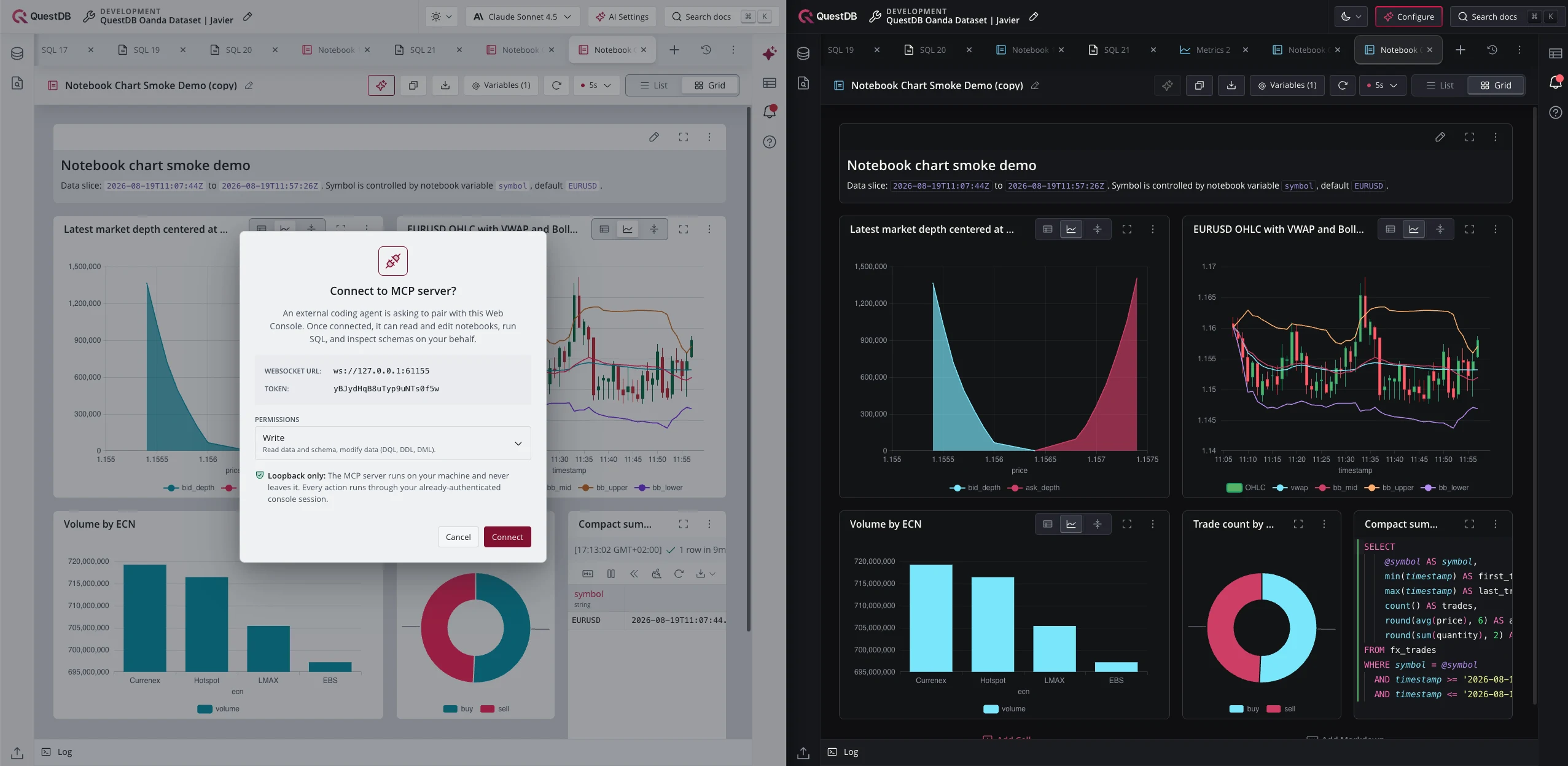
Notebooks are also why there's a light theme now, where dark used to be the only option. A table pane and a SQL editor were fine in the dark, but people who spend all day in Jupyter or Marimo expect a light background. There's a settings panel too.
What it doesn't do
There's no alerting in the Web Console. If something needs to wake you at four in the morning, that stays where it is, and so does the Grafana doing it. Your datasource carries on working exactly as it does today.
One bug, and everything else
sys.acl_permissions is an append-only log that the ACL loader collapses when
it reads it. On one deployment that re-grants on a schedule, it had reached 10.7
million rows. Every replicated GRANT then made the replica reload its access
lists with a two-minute full-table scan, holding the monitor that PGWire logins
need, so logins on that replica hung for the full two minutes. The table
compacts itself now, and the expensive part of the work holds no lock at all.
The rest sits on top of QuestDB 10.0.1, so this release also carries the engine work that went into it. The 10.0 post has the detail:
- Per-query memory limits, and queries that stop when the client disconnects. One person pasting an unbounded join no longer decides how everyone else's afternoon goes.
- Schema evolution on Parquet tables:
ALTER COLUMN ... TYPEworks on Parquet partitions now, converting lazily at the query path instead of failing or leaving the data unconverted. ALTER TABLE ... REBASE WAL, for re-baselining a table for replication.
There's a long tail of other fixes, and a few breaking changes worth reading
before you upgrade, including one that stops an instance starting if it still
carries the OSS http.user and http.password settings. The
release notes page has the detail, as do
the 10.0.0 and
10.0.1 notes for the
engine.
What comes next
Three things this release stops short of, and they have the same shape: the bit still done by a person.
A coordinator. Promotion doesn't need a restart any more, but something still has to decide the moment has come. The next release brings a process that watches the cluster and performs the failover itself.
Subscriptions. A SELECT and a callback, with rows pushed to it as they
arrive. Store-and-forward already removed the queue in front of the database;
this is the one behind it.
Cold storage in the lakehouse. Registering tiered partitions is covered in Parquet and Iceberg for Iceberg and in DuckLake and QuestDB for DuckLake.
None of that changes what 4.0 does today.
Getting the update
Self-managed enterprise customers will find the binaries at the usual download location. BYOC enterprise customers will be contacted for upgrading.
Upgrade replicas before the primary. Sealing a partition is a new WAL event type, and a node still on an older build will fail on it. Because failover no longer needs a restart, you can do the whole thing without a maintenance window: upgrade a replica, promote it, then upgrade the node that used to be the primary.
Not on QuestDB Enterprise yet? Learn more about QuestDB Enterprise and BYOC, or contact the QuestDB team for a conversation or a demo.