Databento connector

The Databento connector streams market data into QuestDB using QWP over WebSocket. It runs as a standalone process configured with TOML and handles subscriptions, table creation, batching, and recovery.
Each task reads one Databento dataset, such as EQUS.MINI. Its
subscriptions select schemas and symbols and choose the destination tables.
Multiple tasks can share a QuestDB connection pool in the same process.
For QuestDB Open Source, see Databento with Python.
Quick start
This connector uses your Databento account. Live access and Historical downloads may incur charges depending on your plan and dataset. Review Databento pricing before running the connector.
Prerequisites
- QuestDB Enterprise 4.0.0 or later with QWP over WebSocket, reachable on port 9000 by default.
- A Databento API key with Live access to
EQUS.MINIfor the example below. Historical backfills require Historical access.
1. Install the connector
Obtain the connector archive and its SHA-256 checksum through your QuestDB Enterprise contact. Contact us if you need access. Releases are available for Linux x86-64 and ARM64 (glibc 2.17 or later), macOS Apple silicon, and Windows x86-64.
Verify the checksum and extract the archive. It includes the Live configuration
below as examples/connector.toml and the Historical backfill
configuration as examples/backfill.toml. Add the extracted directory to your
PATH, then check the installation:
databento-questdb --version
2. Configure a Live feed
Set the source API key and QuestDB connection string:
export DATABENTO_API_KEY='<your-api-key>'
export QDB_CLIENT_CONF='ws::addr=localhost:9000;username=admin;password=<your-password>;'
Save the following as connector.toml. It collects trades and top-of-book
quotes for all symbols in EQUS.MINI.
version = 1
on_task_failure = "exit"

[pools.main]
conf_env = "QDB_CLIENT_CONF"

[[tasks]]
name = "equs-mini"
pool = "main"
dataset = "EQUS.MINI"
state_dir = "./state/equs-mini"

[tasks.source]
api_key_env = "DATABENTO_API_KEY"

[[tasks.subscriptions]]
schema = "mbp-1"
symbols = "ALL_SYMBOLS"
stype_in = "raw_symbol"
table = "equs_orderbook"

[[tasks.subscriptions]]
schema = "trades"
symbols = "ALL_SYMBOLS"
stype_in = "raw_symbol"
table = "equs_trades"
ALL_SYMBOLS selects every instrument in the dataset. The symbol column
stores each record's resolved trading symbol.
3. Validate and start
databento-questdb --config connector.toml --check-config
databento-questdb --config connector.toml
--check-config validates local settings and prints the effective configuration
with credentials redacted. It does not connect to either service or check
Databento permissions or symbol validity.
With no start or saved checkpoint, the task receives new data as it arrives.
Tables are created when their first records are written. If the market is
closed, a new subscription may have no rows yet.
4. Query the data
Open the QuestDB Web Console at http://localhost:9000 and query recent trades:
SELECT ts_recv, ts_event, symbol, price, size, side
FROM equs_trades
ORDER BY ts_recv DESC
LIMIT 10;
For bid and ask queries, see Order book arrays, and to
chart them, see Visualize the data. Ctrl+C
requests a normal stop and saves confirmed progress to state_dir.
Configuration
The configuration file requires version = 1. Task names must be unique, and
each task's pool must refer to a declared pool. Unknown fields are rejected.
Subscriptions
Each entry in tasks.subscriptions selects one source schema:
| Setting | Meaning |
|---|---|
schema | Required Databento schema, such as trades or mbp-10. |
symbols | Required list of symbols, or "ALL_SYMBOLS" for the dataset. |
stype_in | How to interpret symbols. Defaults to raw_symbol; also supports parent, continuous, and instrument_id. |
table | Destination table. Omit it to use the schema's default table. |
start | Inclusive RFC 3339 start time. In Live mode, omit for new data or use the integer 0 for all available replay. |
use_snapshot | Request an initial MBO snapshot. Live only; cannot be combined with start. Defaults to false. |
replay_dedup | Filter previously confirmed records during Live replay. Defaults to false; see Duplicate records. |
Each schema can appear at most once per task. A Live task can combine mbp-1
with tbbo when their source settings and replay_dedup values match. One
mbp-1 subscription then feeds both tables.
Use separate tasks when the same schema needs different symbols, start times, or
tables. A matching saved checkpoint takes precedence over start.
Multiple datasets
Append another task to connector.toml to collect Nasdaq trades through the
same QuestDB pool:
[[tasks]]
name = "nasdaq"
pool = "main"
dataset = "XNAS.ITCH"
state_dir = "./state/nasdaq"

[[tasks.subscriptions]]
schema = "trades"
symbols = ["AAPL", "MSFT"]
table = "nasdaq_trades"
Tasks read DATABENTO_API_KEY by default. Set tasks.source.api_key_env when a
task needs a different key. Each Live task opens its own Databento session;
sharing a QuestDB pool does not combine source sessions.
QuestDB authentication and TLS
The pool accepts a QuestDB
connection string. Set conf_env to
read it from an environment variable, or use conf for an inline value. Specify
one, not both.
For example, for a TLS-enabled Enterprise cluster:
export QDB_CLIENT_CONF='wss::addr=node-a.example.com:9000,node-b.example.com:9000;token=<your-token>;target=primary;request_durable_ack=on;'
wss:: enables TLS, and target=primary sends table-creation queries to the
primary node. request_durable_ack=on makes progress wait for durable
acknowledgements.
Authenticate with a service account token rather than a user's credentials. A service account has only the permissions granted to it directly, so the connector's access does not change with a person's group memberships. Grant it:
HTTP, to connect over QWP.CREATE TABLE, to create missing tables. The account owns the tables it creates, so it can insert into them.INSERT ONeach destination table, instead ofCREATE TABLE, if you precreate the tables.
CREATE SERVICE ACCOUNT databento_connector;
GRANT HTTP, CREATE TABLE TO databento_connector;
ALTER SERVICE ACCOUNT databento_connector
    CREATE TOKEN TYPE REST WITH TTL '365d' REFRESH;
Pass the returned token as token= in the connection string. With REFRESH,
each successful connection extends the token's expiry.
Source connections
tasks.source accepts Live connection settings such as gateway, port,
connect_timeout_ms, auth_timeout_ms, and heartbeat_interval_s.
tasks.source.http configures Historical requests and continuous-contract
resolution. It accepts connect_timeout_ms, request_timeout_ms, proxy_url
or proxy_url_env, and ca_cert_file. Relative certificate and state paths
resolve from the configuration file's directory.
Tables and column mapping
Each schema has fixed columns and a configurable table name. Use separate tables for different schemas, including across tasks and processes. Configuration validation checks table names case-insensitively across tasks sharing a pool.
Missing tables are created with daily partitions and WAL. Precreate a compatible table to customize partitioning, symbol capacity, or deduplication. Existing tables must accept the mapped column types and use the expected designated timestamp; the connector does not validate their layouts.
Schemas and default tables
Available source schemas depend on the dataset. The connector maps these schemas:
| Schema | Default table |
|---|---|
trades | market_trades |
mbo | market_mbo |
mbp-1 | market_depth_1 |
mbp-10 | market_depth_10 |
tbbo | market_tbbo |
bbo-1s | market_bbo_1s |
bbo-1m | market_bbo_1m |
cmbp-1 | market_cmbp_1 |
tcbbo | market_tcbbo |
cbbo-1s | market_cbbo_1s |
cbbo-1m | market_cbbo_1m |
ohlcv-1s | market_ohlcv_1s |
ohlcv-1m | market_ohlcv_1m |
ohlcv-1h | market_ohlcv_1h |
ohlcv-1d | market_ohlcv_1d |
ohlcv-eod | market_ohlcv_eod |
definition | instrument_definitions |
statistics | market_statistics |
status | market_status |
imbalance | market_imbalance |
Every row includes dataset and the resolved symbol as SYMBOL columns,
publisher_id as INT, and instrument_id as LONG. Source prices are
converted to DOUBLE. DBN framing fields and reserved bytes are omitted.
Timestamps
Both ts_event and, where supplied by the schema, ts_recv retain nanosecond
precision as TIMESTAMP_NS:
| Column | Meaning | Used as the designated timestamp |
|---|---|---|
ts_event | Source event time; for OHLCV, the bar's start time. | OHLCV schemas. |
ts_recv | Databento capture server's receive time. | All other schemas. |
The designated timestamp controls
partitioning and time-series operations such as SAMPLE BY, and the connector
always uses the column listed above for each schema. On a trades or quotes
table, ts_recv is the designated timestamp; ts_event remains available as a
regular column for event-time analysis.
Empty MBO snapshots are an exception: when the source ts_recv is undefined,
the connector uses ts_event for the stored ts_recv. This time can precede a
Historical request's start, so a backfill can include an empty-snapshot row
dated before the requested range.
Order book arrays
Quote tables store bids and asks as DOUBLE[][] arrays of shape [2, N],
with the best level first. The first row contains prices; the second contains
sizes. N is 10 for mbp-10 and 1 for top-of-book schemas. QuestDB array
indices start at 1.
SELECT ts_recv, symbol,
       bids[1][1] AS bid_price,
       bids[2][1] AS bid_size,
       asks[1][1] AS ask_price,
       asks[2][1] AS ask_size,
       asks[1][1] - bids[1][1] AS spread
FROM equs_orderbook
ORDER BY ts_recv DESC
LIMIT 10;
Where provided by the schema, bid_ct and ask_ct store per-level order counts
as DOUBLE[]. MBO is stored as individual order events, not reconstructed book
arrays. See Order book analytics for more
queries.
Cold storage and tiering
Market data tables grow every day. A storage policy decides where older partitions live, and keeps them queryable. Set it on each destination table after the connector has created it:
ALTER TABLE equs_orderbook SET STORAGE POLICY(
    TO PARQUET 7d,
    TO REMOTE 1d,
    DROP LOCAL 30d
    -- , DROP REMOTE 1Y
);
TO REMOTEsets when a partition is copied to cold storage in object storage. The remote copy is always Parquet, whatever the local format. It requires cold storage to be configured.TO PARQUETsets when the local partition is converted to compressed Parquet, to save local disk space.DROP LOCALremoves the local copy, after which reads go to the remote copy. WithoutTO REMOTE, it deletes the partition.DROP REMOTE, commented out here, deletes the partition from object storage.
DROP LOCAL also seals the partition as read-only, and later writes to it are
skipped. Keep it beyond the range of any
Historical backfill into the same table.
Materialized views and live views
Some Databento schemas are already aggregated by time slice: OHLCV bars at one
second, minute, hour, and day, and BBO and CBBO snapshots at one second and one
minute. Subscribe to those directly when they fit. To aggregate the raw
trades or mbp-1 data in other ways, keep the result in QuestDB:
- A materialized view maintains time-bucketed aggregates, such as candles at an interval Databento does not provide.
- A live view maintains window-function results per row, such as indicators that accumulate through a trading session.
Both refresh as the connector writes, and both are read like regular tables.
Candles with a materialized view
This view keeps 5-minute candles with volume per symbol:
CREATE MATERIALIZED VIEW equs_trades_ohlcv_5m AS
SELECT
  ts_recv,
  symbol,
  first(price) AS open,
  max(price) AS high,
  min(price) AS low,
  last(price) AS close,
  sum(size) AS volume
FROM equs_trades
SAMPLE BY 5m;
The bars are bucketed by ts_recv, the designated timestamp, whereas
Databento's OHLCV schemas use event time, so a trade near a bar boundary can
fall into a different bar. A view built on an aggregated schema such as
ohlcv-1m does not have this issue, because OHLCV tables use ts_event as
their designated timestamp.
Session VWAP with a live view
An anchored window resets a live view's calculation at a fixed wall-clock time. This view keeps a session VWAP and volume per symbol, resetting at midnight New York time:
CREATE LIVE VIEW equs_session_vwap
FLUSH EVERY 1s
START FROM BEGINNING
AS
SELECT
  ts_recv,
  symbol,
  price,
  sum(price * size) OVER w / sum(size) OVER w AS session_vwap,
  sum(size) OVER w AS session_volume
FROM equs_trades
WINDOW w AS (
  PARTITION BY symbol
  ORDER BY ts_recv
  ANCHOR DAILY '00:00' 'America/New_York'
);
START FROM BEGINNING seeds the view from the trades already stored, so the
current session is complete from the first read. On a large table, start from a
recent timestamp instead, such as START FROM '2026-10-21T04:00:00Z'.
SELECT ts_recv, symbol, price, session_vwap, session_volume
FROM equs_session_vwap
WHERE symbol = 'AAPL'
LIMIT -10;
Visualize the data
In a Web Console notebook
Chart the quick start's quotes and trades on a live dashboard in a Web Console notebook. Notebooks are built into QuestDB and run under the same users and permissions as the Web Console, with no extra tool to install.
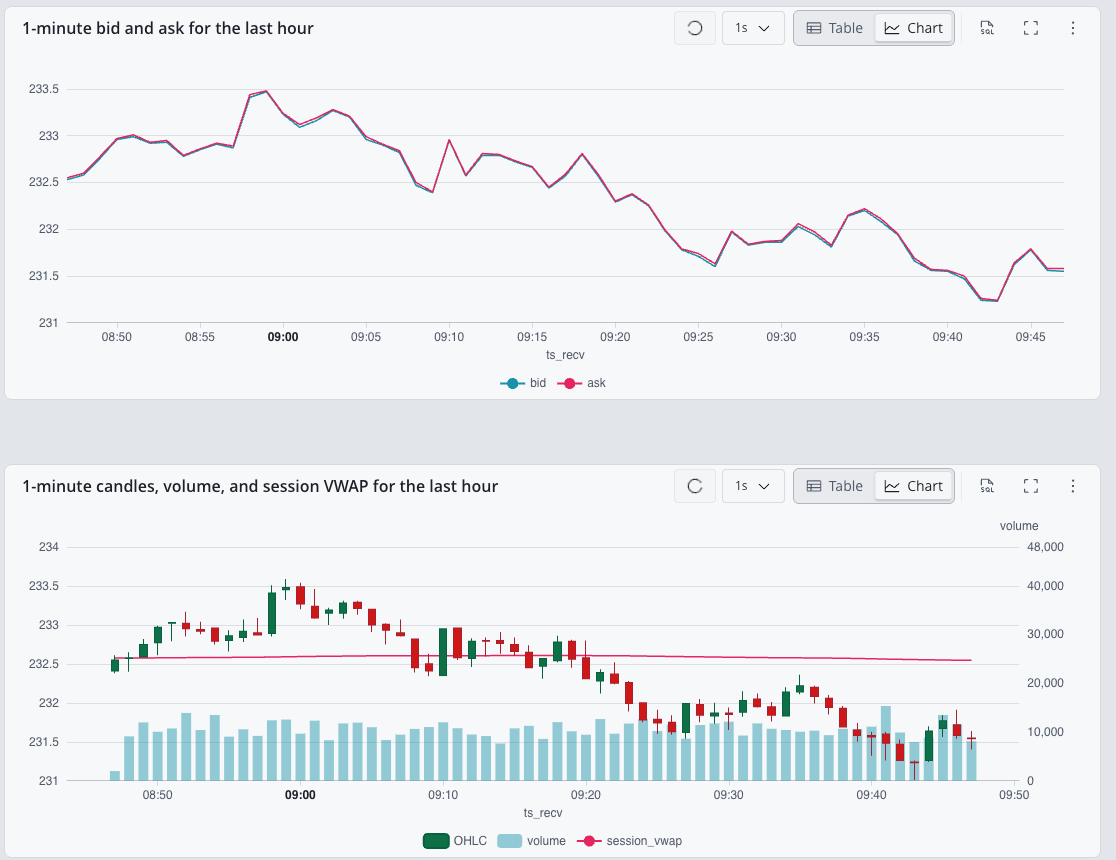
-
Create a notebook and define two variables:
@symbol := 'AAPL'and@window := '$now - 1h..$now'. -
Add a cell with the following query and press Draw to chart bid and ask as lines:
1-minute bid and ask for the last hourSELECT ts_recv, last(bids[1][1]) AS bid, last(asks[1][1]) AS ask
FROM equs_orderbook
WHERE symbol = @symbol AND ts_recv IN @window
SAMPLE BY 1m; -
Add a second cell with these statements and press Draw to chart candles with volume bars behind them and the session VWAP as a line. In Chart settings, assign the volume query to the right axis and cap that axis so the bars stay low. The third statement reads the session VWAP live view; leave it out if you have not created the view:
1-minute candles, volume, and session VWAP for the last hourSELECT ts_recv, first(price) AS open, max(price) AS high,
min(price) AS low, last(price) AS close
FROM equs_trades
WHERE symbol = @symbol AND ts_recv IN @window
SAMPLE BY 1m;
SELECT ts_recv, sum(size) AS volume
FROM equs_trades
WHERE symbol = @symbol AND ts_recv IN @window
SAMPLE BY 1m;
SELECT ts_recv, last(session_vwap) AS session_vwap
FROM equs_session_vwap
WHERE symbol = @symbol AND ts_recv IN @window
SAMPLE BY 1m; -
Set the notebook's auto-refresh to 1s to keep the charts live while the connector runs.
In Grafana
If you already use Grafana, chart the same data there. The $__timeFilter and
$__sampleByInterval macros follow the dashboard's time range.
-
Add the QuestDB data source to Grafana.
-
Add a time series panel with the following query to chart bid and ask:
Bid and ask for the Grafana time rangeSELECT ts_recv, last(bids[1][1]) AS bid, last(asks[1][1]) AS ask
FROM equs_orderbook
WHERE $__timeFilter(ts_recv) AND symbol = 'AAPL'
SAMPLE BY $__sampleByInterval; -
Add a candlestick panel with the following query to chart trades:
Candles for the Grafana time rangeSELECT ts_recv, first(price) AS open, max(price) AS high,
min(price) AS low, last(price) AS close
FROM equs_trades
WHERE $__timeFilter(ts_recv) AND symbol = 'AAPL'
SAMPLE BY $__sampleByInterval; -
Set the dashboard's refresh interval to keep the panels live while the connector runs.
Historical backfills
Set mode = "historical" to run bounded requests instead of a Live session.
Every subscription needs an inclusive start; the task needs an exclusive
end. This example writes one minute of trades into a separate table:
version = 1
on_task_failure = "exit"

[pools.main]
conf_env = "QDB_CLIENT_CONF"

[[tasks]]
name = "cme-backfill"
pool = "main"
dataset = "GLBX.MDP3"
mode = "historical"
end = "2026-09-15T14:31:00Z"

[[tasks.subscriptions]]
schema = "trades"
symbols = ["ES.FUT"]
stype_in = "parent"
start = "2026-09-15T14:30:00Z"
table = "cme_trades_backfill"
Choose a range covered by your account, then run:
databento-questdb --config backfill.toml --check-config
databento-questdb --config backfill.toml
Without state_dir, each run downloads the full range. Set it to skip completed
queries on restart; use a new directory when changing the range. Interrupted
queries always restart from their original start, so retries can repeat rows
and incur additional Databento charges.
Historical and Live tasks can run in the same process. A process containing only Historical tasks exits when they finish.
Recovery and delivery guarantees
Progress advances only after QuestDB acknowledges the corresponding output. Live
reconnects resume from a boundary that includes unconfirmed input, with an
additional replay_lookback_ms window of 5 seconds by default. Delivery is at
least once within the source replay coverage and configured lookback.
Give each task its own persistent state_dir to recover across process
restarts. Checkpoints are saved every second by default and at normal shutdown.
Without state_dir, progress is retained only while the process is running.
Changes to the dataset, subscriptions, tables, Historical range, QuestDB
endpoints, or acknowledgement level require a new state directory.
Duplicate records
Replay writes records again by default. A crash after QuestDB accepts rows but
before the checkpoint is saved can also produce duplicates. The connector does
not enable QuestDB DEDUP automatically. If you need it, precreate the table
with keys that identify an event uniquely. A symbol and timestamp alone do not
identify every trade or order event.
The optional subscription setting replay_dedup = true applies
Databento's time-and-count filtering.
It assumes that, per instrument, the recovery timestamp (ts_recv for BBO and
CBBO, ts_event for other schemas) never decreases, and that records sharing a
timestamp always arrive in the same order. Enabling it when those assumptions do
not hold can discard unseen records. It is disabled by default and does not
guarantee exactly-once delivery across crashes.
Replay availability
Databento generally provides 24 hours of Live replay, with dataset-specific exceptions. If the required history has expired, the task fails. To recover:
- Find each affected subscription's saved recovery boundary using the sources
below. Keep the original
state_diruntil recovery is complete. - Run a Historical backfill from that boundary into
the same destination tables as the Live task. If you enable checkpoints,
use a separate
state_dir. - Restart Live with a new
state_dirand an explicitstartthat is still within replay coverage. Choose a start before the backfill'sendto overlap the ranges; this overlap can produce duplicates.
For checkpointed tasks, obtain the recovery boundary from either source:
- Saved metrics: This works only if metrics were
enabled and scraped before the failure.
databento_questdb_disk_resume_start_timestamp_secondsreports the saved boundary in Unix seconds, labeled byconnectorandschema. Metrics are disabled by default, and the endpoint is unavailable after process exit. - Recovery logs: On restart with the original configuration and
state_dir, therecovering source subscriptionmessage reports the attempted boundary asstart_ns, in Unix nanoseconds. Match itsconnectorandschemafields; this message requires info-level logging (RUST_LOG=info).
Use the recovery boundary, rather than the last displayed record, to choose the
backfill start. Convert it to UTC RFC 3339: divide start_ns by one billion to
get Unix seconds. For example, 1789482600000000000 nanoseconds and
1789482600 seconds both represent 2026-09-15T14:30:00Z. When using metrics,
start one second earlier to allow for timestamp rounding.
Continuous-contract subscriptions keep their mapping for the current session. On
recovery, the connector uses Databento's Historical symbology API to resolve
contracts covering the replay range, with the same API key and
tasks.source.http settings. Contract rolls take effect at the next reconnect
or restart.
Running in production
Failures and shutdown
Transient source failures are retried with exponential backoff. Under
tasks.source_retry, initial_backoff_ms defaults to 1000, max_backoff_ms
to 30000, and max_elapsed_ms to 300000. Permanent errors fail the task.
A SymbolResolutionFailed error from the Live gateway means Databento could not
resolve a requested symbol. The connector stops the whole task, including its
valid symbols. To recover:
- Read the gateway message and check
dataset,stype_in, andsymbols. Fix misspelled symbols and replace or remove contracts that are invalid for the requested period. - For a checkpointed task, restart the task with a new
state_dir. Keep the original directory and set each subscription'sstartfrom its saved recovery boundary to cover the interruption; use a Historical backfill if replay has expired.
The top-level on_task_failure setting controls what happens next:
| Value | Behavior |
|---|---|
exit | Stop the other tasks normally and exit with a nonzero status, allowing a service supervisor to restart the process. Used in the quick start. |
continue | Keep other tasks running and retain the failed task in logs and metrics. This is the default. |
A failed task is not restarted in-process. Ctrl+C or SIGTERM requests a normal stop: drain pending output, then persist the final checkpoint. The default drain timeout is 30 seconds; saving the final checkpoint is not counted against it.
Give the service manager more time than
shutdown_timeout_ms before it kills the process,
so the final checkpoint is saved. Kubernetes waits 30 seconds by default, which
is not enough: set terminationGracePeriodSeconds to at least 60. systemd
waits 90 seconds by default (TimeoutStopSec). Raise either value if you
increase shutdown_timeout_ms.
Logs and metrics
Logs go to stderr. RUST_LOG controls the filter, which defaults to info. The
top-level progress_log_interval_s sets the progress-summary interval; it
defaults to 60, and 0 disables summaries.
Enable Prometheus metrics with:
databento-questdb --config connector.toml --metrics-addr 127.0.0.1:9090
Scrape http://127.0.0.1:9090/metrics for task status, throughput,
confirmations, retries, checkpoints, and failures. Metrics use the
databento_questdb_* prefix and connector, schema, and table labels where
applicable; connector contains the task name. The endpoint is plain HTTP
without authentication. No metrics port is opened unless configured.
Batching and backpressure
Start with the defaults. Override these settings under tasks.runtime when
latency or available memory requires it:
| Setting | Default | Purpose |
|---|---|---|
batch_rows | 1000 | Maximum source records per batch. |
batch_bytes | 1048576 | Estimated bytes per batch. |
flush_interval_ms | 20 | Maximum wait before a partial batch is sent. |
queue_max_bytes | 67108864 | Estimated buffered input budget. |
queue_max_batches | 64 | Number of batches the writer queue can hold. |
max_inflight_batches | 64 | Published batches waiting for confirmation. |
checkpoint_interval_ms | 1000 | Interval between background checkpoint requests. |
replay_lookback_ms | 5000 | Additional Live replay lookback. |
shutdown_timeout_ms | 30000 | Time allowed to drain pending output. |
Smaller batches reduce latency but increase write overhead. When bounded queues fill, the connector pauses source reads while it keeps writing and processing acknowledgements. Reads resume when capacity becomes available. These byte budgets do not cap total process memory.
The connector requests Databento's
warn mode:
a SlowReaderWarning is logged, and the source continues replaying records
without skipping ahead. If the backlog outlives the replay retention window,
ReplayDataAgedOut fails the task. Follow the
backfill procedure; reconnecting alone cannot restore
expired data.