Parquet and Iceberg: how a table format builds on a file format
Parquet is a file format and Iceberg is a table format that sits on top of it. Where the line between them falls, why Iceberg adopts Parquet rather than replacing it, and how QuestDB cold storage lines up with an Iceberg lakehouse.



Parquet and Iceberg get mentioned in the same breath so often that a lot of people assume they compete. They do not. One is a file format and the other is a table format, and the second is designed to build on top of the first. That distinction is also what decides whether the cold data QuestDB writes into your bucket can be read as a table by everything else you run.
QuestDB already writes Parquet. Older partitions are converted to Parquet for cheaper, portable, columnar cold storage, and QuestDB Enterprise 4.0, which is built on QuestDB 10.0.1, tiers those partitions out to cold storage on a schedule you set, with no manual export step. Once your history is sitting in an object store as Parquet, the next question is whether that's a data lake, and whether Iceberg belongs on top of it.
TL;DR
- Parquet is a file format: one file, columnar layout, great compression, fast scans.
- Iceberg is a table format: a metadata layer that turns many Parquet files into a single, versioned, mutable, concurrently writable table.
- Iceberg stores its data as Parquet (or ORC or Avro). It does not replace Parquet, it wraps it.
- Because Iceberg can adopt existing Parquet files without rewriting them, an Iceberg table can be registered over the Parquet QuestDB already wrote, with no second copy of the data.
- Native Iceberg support is on the QuestDB roadmap. Until it ships, you can bridge the gap yourself with a small scheduled job, and query the result from Trino, Spark, Snowflake, Databricks, or PyIceberg.
Parquet is a file format
Apache Parquet is an open, column oriented file format. Inside a single file, values are grouped by column rather than by row, which is what makes it so good for analytics. Because a column holds values of one type, Parquet can apply aggressive encodings and compression, and a query that only needs three columns out of fifty can read just those three.
A Parquet file is not a flat blob. It's organised into row groups, and within each row group each column is stored as a chunk with its own statistics: min, max, null counts, and optionally a bloom filter. A reader can look at those statistics and skip whole row groups that cannot match a predicate, so a filter on a narrow time range never has to touch most of the file. That's predicate pushdown, and combined with column projection and vectorised decoding it's why Parquet scans are fast and cheap on memory.
This is why QuestDB uses Parquet for cold partitions. It compresses well, so historical data costs less to keep. It's columnar, so analytical scans stay fast. And it's an open standard, so anything in the ecosystem can read it. Point Python, Spark, or a dataframe library straight at the files and you're working with your data, no proprietary export in the middle.
The trouble starts when you try to treat a collection of Parquet files as a single table.
Where a pile of Parquet files stops being a table
Parquet describes one file. It says nothing about how many files make up a
dataset, which of them are current, or how they change over time. The long
standing convention, inherited from Hive, is that a
table is just a directory of Parquet files, often with values encoded into
folder names like year=2026/month=07. That convention works until it does not,
and the failure modes are familiar to anyone who has run one of these layouts in
production:
- No atomic commits across files. Writing a logical change that spans several files has no all-or-nothing guarantee. A reader can catch you mid write and see a half updated dataset.
- No safe concurrent writes. Two writers touching the same directory can quietly clobber each other. There's no transaction to arbitrate.
- No snapshots, no time travel, no rollback. The directory only reflects its current state. If a bad job corrupts it, there's no clean previous version to return to.
- Repartitioning means rewriting everything. Partitioning is baked into the physical folder layout. Change your partitioning scheme and you rewrite the whole dataset.
- Schema evolution is fragile. Matching columns across files by position or name is error prone. Rename or reorder a column and readers can silently misalign.
- The small files problem. Streaming or frequent writes produce many tiny files, and query planners bog down trying to open all of them.
- Updates and deletes are painful. Parquet is append only. Changing a handful of records means rewriting the files that contain them.
None of these are defects in Parquet. They're simply things a file format was never meant to solve. Solving them is the job of a layer above the files, and that layer is a table format.
If you already run QuestDB, you may be raising an eyebrow here, because QuestDB solves every one of these problems for its own tables. A QuestDB table is not a loose directory of files. The write ahead log gives you atomic commits and safe concurrent writes, the engine tracks which partitions and columns exist and how they've evolved, and reads stay consistent while new data arrives. QuestDB is a table format in its own right, and its cold partitions being Parquet doesn't change that. The files you see in object storage are already a real, transactional table as far as QuestDB is concerned.
The catch is that all of this lives in QuestDB's own metadata, which is efficient for QuestDB but is not a standard anyone else implements. An outside engine pointed at the raw Parquet in your bucket sees files, not a table, and would have to parse QuestDB internals to reconstruct the table on top of them. That's not a practical thing to ask of Spark, Trino, or Snowflake. What the wider ecosystem needs is that same table exposed through a metadata layer they all already speak. That's where Iceberg comes in.
Iceberg is a table format
Apache Iceberg is a high performance open table format for large analytic datasets. It does not store data itself: underneath, the data files are still Parquet (or ORC, or Avro). What Iceberg adds is a tree of metadata that turns those files into a coherent table:
- A catalog points to the current metadata file for each table.
- A metadata file records the schema, the partition spec, and the list of snapshots.
- A manifest list describes the files that make up a given snapshot.
- Manifests track individual data files along with their column level statistics.
Every change to the table, an append, a delete, a compaction, produces a new snapshot by writing new metadata that points at the relevant data files. Nothing is mutated in place, so a commit is atomic: readers either see the old snapshot or the new one, never a half written state. From that single design decision, everything else follows:
- ACID transactions and safe concurrent writes. Commits go through the catalog, so multiple writers coordinate instead of colliding.
- Time travel and rollback. Because old snapshots are retained, you can query the table as of an earlier point in time, or roll back a bad write.
- Hidden partitioning. Iceberg records partitioning as transforms in metadata, for example "day of this timestamp". Queries don't need extra partition columns, and you can change the partitioning scheme without rewriting the data, because it was never encoded in folder paths in the first place.
- Full schema evolution. Columns carry stable field IDs, so you can add, drop, rename, or reorder them safely, with no risk of readers misaligning.
- Engine interoperability. Spark, Trino, Snowflake, Databricks, Flink, Presto, and PyIceberg can all read and write the same Iceberg table concurrently, with no duplication and no per engine export.
- Compaction. The small files problem becomes a background maintenance task that rewrites many small files into fewer large ones, without disturbing readers.
Iceberg gives you the reliability and semantics of a SQL table over data that physically lives as plain files in an object store. It isn't better than Parquet, it's better than pretending a directory of Parquet files is a table.
Iceberg can adopt Parquet files without rewriting them
Because Parquet files are self describing, carrying their own schema and
statistics, Iceberg can adopt existing Parquet files without rewriting them.
The add_files operation
registers files that already exist in your object store directly into an
Iceberg table's metadata. No copy, no rewrite, no duplicated storage. Iceberg
simply starts tracking the files you already have.
QuestDB already produces Parquet for cold partitions, and QuestDB Enterprise tiers those partitions to object storage for you, so the cold history QuestDB writes can become an Iceberg table with essentially zero extra data movement. You keep one physical copy of the data. QuestDB stays the low latency engine for hot data and cross tier SQL, and Iceberg gives the rest of your stack a governed, versioned, mutable view of the same history.
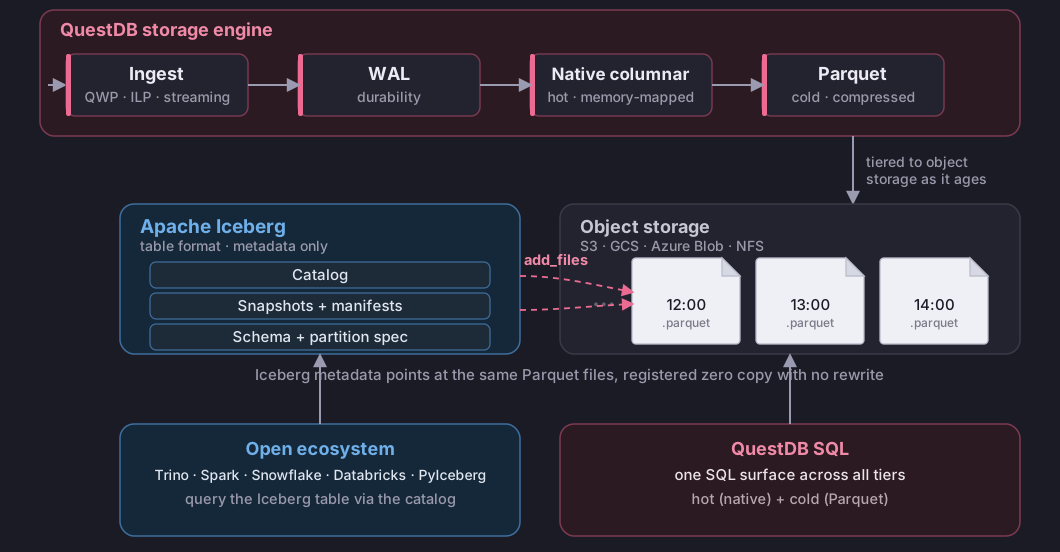
To make sure those files play well, QuestDB doesn't just produce valid standard Parquet, it also follows the conventions Iceberg expects: canonically named list elements, no conflicting field IDs, and column statistics in the footer. Registration needs no workarounds as a result, and stock PyIceberg takes the files as they are.
Where QuestDB is today: Parquet on disk and in the bucket
QuestDB uses a three tier storage engine. Incoming data is written to a write ahead log for instant durability, then applied into QuestDB's native, time partitioned columnar format, which is the hot query layer: vectorised, multi core, with the full set of time series SQL extensions. Older partitions convert to Parquet for cold storage.
Converting a partition has been available in QuestDB open source for a while. You do it synchronously, one partition at a time:
ALTER TABLE trades CONVERT PARTITION TO PARQUETWHERE ts < dateadd('d', -7, now());
In QuestDB Enterprise a storage policy does it asynchronously as partitions age. Since QuestDB 9.4.3 you can also create a table whose partitions are Parquet from the start, so every new partition is written directly as Parquet with no native intermediate:
CREATE TABLE trades (ts TIMESTAMP, price DOUBLE, sym SYMBOL)TIMESTAMP(ts) PARTITION BY DAY FORMAT PARQUET WAL;-- change the default format for future partitions of an existing tableALTER TABLE trades SET FORMAT PARQUET;ALTER TABLE trades SET FORMAT NATIVE;
SET FORMAT is a metadata-only change: it governs partitions created after the
statement and does not rewrite existing ones.
Everything above writes Parquet locally, and all of it is open source. What QuestDB Enterprise 4.0 adds is the cold end of that pipeline: cold storage tiers Parquet partitions out to object storage automatically, so your local disk holds recent data while history lives cheaply in S3, GCS, Azure Blob, or an on-prem NFS mount, and the query planner still spans every tier from a single SQL surface.
Those Parquet files in your bucket are all Iceberg needs.
Registering QuestDB cold partitions as an Iceberg table
The workflow has two steps: get the Parquet into object storage, then register those files as an Iceberg table. The QuestDB to Iceberg tutorial walks through both. I also published a working example, in Python and in Java, at github.com/javier/iceberg-questdb if you want code to start from.
That repository is a demo, not a production tool. It runs against a local SQLite catalog with no authentication, which is fine on a laptop and wrong for anything real: in production you'd point it at your own catalog with proper credentials and access control. The Iceberg API calls it makes to register a table and to keep metadata in sync with new and deleted partitions are the same ones you'd use either way.
Step 1: get the Parquet into object storage
On QuestDB Enterprise this is automatic. A
storage policy with a TO REMOTE stage tiers
aging partitions to your bucket as Hive-style partitioned Parquet, one folder
per partition:
fx_trades/year=2026/month=02/day=10/hour=08/data.parquet
On QuestDB OSS you do the two moves yourself: convert the partition to Parquet, then copy the file into the same Hive-style layout in your bucket.
ALTER TABLE fx_trades CONVERT PARTITION TO PARQUETWHERE timestamp < dateadd('d', -7, now());
Either way you end up with the same thing: plain Parquet files sitting in S3, GCS, Azure Blob, or an on-prem NFS mount, laid out one folder per partition.
Step 2: register the files as an Iceberg table
Registration writes metadata only. PyIceberg's
add_files, or the equivalent JVM call, reads the Parquet footers, builds the
manifests, and points a new Iceberg snapshot at the files already in your
bucket. No copy, no rewrite.
Partition the Iceberg table by the transform that mirrors QuestDB's partition
unit, for example hour(timestamp) for hourly partitions, so Iceberg's
partition pruning lines up with how the files are physically split.
The catalog is your choice: a local SQLite or JDBC catalog to start, or a REST catalog (Polaris, Unity, Lakekeeper, Nessie, S3 Tables), Glue, or Hive in production. Worth stressing that catalog authentication (who can update table metadata) is separate from storage authentication (who can read the data files), and registration always needs storage credentials because it reads the footers to build the manifests.
The operational gotcha: Iceberg has no partition projection
If you have run a Hive-style layout on Athena, you may be used to partition projection: set a path template, and new partitions appear at query time with zero maintenance. Iceberg has no equivalent, and that's by design. Iceberg is a manifest-based format, so the metadata holds an explicit list of every data file, and that's what gives it snapshot isolation, time travel, and fast planning with no S3 listing per query. The trade-off is that new files never appear on their own. Something has to commit them.
So when QuestDB writes a new hourly partition, a registration run has to add it.
The incremental path is cheap: list the Parquet under the prefix, diff against
the files already in the table, and add_files only the new ones in a fresh
snapshot. A run with nothing new is one listing plus a set difference. To stay
current hands off, schedule that incremental run (cron, Lambda, Airflow) on
roughly the cadence QuestDB tiers partitions.
| Athena + projection | Iceberg | |
|---|---|---|
| New partition visibility | automatic at query time | after a registration run |
| Per-query S3 listing | yes | no, the manifest is authoritative |
| Snapshot isolation / time travel | no | yes |
| Maintenance to stay current | none | scheduled incremental run |
The same reasoning runs in the other direction. Partitions don't only appear, they also disappear, whether you drop one by hand or a storage policy or TTL expires it. Iceberg will not notice that on its own either, and the manifest keeps pointing at a file that's no longer there. So the sync job has to work both ways, and the example script does: it adds files that are new in the bucket and removes from the Iceberg table the ones that have gone.
Nanosecond timestamps and UUIDs
Two QuestDB types deserve care when you register a table. The Iceberg spec only
gained nanosecond types in format version 3, and the Python and JVM
implementations are at different points in supporting it, so the client you pick
affects what third-party engines see: PyIceberg downcasts nanosecond timestamps
to microseconds and stores uuid as fixed[16], while the JVM path writes both
natively. Nothing is lost in the files themselves, since registration writes
metadata only and never touches the Parquet bytes, and querying through
QuestDB you never lose precision. The
tutorial and the example
repository go through the mapping in detail if you need it.
Querying it from Spark, Trino, or Snowflake
Once registered, the table is just an Iceberg table, so any Iceberg-aware engine reads it from the catalog: Spark, Trino, Snowflake, Databricks, Athena, PyIceberg. QuestDB keeps serving low latency SQL over hot data and across tiers, and the rest of the stack gets a governed, versioned, mutable view of the same cold history, with one physical copy of the data underneath.
Parquet and Iceberg are layers, not rivals
Parquet gives you portable, compressed, columnar files that anything can read. Iceberg gives you atomic commits, snapshots, time travel, schema evolution, and multi engine access over those same files. QuestDB sits at the front of that stack: it ingests millions of rows per second, serves low latency SQL over hot and cold data from one surface, and writes its history in the open Parquet format that a lakehouse is built on. The open formats QuestDB already speaks mean the bridge is a short script, not a migration.
We're also working on integrating Iceberg directly into QuestDB, so the registration and sync described here happen for you rather than through a scheduled job. You can follow that on the roadmap. And Iceberg is not the only destination worth having: Delta Lake and DuckLake are table formats that also keep their data as Parquet, so the same cold partitions could be exposed through either of them by the same kind of metadata-only registration. DuckLake and QuestDB takes that second one end to end, and shows where keeping the metadata in a SQL database instead of manifest files changes the operational story. Once the data is in an open file format, which table format you put on top stays a choice rather than a commitment.
If you want to try it, grab QuestDB from github.com/questdb/questdb, and come tell us what you're building on our Slack.