QuestDB 10.1: fresher data, less I/O, and more analysis in SQL
QuestDB 10.1 adds merge-append partitions, which cut disk I/O and make late data readable sooner, brings SUBSAMPLE and exact percentiles to SQL, keeps a history of its own metrics, and runs GROUP BY over joins in parallel.



QuestDB is happiest when data arrives in order. Live data, on the other hand, often arrives out of order, especially when it comes from several feeds or from parallel senders. When that happens, QuestDB has to write the affected partitions again with the late rows merged in. Meanwhile a lot of everyday analysis still happens just outside the database: a chart library thinning millions of points, a notebook computing a p99 that SQL could only approximate, a separate monitoring stack collecting QuestDB's own metrics.
QuestDB 10.1 writes late data with less I/O and makes it readable sooner, and brings those other jobs into SQL.
10.1 has more breaking changes than a usual point release. Most turn a query
that quietly returned the wrong thing into an error, but a few change results.
Read the list before upgrading,
especially if you use HORIZON JOIN, INT arithmetic or interval strings like
'1min'.
QuestDB 10.1 at a glance
Merge-append partitions: A late write into an older partition no longer has to write that partition out again. QuestDB appends the rows it touches and folds the partition back together in the background, trading some temporary disk space for much less disk I/O, and since each write has less to do, new rows are readable sooner. It's opt-in, with one configuration setting.
SUBSAMPLE: A new SQL clause that picks the most significant rows of a result and returns them unchanged. For a chart, that's the few hundred rows that keep its shape out of millions. It also works for error-bounded compression and archiving.
Exact percentiles:
percentile_disc() and percentile_cont(), as aggregates and window functions,
with several percentile levels in one pass. Unlike approx_percentile(), they
accept negative values.
Metrics history in sys.metrics:
QuestDB writes its own metrics to a table every second. Put a notebook on top
and you have monitoring with no metrics aggregator and no dashboard server.
HORIZON JOIN changes:
Markout queries return one row per trade and offset, and can filter the quotes
they match against, such as a single venue's. Both changes might alter the
results of existing queries, so if you use HORIZON JOIN, it's worth reading
that section before you upgrade.
Parallel GROUP BY over joins: Aggregating over a join now uses every query worker, with no change to the query.
Lists in variables: A
DECLARE variable can hold a list for IN, which makes notebook dashboards
filterable by a set of symbols.
And more: Faster LATEST ON, faster
pattern filters on indexed symbols, lag() over symbols, and a long list of
correctness fixes.
That's 10.1 in brief. If it's all you need, read the breaking changes and go straight to getting 10.1. Otherwise, the sections below cover each change in more detail, with queries you can run on the demo.
Merge-append partitions: late data without the rewrite
Late data is normal in time-series work. Several writers feed the same table and their batches overlap in time, a venue reconnects and replays forty minutes from earlier in the day, a device comes back online with an hour of buffered readings, or a backfill fills a gap from last week. QuestDB keeps each partition sorted by time, so a commit with rows for a partition that's already on disk has always meant writing a new copy of that partition with the late rows merged in. A few thousand late rows can cost a rewrite of millions, and a steady trickle of them keeps the disk busy rewriting the same partitions.
With cairo.o3.partition.merge.append.enabled=true, the late commit instead
takes the slice of the partition its rows fall into, merges the late rows into
that slice, and appends the result to the end of the partition's column files.
The partition then points at the new copy of that slice. A partition can hold
several of these pieces over one set of files, much like Parquet row
groups, and the rows they replaced stay behind as dead space until a background
compaction folds the partition back into one piece.
The public demo has run with merge-append since 22 October. Before that, it wrote about 440 rows to disk for every row it ingested, most of it from refreshing materialized views. Since the switch, it writes about 8:
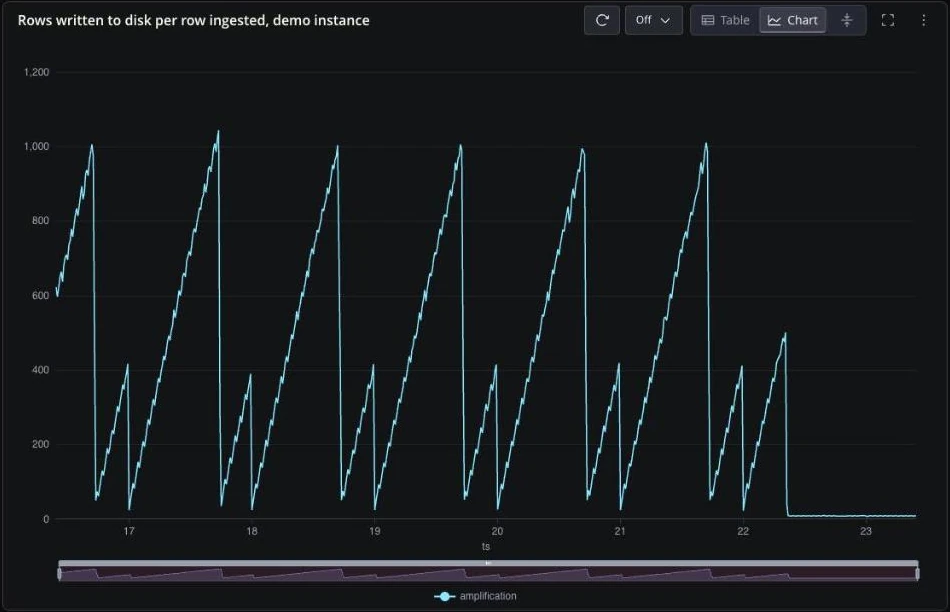
Less rewriting pays off twice. The disk does less work, and because each WAL apply has less to write, rows become readable sooner after they're ingested. On the demo, the median time to apply a batch fell from 1.7 ms to 0.6 ms, and the average from 5.5 ms to 3.0 ms.
The chart comes from sys.metrics,
also new in 10.1, so you can watch the same ratio on your own instance before
and after turning merge-append on. Its counters are cumulative, so the query
takes the difference between consecutive rows:
WITH d AS (SELECT ts,wal_apply_physically_written_rows- lag(wal_apply_physically_written_rows) OVER (ORDER BY ts) AS written,wal_apply_written_rows- lag(wal_apply_written_rows) OVER (ORDER BY ts) AS ingestedFROM 'sys.metrics'WHERE ts IN '$now - 7d..$now')SELECT ts, sum(written) / sum(ingested) AS amplificationFROM dWHERE written >= 0 AND ingested > 0SAMPLE BY 15m;
deadRows, pieceCount and lastWriteTimestamp are new columns in
table_partitions() and
SHOW PARTITIONS, so you can see where dead space is building up:
SELECT name, numRows, deadRows, pieceCount, lastWriteTimestampFROM table_partitions('fx_trades')WHERE pieceCount > 1;
On an hourly-partitioned table like this one, the only partition that shows pieces, if any, is the hour being written, with a handful of dead rows from slightly late rows in the feed. The earlier hours are back to a single piece.
The folding is done by a new partition-compaction worker, which checks WAL
tables every two minutes. It builds the compacted copy from a reader snapshot
and swaps it in as a metadata change, so ingestion doesn't pause. It runs
whether or not merge-append is on, because it also cleans up idle Parquet
partitions with dead row groups, and merges partitions that out-of-order
writes split in the middle once they go idle.
Three things to know before turning it on:
- It trades disk space for write amplification. Between a late write and the next compaction, a partition takes more space than its live rows.
- It's off by default. The merge-append docs cover when it helps and how to enable it. We'd like to hear how it behaves on your late data.
- Rolling back takes some preparation. QuestDB versions before 10.1 refuse a table that still has merge-append partitions. The downgrade steps explain what to do first.
SUBSAMPLE: keep the rows that matter
SUBSAMPLE picks the most significant rows of a
query result and drops the rest. SAMPLE BY aggregates each time bucket, so
what you get is a min(), max() or avg() per bucket rather than values from
real rows. SUBSAMPLE selects real rows from the data, each with its original
timestamp and all its columns.
What "most significant" means depends on the method. For a line chart, it means
the rows that best preserve the shape of the line: the peaks, the troughs and
the turns, and not the points in the middle of a smooth run. Here's one day of
EURUSD trades on the demo, 682,348 of them, compressed with sdt at four
tolerances, each in a cell of the same Web Console notebook:
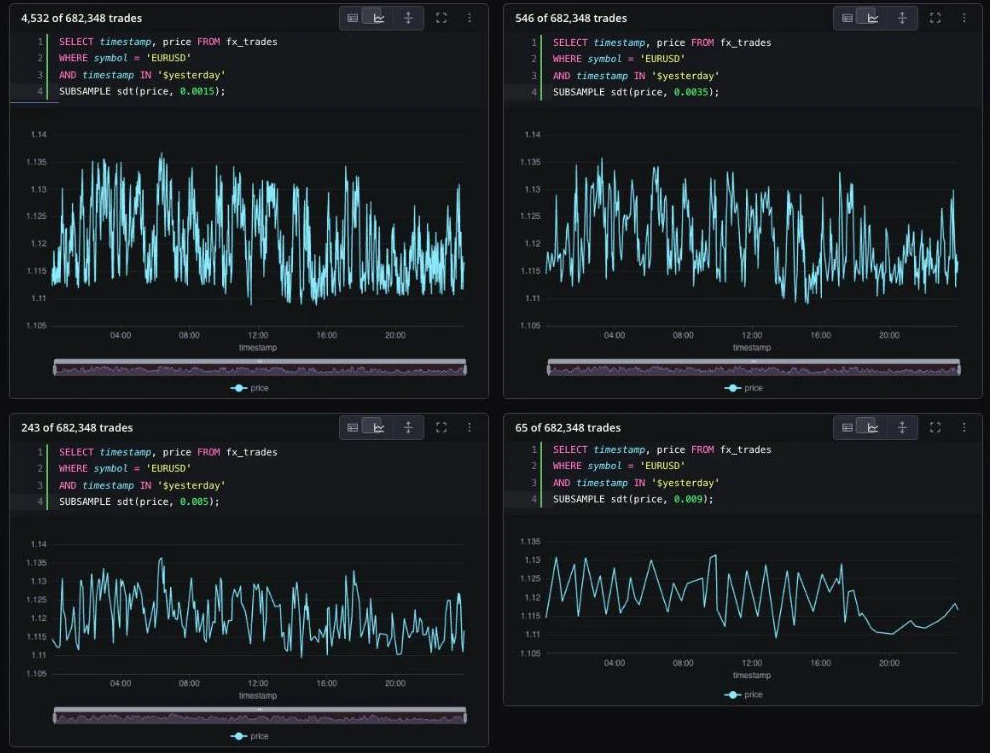
As the tolerance grows, the noise goes first and the larger moves stay.
sdt, Swinging Door Trending,
comes from the process historians used in
industrial plants. Instead of a row count it takes a tolerance in the units of
the column, and keeps as few rows as it can while guaranteeing that a straight
line between the kept rows never strays further than twice that tolerance from
any row it dropped.
That guarantee is what makes SUBSAMPLE useful beyond charts. A tolerance of
0.0005 keeps 82,023 of those 682,348 trades, and any price in between can be
reconstructed to within 0.001. Written to another table, that's a compressed
archive with a known error:
INSERT INTO fx_trades_archiveSELECT timestamp, symbol, priceFROM fx_tradesWHERE symbol = 'EURUSD'AND timestamp IN '$yesterday'SUBSAMPLE sdt(price, 0.0005);
When the goal is a fixed number of points instead of a fixed error, the other methods take a target count:
| Method | Keeps |
|---|---|
lttb(col, n) | n rows that preserve the shape of a line |
m4(col, n) | up to n rows: first, last, min and max of each time slot |
minmax(col, n) | up to n rows: min and max of each time slot |
uniform(n) | n evenly spaced rows, including the first and last |
cadence(k) | every k-th row |
sdt(col, dev) | as few rows as the tolerance allows |
lttb (Largest-Triangle-Three-Buckets) is the usual choice for a line chart,
and m4 keeps the exact visual envelope for a chart of a known pixel width.
SUBSAMPLE runs after SAMPLE BY, so you can aggregate first and then thin the
aggregate:
SELECT timestamp, avg(best_bid) AS bidFROM market_dataWHERE symbol = 'EURUSD'AND timestamp IN '$yesterday'SAMPLE BY 1sSUBSAMPLE lttb(bid, 300);
The SUBSAMPLE reference has a diagram for each
method and the full error guarantee for sdt.
Exact percentiles: percentile_disc and percentile_cont
QuestDB has had approx_percentile() for a while. 10.1 adds the two SQL
standard functions, closing one of our longest-open
feature requests.
percentile_disc()
returns a value that's actually in the data, and
percentile_cont()
interpolates between the two nearest values. Here they are next to
approx_percentile() at a low resolution:
SELECT symbol,percentile_cont(price, 0.99) AS p99_exact,approx_percentile(price, 0.99, 1) AS p99_approx,percentile_disc(quantity, ARRAY[0.5, 0.9, 0.99])AS size_p50_p90_p99FROM fx_tradesWHERE timestamp IN '$yesterday'AND symbol IN ('EURUSD', 'GBPUSD', 'USDJPY')GROUP BY symbolORDER BY symbol;
| symbol | p99_exact | p99_approx | size_p50_p90_p99 |
|---|---|---|---|
| EURUSD | 1.1344 | 1.1250 | [111881.0, 238559.0, 504031.0] |
| GBPUSD | 1.3527 | 1.3125 | [112006.0, 239509.0, 505138.0] |
| USDJPY | 159.17 | 152.00 | [112552.0, 244294.0, 522504.0] |
The highlights:
- Exact. At precision 1,
approx_percentile()puts the USDJPY p99 at 152.00 against an exact 159.17. Higher precision closes the gap, at the cost of more memory per group. - Negative values work.
approx_percentile()can't record a negative number, which rules it out for returns, spreads or P&L. The exact functions take any numeric input. - Several levels in one pass. Pass an array and get every level back from
one scan, like the trade sizes above. With
UNNEST, ten deciles become a histogram in a single query. - Parallel. Both run on every query worker in
GROUP BYandSAMPLE BY.
Both also work as window functions over a whole partition, which puts each group's percentile next to every row:
SELECT timestamp, symbol, price,price - percentile_disc(price, 0.5)OVER (PARTITION BY symbol) AS vs_medianFROM fx_tradesWHERE timestamp IN '$yesterday'AND symbol IN ('EURUSD', 'USDJPY');
The window form doesn't take a rolling frame, and approx_percentile() has no
window form.
With a GROUP BY, the exact functions run on every query worker, and they're
usually faster than approx_percentile(), with the gap growing as the number of
groups grows. Without a GROUP BY, approx_percentile() is still faster on
integer columns. It also uses less memory: the exact functions keep 8 bytes for
every row, while the approximation keeps one fixed-size histogram per group. Our
advice is to start with the exact functions, and switch to
approx_percentile() when memory is tight or it's faster on your data, as long
as its precision is enough and there are no negative values.
approx_percentile() also gained the array form, and it now returns NULL for an
empty group instead of another group's value. quantile_disc() and
quantile_cont() work as aliases.
sys.metrics: monitoring QuestDB from QuestDB
QuestDB now writes its global metrics to a sys.metrics table every second:
about 160 counters and gauges covering queries, connections, ingestion, WAL
apply, memory by allocation type, CPU and garbage collection. The table is
partitioned by day with a one-week TTL, and it's written even when the
Prometheus endpoint is off.
You query it like any other table. For example, peak CPU, memory and WAL apply rate per hour over the last twelve hours:
SELECT ts,max(cpu_questdb_percent) AS peak_cpu_pct,max(memory_rss) / 1073741824.0 AS peak_rss_gib,max(wal_apply_rows_per_second) AS peak_wal_rows_sFROM 'sys.metrics'WHERE ts IN '$now - 12h..$now'SAMPLE BY 1h;
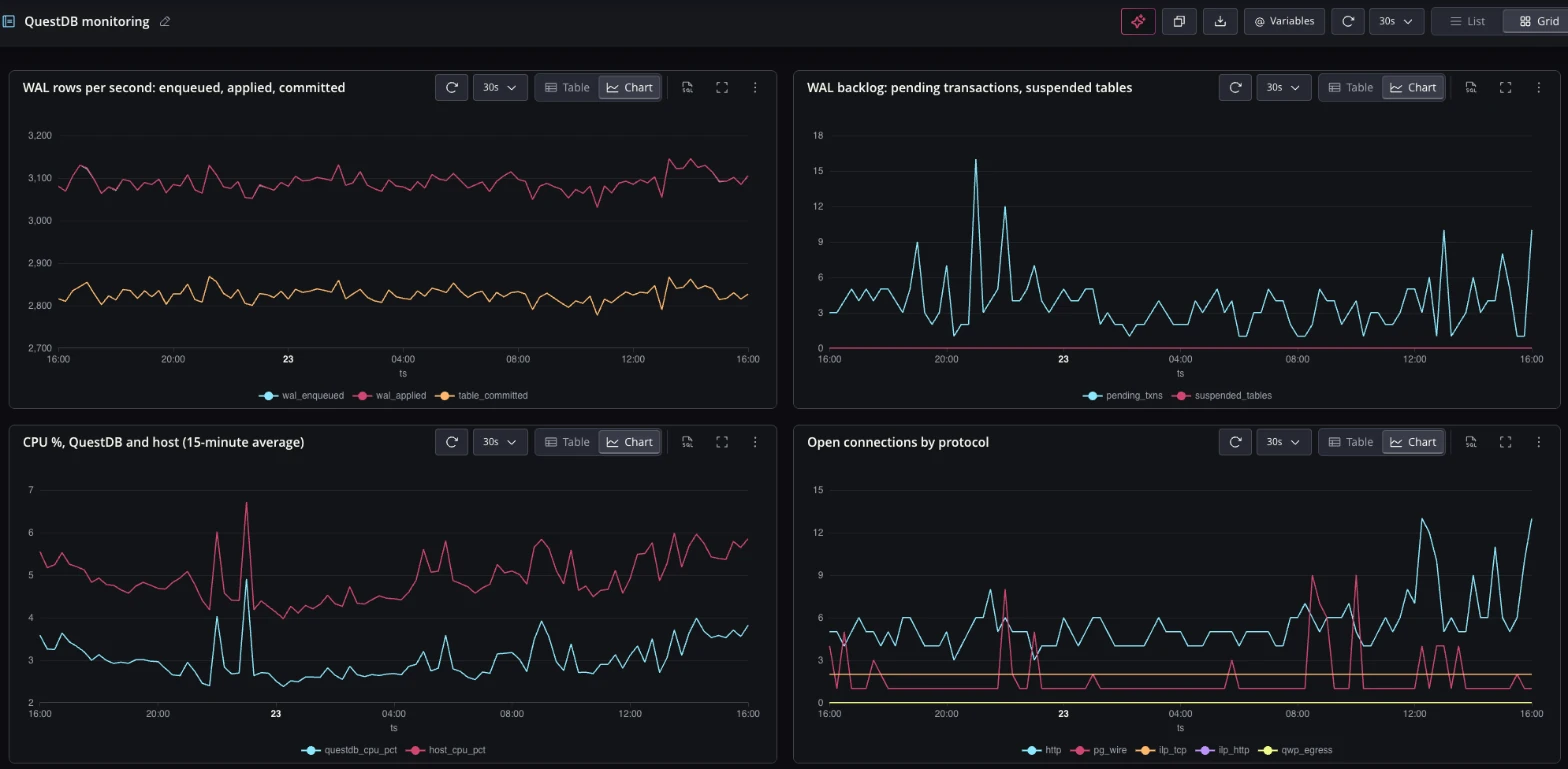
Put queries like that in a Web Console notebook, draw them as charts and turn on auto-refresh, and you have a monitoring dashboard that lives in QuestDB itself, with no metrics aggregator and no dashboard server to run next to it. It's the same machinery as any other live notebook dashboard. Here's one on the demo instance, refreshing every 30 seconds:
The table doesn't show up in tables(), so query it by name. The interval, the
TTL, an exclude pattern and Parquet storage are set under metrics.persist.*;
see persisted metrics.
It's the history of one instance, so for a fleet you still want Prometheus or a
Telegraf pipeline that
collects every instance in one place.
HORIZON JOIN: one row per trade, and filters on the quotes
HORIZON JOIN matches each trade with the
prevailing quote at a list of offsets before and after it, which is what a
markout curve is built from. The
time-series joins guide
covers it from scratch. Both changes in 10.1 might alter the results of
existing queries.
One row per trade and offset. Without aggregate functions, it now returns
one row per left-hand row and offset,
duplicates included. Before, it grouped by the selected columns as if the query
said SELECT DISTINCT, so two trades at the same price and time came back as
one row.
SELECT t.timestamp, t.symbol, t.side, t.price,h.offset / 1_000_000_000 AS horizon_s,m.best_bid, m.best_askFROM fx_trades tHORIZON JOIN market_data m ON (symbol)LIST (0, 1s, 5s, 30s) AS hWHERE t.timestamp IN '$yesterday'AND t.symbol = 'EURUSD';
That's 682,348 trades and 2,729,392 rows, four per trade. The result keeps the
trades' designated timestamp and order, so an outer query can run SAMPLE BY,
another join or a window function over it. If you relied on the old shape, add
SELECT DISTINCT or a GROUP BY, and run REFRESH MATERIALIZED VIEW ... FULL
on any materialized view built on such a query. The docs have
upgrade steps.
Filters on the quotes. A predicate on the right-hand table in ON used to
be silently ignored: AND c.ecn = 'LMAX' parsed fine, and the join matched
against every venue anyway. Now it
filters the quotes before matching,
so each trade gets the latest quote that passes the filter. Two venues can sit
side by side in one query:
SELECT h.offset / 1_000_000_000 AS horizon_s,avg(CASE WHEN t.side = 'buy'THEN (l.bid_price + l.ask_price) / 2 - t.priceELSE t.price - (l.bid_price + l.ask_price) / 2END) * 10_000 AS lmax_pips,avg(CASE WHEN t.side = 'buy'THEN (e.bid_price + e.ask_price) / 2 - t.priceELSE t.price - (e.bid_price + e.ask_price) / 2END) * 10_000 AS ebs_pipsFROM fx_trades tHORIZON JOIN core_price lON (t.symbol = l.symbol AND l.ecn = 'LMAX')HORIZON JOIN core_price eON (t.symbol = e.symbol AND e.ecn = 'EBS')LIST (0, 1s, 5s, 30s, 60s) AS hWHERE t.timestamp IN '$yesterday'AND t.symbol = 'EURUSD'ORDER BY horizon_s;
The demo's venues are simulated from the same price process, so the two columns agree closely. On real venue data, this is the query that shows which venue's quotes your fills compare badly against.
A filtered table also works on the right-hand side,
HORIZON JOIN (core_price WHERE ecn = 'LMAX') l ON (...). A predicate on the
left-hand table in ON was ignored the same way, and now fails with
unsupported HORIZON join expression. It belongs in WHERE.
GROUP BY over a join, on every core
Filters and GROUP BY over a single table have used every query worker in
QuestDB for a long time. A GROUP BY over a join didn't: the join ran on one
thread and fed the aggregation from there, while the other workers waited.
In 10.1, a GROUP BY or SAMPLE BY over a join of two tables on matching
keys, the ON t.symbol = d.symbol kind, runs on all the query workers. QuestDB
builds a lookup table from one side of the join once, and every worker matches
its own share of the other side's rows against it and aggregates as it goes.
Nothing changes in the query. Here, each pair's trades from yesterday are
checked against the day before's range:
SELECT t.symbol,count() AS trades,sum(CASE WHEN t.price > d.high THEN 1 ELSE 0 END)AS above_prev_high,sum(CASE WHEN t.price < d.low THEN 1 ELSE 0 END)AS below_prev_lowFROM fx_trades tJOIN (SELECT symbol, high, lowFROM fx_trades_ohlc_1dWHERE timestamp IN '$yesterday - 1d') d ON t.symbol = d.symbolWHERE t.timestamp IN '$yesterday'GROUP BY t.symbolORDER BY trades DESCLIMIT 5;
| symbol | trades | above_prev_high | below_prev_low |
|---|---|---|---|
| EURUSD | 682348 | 59 | 6172 |
| USDJPY | 616285 | 0 | 199730 |
| GBPUSD | 548795 | 73 | 69 |
| USDCHF | 477103 | 0 | 58552 |
| AUDUSD | 408599 | 0 | 0 |
EXPLAIN shows the plan as Async Hash Join Group By, here with the demo's 46
workers. In the PR's benchmark, a 4M-row Parquet LEFT JOIN with a 400,000-row
other side on 8 workers went from about 101 ms to about 50 ms, and its peak
memory from 308 MB to 165 MB.
It covers INNER and LEFT joins, some RIGHT joins, and the common aggregates:
count(), sum(), avg(), min(), max(), variance, standard deviation,
correlation and weighted_avg(), among others. Order-dependent aggregates such as first()
and last(), and count_distinct(), keep the old plan. The
configuration reference
has the full rules, and cairo.sql.parallel.hash.join.groupby.enabled=false
turns it off.
Lists in DECLARE, for notebooks and dashboards
A DECLARE variable can now hold a list, used on the right-hand side of IN:
DECLARE @majors := ('EURUSD', 'GBPUSD', 'USDJPY')SELECT symbol, count() AS trades, sum(quantity) AS volumeFROM fx_tradesWHERE timestamp IN '$yesterday'AND symbol IN @majorsGROUP BY symbolORDER BY symbol;
| symbol | trades | volume |
|---|---|---|
| EURUSD | 682348 | 91177886373 |
| GBPUSD | 548795 | 73471371346 |
| USDJPY | 616285 | 83815213892 |
This is most useful in notebooks.
Notebook variables
are built on DECLARE, so a variable like
@symbols := ('EURUSD', 'GBPUSD') can now feed every cell that filters with
symbol IN @symbols. Edit the list in the variables panel and every chart in
the notebook uses the new symbols on its next refresh. The same goes for views, where an
OVERRIDABLE list parameter can be overridden with a list of any length. On the
designated timestamp, a declared list becomes an interval scan, the same as a
written-out one. See value lists.
Faster queries and other changes
These numbers come from the benchmarks in each PR.
LATEST ON. Filtered and multi-symbolLATEST ONqueries ran 2.9x to 7.1x faster.symbol = 'A' OR symbol = 'B'is now planned likesymbol IN ('A', 'B'), and a key filter outside aLATEST ONsubquery is pushed inside it, so QuestDB only looks for the keys you asked for.- Pattern filters on indexed symbols.
LIKE,ILIKEand regex filters, and their negations, can use a symbol index when the pattern matches few values. Selective patterns ran 35x to 73x faster. Broad patterns still scan. SAMPLE BYwith a time zone. Calendar-aligned day buckets in a time zone with daylight saving run up to about 65% faster.- Late writes on XFS. Out-of-order commits no longer wait on a synchronous
disk allocation per column. Time in
posix_fallocateduring WAL apply fell from 2,171 ms to 28 ms in the PR's test. - Large QWP results. A 50-million-row read over QWP used to peak at 6.40 GiB of server memory. The same read now peaks at 462 MiB and finishes 30% faster.
- Fewer stalls. Unmapping files no longer holds a process-wide lock, which removes a source of ingestion and query stalls.
lag() and lead() over symbols. Both now accept SYMBOL columns,
including with IGNORE NULLS, which is what you need to spot a change of venue,
side or regime from one row to the next:
SELECT symbol, count() AS venue_switchesFROM (SELECT symbol, ecn,lag(ecn) OVER (PARTITION BY symbol ORDER BY timestamp)AS prev_ecnFROM fx_tradesWHERE timestamp IN '$yesterday')WHERE ecn != prev_ecnGROUP BY symbolORDER BY venue_switches DESCLIMIT 5;
| symbol | venue_switches |
|---|---|
| EURUSD | 144029 |
| USDJPY | 130316 |
| GBPUSD | 117001 |
| USDCHF | 102588 |
| AUDUSD | 88365 |
Outside SQL, browsers can now connect to QWP directly over a WebSocket, either same-origin with the session cookie or cross-origin through an allowlist. The bundled Web Console adds support for live views, a panel that lists running queries with their memory use and lets you cancel them, an option to run the whole query text, and rule-based trends in the result grid.
One change makes some joins slower. Joins on SYMBOL keys now keep their symbol
lookup caches off-heap, where they're freed when the query ends and counted
against the per-query memory limit. That uses less memory, but some queries
might run slower.
Before you upgrade: breaking changes in 10.1
Most of this list is QuestDB refusing a query it used to misread. The first three items can change results, so check those first.
HORIZON JOINwithout aggregates. One row per left row and offset. UseSELECT DISTINCTorGROUP BYfor the old result, andREFRESH ... FULLon materialized views built on it.HORIZON JOINONpredicates. Right-hand predicates now filter, left-hand ones fail with an error. Both used to be ignored.- INT arithmetic. Wraps at 32 bits everywhere, including under a cast:
(100000 * 30000)::longis-1294967296. Widen an operand, as in100000L * 30000, for 64-bit math. - Malformed intervals.
SAMPLE BY 1minfails withInvalid unit: 1min. It used to be read as one nanosecond, and100msas one second. Use one-letter units:1m,100T,1d. dateadd()and the designated timestamp. Adateadd()projection keeps the designated timestamp only for fixed-duration units over the designated column. Month and year units lose it, and views built on them become invalid.ORDER BYexpressions. No longer returned as a hidden extra column.subsample. Reserved word. Quote it as"subsample".- Window functions over
SYMBOL.first_value(),last_value(),min(),max()andnth_value()over a symbol now fail to compile, as doeslag()with a non-null default.lag()itself now works over symbols, as shown above. SAMPLE BY ... FILLedge cases.first(ts) AS ts ... FILL(0)now errors.- Parquet and cold partitions.
UPDATEon WAL tables with Parquet partitions,ADD INDEXwith cold partitions andALTER COLUMN TYPEwith read-only ones are rejected instead of suspending the table. CREATE TABLE AS SELECToverLATEST ON. A partitioned CTAS that picks several keys from aLATEST ONsubquery, on a symbol with a covering index, no longer infers the designated timestamp. AddTIMESTAMP(col).table_partitions(),SHOW PARTITIONS,materialized_views(). New columns, so code that reads them by position needs updating.- HTTP sessions. A request with a rejected
Authorizationheader gets 401 and ends the session, instead of falling back to the cookie. - Platforms. Intel (x86-64) macOS is no longer supported. macOS builds are Apple Silicon only.
The 10.1.0 release notes on GitHub have the full list with PR links.
Getting 10.1
docker pull questdb/questdb:10.1.0
Or download QuestDB directly. The queries in this post run on the live demo, which is already on 10.1. The full changelog is on GitHub.
If you try merge-append on a table with a lot of late data, or SUBSAMPLE
behind a chart, tell us how it goes on Slack or
Discourse.