The Best Time-Series Databases in 2026 (and How to Choose)
The best time-series database is the one that fits your workload. A 2026 guide comparing QuestDB, InfluxDB, TimescaleDB, ClickHouse, kdb+ and more.


Last updated: 7 July 2026.
Search for "the best time-series database" and you will find the same article over and over: a few engines lined up and ranked, almost entirely on speed. It is an odd way to choose one. Ingesting and querying fast is the reason the whole category exists, and the serious engines are all fast enough for most workloads, so a ranking built on throughput mostly answers a question you have already settled.
So this guide is about everything else, the parts of the decision you actually live with once the data is flowing: whether the query language really understands time, how much you have to operate day to day, how easily your data moves in and out, and where each engine draws its line between what is open source, what is free, and what needs a commercial license.
Performance still matters, of course. Any of these engines will outrun a general-purpose transactional or analytical database on this work, so among them speed alone rarely settles the choice. It decides at the top end: if you need to ingest millions of rows per second, or hold the same throughput on less hardware, QuestDB is a strong match, and our head-to-head benchmarks against InfluxDB, TimescaleDB and ClickHouse show it. Treat every benchmark, ours included, with a pinch of salt though: small changes to the setup reshuffle the rankings, as we found in Lies, damn lies and database benchmarks.
This is a guide, not a leaderboard: for each question we name the databases that fit and the ones that do not, which might or might not be QuestDB (we are biased here, of course). If you want the category basics first, our time-series database glossary entry covers them.
Full disclosure: we build QuestDB, so we know it in depth and are not equally expert in the other six engines. We researched them carefully, by hand and with AI agents, and checked the claims here against each vendor's own documentation, to paint as realistic and fair a picture as we could. We may still have something wrong. If you spot an error, tell us on our community forum and we will fix it.
Quick picks: the best time-series databases in 2026
If you just want the shortlist:
- Best overall, for high-volume ingestion and low-latency time-based queries: QuestDB. The fastest out-of-the-box ingestion in our TSBS runs, SQL with the right primitives for low-latency domains, and open Parquet storage under an Apache 2.0 license.
- Time-series without leaving PostgreSQL: TimescaleDB. Relational and time-series data share one Postgres database and its entire ecosystem.
- Observability, logs and huge event datasets: ClickHouse. Columnar aggregation at very large scale, when writes arrive in batches.
- Industrial IoT fleets and the edge: TDengine or InfluxDB 3. TDengine puts clustering in its open-source core; InfluxDB's Telegraf agent and line protocol are made for constrained devices. Both work best while ingest rates and the number of unique series stay moderate.
- High-frequency trading where the application layer is already built in q: kdb+. Very fast in-memory tick analytics, for teams where openness and vendor lock-in are not a constraint.
- Infrastructure monitoring and metrics: Prometheus. A different job from the business data this guide is about, and the cloud-native standard for it.
Monitoring vs business data: not all time-series data is the same
Two very different jobs hide under the label "time-series." One is infrastructure and service monitoring: CPU, memory, request rates and the like, collected on a schedule and read mostly through alerts and dashboards. If that is your data, Prometheus and its ecosystem are built for exactly it. Prometheus is the CNCF-graduated standard for cloud-native and Kubernetes monitoring: it scrapes HTTP endpoints, labels each series, queries with PromQL and alerts through Alertmanager, with an exporter for almost everything.
The other job is business data: the time-stamped records your systems are actually built on, whether that is trades and quotes, readings from a turbine, telemetry from a robot, or energy meter data. Unlike monitoring data, which is routinely sampled, downsampled and aged out, where a lost scrape is a non-event, this data is mission-critical. A missing trade is a compliance problem, a gap in meter data is revenue you cannot bill, and a lost telemetry window is an incident you cannot reconstruct. You keep the raw records, you keep them durably, and you run analytical queries over them, and that is the job this guide is about.
Do you even need a time-series database?
A specialized engine earns its keep on a specific shape of problem, so before comparing them, make sure you have it. A time-series database pays off when most of your queries filter or aggregate by time (recent windows, downsampling, rolling statistics), when ingestion is sustained and high-volume, or when the data outgrows local disks and needs to be tiered, archived or expired over time.
If none of that fits, if most queries carry no time filter, ingestion is modest, and the data lifecycle is not a headache, then a general-purpose relational database like PostgreSQL is very likely the simpler and better choice, and you can skip the rest of this comparison. The same holds if your workload is really transactional, many small updates and deletes that need row-level consistency, which is exactly what those databases are built for and what time-series engines trade away for ingest speed. If Postgres is already struggling with your time-series data, read on.
The contenders, and what we are setting aside
Six of them are time-series databases, in alphabetical order: DolphinDB, InfluxDB, kdb+, QuestDB, TDengine and TimescaleDB. The seventh, ClickHouse, is not one; it is a column-oriented OLAP database. We include it because it is one of the OLAP engines people most often compare against a purpose-built time-series database.
We also set aside the metrics-first monitoring systems, Prometheus and VictoriaMetrics, which belong to the monitoring job above, and Apache Druid and Apache Pinot: both are very good at serving sub-second aggregations to thousands of dashboard users at once, but that is a different job from being the database you write everything to and query freely.
Every engine here is a strong choice for some workload. The rest of this guide is about matching one to the shape of your data and the way you work with it.
The 7 best time-series databases at a glance
Here is the whole field at a glance. Each column matches a section further down, so if a row raises a question, the answer is below.
| Engine | Highlights | License | Best for |
|---|---|---|---|
| QuestDB | SQL + time semantics Full temporal joins Matviews · dedup on write Tiered Parquet (Enterprise) Console + dashboards | Apache 2.0 + Enterprise | Capital markets, energy, aerospace & robotics |
| InfluxDB 3 | SQL + InfluxQL No temporal joins No matviews · last-write Object store native (Core) Explorer app | MIT/Apache, commercial tiers | Recent-data metrics & IoT |
| TimescaleDB | PostgreSQL SQL (no TS) No temporal joins Matviews · dedup on write Tiering: Tiger Cloud only Cloud console | Apache 2.0 + TSL | Time-series in PostgreSQL |
| TDengine | SQL ASOF + window joins Matviews (TSMA) · dedup Tiering: Enterprise taosExplorer | AGPL-3.0 + Enterprise | Industrial IoT & edge |
| ClickHouse | SQL dialect ASOF join only Matviews · eventual dedup S3 tiering (OSS) /play console | Apache 2.0 + Cloud | Large-scale analytical scans |
| kdb+ | q + SQL (KDB-X) + Python ASOF + window joins No matviews · DIY dedup Proprietary storage KX Dashboards · pgwire | Proprietary, free tiers | HFT & capital markets |
| DolphinDB | SQL + scripting language ASOF + window (functions) No matviews · ingest dedup Proprietary storage GUI + web dashboards | Proprietary, free Community | Capital markets, industrial IoT |
"InfluxDB" is really three databases. 1.x and 2.x run the older TSM engine, queried with InfluxQL and Flux. InfluxDB 3 is a ground-up Rust rewrite on Apache Arrow and Parquet, queried with SQL and InfluxQL, with Flux dropped; moving to it from 1.x or 2.x is a migration, not an upgrade. In this guide, InfluxDB means version 3.
How to choose a time-series database: the questions that decide it
Ingestion and query speed: necessary, not decisive
You do need enough headroom, so start here, then move on. In our reproducible TSBS benchmarks, QuestDB (version 9.x; v10 is around the corner) sustains ingestion from about 4 million to a peak of 11.4 million rows per second on default settings. Head to head:
- QuestDB vs InfluxDB: up to 36x faster on ingestion, whether against 1.x, 2.x or 3 Core, and up to 130x faster on heavy double-groupby queries
- QuestDB vs TimescaleDB: up to 13x faster on ingestion, and up to 20x faster on heavy double-groupby queries
- QuestDB vs ClickHouse: up to 4.8x faster on ingestion and 27x faster on last-point queries, while ClickHouse is faster on some large range and aggregation scans
What about kdb+ and DolphinDB? Both are in-memory-first and very fast on the tick workloads they are tuned for, but with kdb+ you cannot really check: its license includes a DeWitt clause that forbids customers from publishing benchmark results, so independent, reproducible numbers are scarce and its speed is largely taken on reputation.
The query language, and whether it understands time
Language is the part of the decision you cannot easily reverse, because it shapes every query anyone writes for years and it sets the size of the hiring pool.
The SQL engines are not equivalent. TimescaleDB is a PostgreSQL extension
that stays within standard SQL: it adds its time-series features (hypertables,
continuous aggregates, compression) as functions and policies rather than new
query syntax, so its strength is that it is just Postgres, with no special
time-series semantics to learn. ClickHouse is SQL with its own extensions
for large-scale analytics. QuestDB is SQL with extensions for time series:
SAMPLE BY for downsampling,
LATEST ON for last-value lookups, a full family
of temporal joins, and
TICK interval syntax for expressing complex time
ranges in a single filter. QuestDB Enterprise takes it further with
exchange calendars that resolve real
trading sessions, holidays and early closes from an exchange code.
kdb+ is the outlier that trades SQL for the terse, proprietary q array
language:
powerful in skilled hands, but a steeper curve, a smaller talent pool, and less
reliable help from AI coding agents, which have seen far more SQL in training.
(KX's newer engine, KDB-X, adds SQL and native Python on top of q, but in its own
framing it is "q for speed, Python and SQL for ease": the SQL is a convenience
layer that does not cover the full q feature set, with window joins staying q
functions.) DolphinDB is a hybrid: an ANSI-compatible SQL dialect embedded in
a proprietary scripting language, so you query in familiar SQL, with as-of and
window joins available as SQL functions (aj, wj), and the scripting language
there for heavier analytics.
Temporal joins are where "understands time" becomes concrete. An ASOF JOIN
matches each row to the most recent prior row in another series without a
hand-written window, the everyday operation behind quote-to-trade matching and
sensor alignment.
SELECTt.timestamp, t.symbol, t.price,m.best_bid, m.best_askFROM fx_trades tASOF JOIN market_data m ON (symbol)WHERE t.timestamp IN '$now-1h..$now'LIMIT 20;
QuestDB supports every standard SQL join (INNER,
LEFT, RIGHT, FULL, CROSS, LATERAL) and the full temporal family as
first-class SQL keywords: ASOF (with LT and
SPLICE variants), WINDOW, and
HORIZON. WINDOW JOIN
aggregates a related table within a time window around each row; HORIZON JOIN
computes aggregations at a set of forward time offsets in a single pass, the
shape of trade markout analysis. The examples in the docs run on live data
rather than sitting as bare snippets, so you can paste them into the
demo console and see output.
Where the others land:
| Engine | ASOF join | Window join | Horizon join | Exposed as |
|---|---|---|---|---|
| QuestDB | Yes (+ LT, SPLICE) | Yes | Yes (only engine) | SQL keywords |
| ClickHouse | Yes | No | No | SQL keyword |
| TDengine | Yes | Yes | No | SQL keyword |
| kdb+ | Yes (aj) | Yes (wj) | No | q; asof in SQL |
| DolphinDB | Yes (aj) | Yes (wj) | No | SQL functions |
| TimescaleDB | Emulated (LATERAL) | No | No | not native |
| InfluxDB 3 | No | No | No | not native |
The InfluxDB row holds across versions: Flux (v2) and SQL (v3) both do ordinary equality joins, but neither has a native as-of or temporal join, a long-standing open feature request.
No single join decides it. An as-of join is fairly common, though not
always where you would expect: ClickHouse, which is not a time-series database,
has one in SQL, while InfluxDB and TimescaleDB, which are, do not offer a native
one. kdb+, DolphinDB and TDengine add a window join too. What no other engine
has at all is a HORIZON JOIN, or the LT and SPLICE variants.
Only QuestDB offers the complete family, ASOF with its LT and SPLICE
variants, WINDOW, and HORIZON, as standard SQL keywords.
Those keywords are not just syntactic sugar. You can emulate an as-of or window
join with a LATERAL join or a correlated subquery, but performance suffers
badly, because a native operator is one the engine is built to optimize around.
QuestDB's ASOF JOIN, for example, is backed by several execution algorithms: a
fast path for closely-spaced matches, a dense path for widely-spaced ones, and
more, several of them selectable with
optimizer hints and each suited
to a different data distribution. A hand-rolled LATERAL join gets none of that.
HORIZON JOIN has no real workaround at all: without it you pull the data out
and compute the offsets outside the engine, in application code or a q script,
then ship the results back.
Materialized views and deduplication: what the engine maintains for you
Two chores decide how much plumbing you write around the database: keeping pre-aggregated rollups fresh, and keeping duplicate rows out. The more the engine does automatically, the fewer cron jobs and reconciliation scripts you own.
Rollups
QuestDB's materialized views
refresh incrementally as data arrives (REFRESH IMMEDIATE), with manual and
timer options.
CREATE MATERIALIZED VIEW 'fx_trades_ohlc_1m'WITH BASE 'fx_trades' REFRESH IMMEDIATE AS (SELECTtimestamp, symbol,first(price) AS open,max(price) AS high,min(price) AS low,last(price) AS close,sum(quantity) AS total_volumeFROM fx_tradesSAMPLE BY 1m) PARTITION BY HOUR;
TimescaleDB's continuous aggregates are incrementally maintained by an invalidation engine that reprocesses only the changed time buckets, driven by a background refresh policy, and can blend the newest raw data at query time. ClickHouse offers both an insert-triggered incremental view (new blocks only, no historical backfill) and, since 24.10, a scheduled refreshable one. TDengine covers the ground with stream processing plus background-maintained TSMA rollups. The gap is InfluxDB 3, which dropped v1's continuous queries and v2's tasks and has no materialized view at all, only scheduled plugins. kdb+ has none, and DolphinDB does its continuous aggregation through streaming engines rather than a declarative view; either way you write the rollup yourself.
Deduplication
Time-series pipelines replay and retry, so where the engine removes duplicates matters:
| Engine | How it deduplicates |
|---|---|
| QuestDB | On ingestion, via DEDUP UPSERT KEYS on a key you choose |
| TimescaleDB | On write, via a unique index and ON CONFLICT |
| DolphinDB | On ingestion, via keyed upsert! or the TSDB and PKEY engines |
| TDengine | On write, a duplicate timestamp overwrites |
| InfluxDB | At query and compaction time, last write wins |
| ClickHouse | Eventual, at background merge; needs FINAL to read a clean result |
| kdb+ | Not built in, done yourself with a keyed table |
Licensing and open source: what the free build actually runs
The license label matters less than where the paywall sits. Five of the seven are open source: ClickHouse (Apache 2.0), QuestDB and TimescaleDB (Apache cores, though Timescale's newest features sit under the source-available TSL), TDengine (AGPL-3.0, a real consideration for embedding or resale) and InfluxDB 3 Core (MIT/Apache). kdb+ and DolphinDB are proprietary, free only in capped tiers.
What that free build then buys you varies more than the licenses suggest. ClickHouse and TDengine give the most away: clustering and high availability run in the open-source build, and ClickHouse also does S3 tiered storage there, with only its elastic SharedMergeTree engine reserved for Cloud. QuestDB and TimescaleDB are open at the core but gate the operational tier: full ingest and query performance are free, while replication, automated object-storage tiering and RBAC/SSO are commercial. And some free tiers hit a wall early: InfluxDB 3 Core is single-node and queries reach back only about 72 hours by default, and DolphinDB Community caps you at two nodes and two cores, so any real cluster needs a license.
High availability cuts across all of this, so it gets its own section next.
Day-to-day operations: how much you have to run
The cost that never shows up in a benchmark is the machinery you keep running day to day. All seven run as a single standalone instance, and every one has a free edition that lets you do it, so day one is easy across the board. None of them needs an external coordinator just to run on one node: ClickHouse's Keeper, and the ZooKeeper or Raft quorums the others use, only come into play when you cluster for high availability, which is the next question.
Getting to high availability, and how hard it is
Surviving a node failure is where "open source" and "easy" part ways. What matters is not only whether HA is in the free build, but how much of it you assemble yourself.
TDengine
The most turnkey in open source. Standard multi-node clustering and
three-replica Raft high availability (replica 3) are in the Community edition
with no external coordinator to run. Dual-replica and active-active are the
Enterprise extras.
QuestDB
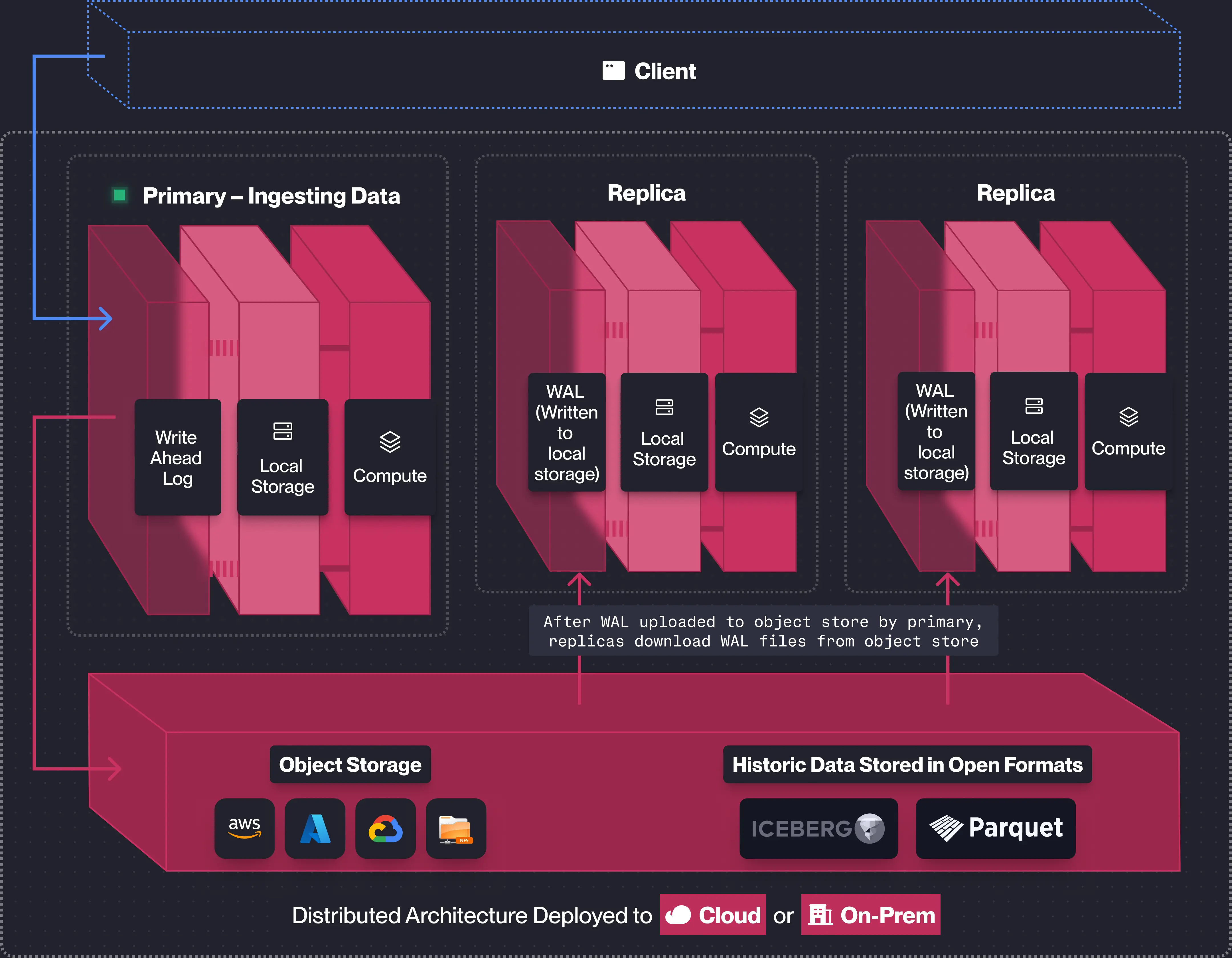
No HA in the open-source core, which runs single-node and scales vertically. QuestDB Enterprise adds primary-replica replication with no coordination service to run: the primary writes its write-ahead log to an object store, which can be a local or NFS filesystem or cloud object storage (S3, Azure Blob, GCS), and replicas replay it, with no direct node-to-node connections. Run replicas hot alongside the primary and failover is automatic, a replica taking over when the primary fails without interrupting connected clients, but that is a commercial feature.
ClickHouse
Can do HA in open source, at the cost of running it yourself: a
separate three-node ClickHouse Keeper (or ZooKeeper) quorum, per-node XML
describing the shard and replica topology, and ReplicatedMergeTree tables. The
tutorials are good, so call it moderate rather than hard, but there is no turnkey
control plane outside ClickHouse Cloud. One default worth knowing: ClickHouse's
insert path favors throughput over per-insert durability, with fsync off by
default, so a hard crash can lose recently inserted parts unless you enable
durability settings. QuestDB's write-ahead log, described above, makes every
committed write durable by default, which is why it tends to win where the data
is the mission-critical kind this guide opened with: market ticks or energy
meter readings you cannot afford to lose.
TimescaleDB
Inherits PostgreSQL's story: streaming replication is built in, but automatic failover is not, so a self-managed HA setup means adding Patroni and an external etcd or Consul. Native multi-node sharding was deprecated in 2.13 and removed in 2.14, so horizontal scale-out is gone; scaling is now vertical plus read replicas. Turnkey HA exists only on Tiger Cloud.
InfluxDB
Puts HA behind an edition step: Core is single-node, Enterprise adds self-managed HA and replicas, Cloud Dedicated is a managed cluster, and Clustered is a self-managed Kubernetes deployment you operate. On AWS, Amazon Timestream for InfluxDB is a fully managed option with Multi-AZ failover, the least-effort path if you are already there.
DolphinDB
Genuine HA (a Raft group of controllers for metadata plus partition replicas and client-side failover), but a real HA cluster exceeds the free Community edition's caps of two nodes and two cores, so in practice it needs an Enterprise license.
kdb+
No built-in HA at all, and in a live tick deployment even durability is
something you engineer. Intraday data is held in memory in the real-time database
(RDB) while history lives on disk in the HDB; if the RDB dies you recover by
replaying the tickerplant's on-disk log, which, along with the gateways and the
failover logic, is part of the tick architecture you build and run in q. KX's
own guidance treats high availability as an engineering project, which is the
tradeoff for its raw speed.
Open formats and the data lakehouse: how open is your data?
How openly a database stores its data decides how well it plays with everything else you run. If the files are in a format the rest of the ecosystem reads, a lakehouse, Spark or DuckDB can work on the same data the database is serving, with no export pipeline. It also settles the vendor lock-in question early: data that is already in an open format, in your own account, never needs migrating.
QuestDB stores older partitions as standard Apache Parquet files that sit on your own disks or in your own cloud account, not locked inside a provider's managed service, with Apache Iceberg integration in Enterprise for lakehouse catalogs. Because the data is already Parquet and already yours, there is nothing to export: any engine that reads Parquet, a lakehouse, Spark or DuckDB, can be pointed straight at the existing files, so the database sits inside an open data lakehouse instead of feeding one through exports. The open-source build converts partitions to Parquet on demand; QuestDB Enterprise does the tiering automatically, and both the per-column encoding and the lifecycle are declarative in the table definition.
CREATE TABLE 'market_data' (timestamp TIMESTAMP PARQUET(delta_binary_packed, zstd(4)),symbol SYMBOL PARQUET(rle_dictionary, zstd(4), bloom_filter),bids DOUBLE[][] PARQUET(default, zstd(4)),asks DOUBLE[][] PARQUET(default, zstd(4)),best_bid DOUBLE PARQUET(default, zstd(4)),best_ask DOUBLE PARQUET(default, zstd(4))) timestamp(timestamp) PARTITION BY HOURSTORAGE POLICY(TO PARQUET 2 DAYS, TO REMOTE 1 HOUR, DROP LOCAL 3 MONTHS);
The remaining migration surface is the SQL itself, and SQL to SQL is the easy case: swapping one engine's time-series extensions for another's equivalents rather than re-platforming your data.
InfluxDB 3 is built on Apache Arrow and Parquet, similarly open at the storage layer. ClickHouse keeps its native tables in the MergeTree format; it reads Parquet well and exports query results to it, so it joins a lakehouse through an export step rather than through files that are already open in place. kdb+ and DolphinDB keep their native data in proprietary columnar formats, part of why they are fast, and both can write Parquet on the way out (DolphinDB through a Parquet plugin, kdb+ through KX's Arrow/Parquet interface); at large volumes that full copy is a real cost in time, compute and storage.
An open format helps most when you can reach the files, and that comes down to how you deploy, not which engine you pick. Self-host any of these, or use a bring-your-own-cloud option like QuestDB's where everything runs on your own infrastructure, and the Parquet is right there for the rest of your platform to read directly. On a fully managed cloud or service, even open-format data lives in the provider's account, so plan the export path before you need it.
Developer experience: consoles, AI agents and client libraries
Past the engine, someone has to query the data, wire it into applications, and increasingly point an AI agent at it.
Consoles and dashboards
QuestDB's web console has a SQL editor, schema
explorer, live metrics, CSV import and, recently, native dashboards: notebook-style
cells with charts and variables, all in the open-source build. They are built and
stored in your browser rather than on the server, so you share them by exporting
and importing, and on the demo instance you can build
one yourself, though none is loaded by default.
InfluxDB 3 ships a separate, free-but-proprietary Explorer app with dashboards;
KX Dashboards is a KX product now bundled with KDB-X; TDengine bundles the taosExplorer web UI;
DolphinDB has a desktop GUI, a VS Code extension and web dashboards. TimescaleDB
has no self-managed UI (its editor is cloud-only), and ClickHouse's built-in
/play is a minimal query page. Grafana connects to all of them.
AI and agents
Every vendor has moved on this in the past year, so it no longer separates them much. Most of these engines ship an official MCP server, so you can point Claude Code, Codex or Cursor at QuestDB, ClickHouse, InfluxDB 3, TimescaleDB/Tiger, kdb+/KX or TDengine; DolphinDB's official MCP is narrower, scoped to stock research, with a general one available from the community. In-product natural-language assistants are common too, in varying flavors. QuestDB's writes SQL in its open-source web console with your own OpenAI or Anthropic key, and its MCP can drive that same console to build those dashboards. Here is one, with the natural-language prompt that produced it:
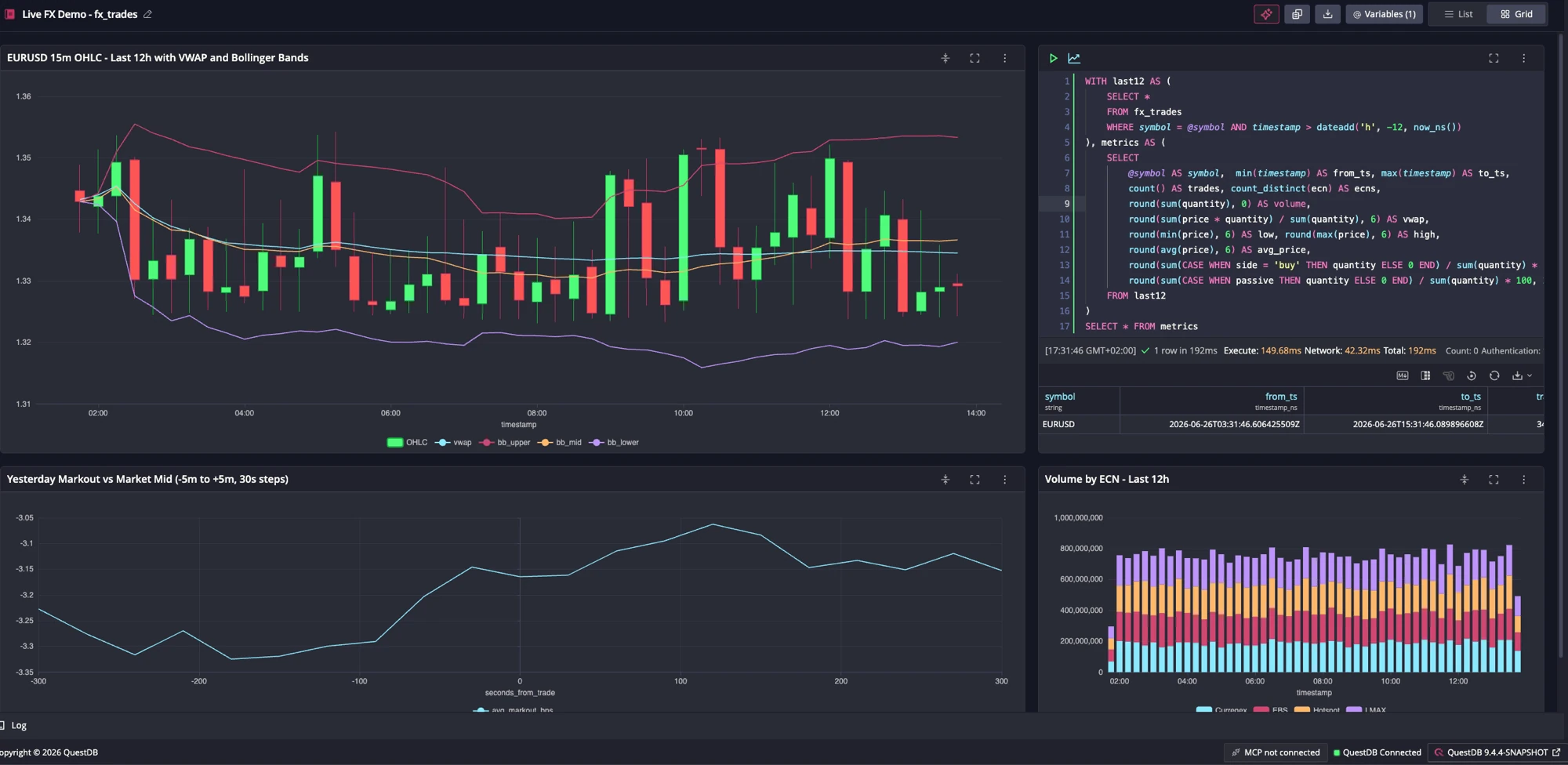
Create a clean QuestDB notebook dashboard for a live FX demo using
fx_trades: a rolling 12-hour chart of 15-minute OHLC candles with VWAP and Bollinger Bands, a markout chart comparing yesterday's trades against market mid from 5 minutes before to 5 minutes after each trade at 30-second steps, volume by ECN, and a compact summary table. Use a notebook variable for the symbol, validate the SQL, enable chart auto-refresh, and make the layout polished for a live demo.
InfluxDB's lives in its Explorer app, ClickHouse's in its Cloud console and, since 25.7, its open-source client, and Timescale's is PopSQL. KX Dashboards' chat agent builds dashboards from plain language. The feature is now widespread; what differs is the packaging, from a free open-source console to companion apps and Cloud-only tools.
Client libraries and interfaces
Coverage is broad across the board; every engine ships native clients for the mainstream languages, Python, Java, Go, C/C++, .NET, Node.js and more, and every one can be driven over HTTP as well, most through a built-in REST query endpoint, kdb+ and TimescaleDB through a module or add-on. The more useful distinction is PostgreSQL wire compatibility, which lets any Postgres client, driver or BI tool connect with no dedicated library. TimescaleDB has it fully, since it is Postgres, while QuestDB, ClickHouse and KDB-X (the newer KX engine) expose a PostgreSQL-compatible query endpoint, though KDB-X's handles only basic ANSI SQL (SELECT, WHERE, LIMIT, ORDER BY), not its richer query features. Classic kdb+, InfluxDB, TDengine and DolphinDB use their own native protocols instead.
The best time-series database by use case
Put the questions above together and a shortlist usually falls out. Here it is, by domain.
Low-latency applications: capital markets, trading infrastructure and crypto
QuestDB for ASOF/WINDOW/HORIZON tick analytics
on an open SQL stack with no proprietary language to hire for; it was built on
trading floors and is heavily used across capital markets.
Because it runs on your own infrastructure, on-prem or in your own cloud
account and never on a vendor's, it also fits a tightly regulated industry
where data has to stay under your control and be kept for decades.
kdb+ is a good bet in one specific situation: the firm already has a full set
of applications built in q, a language powerful enough to build entire
trading systems rather than just queries, and no intention of moving away from
the q ecosystem, vendor lock-in, on-site consultants and all. (KX's newer
KDB-X engine, which adds SQL and Python on top of q, is covered in the
query-language section above.) DolphinDB where its mix of ANSI-compatible SQL
and a powerful proprietary scripting language is the preferred model. See
QuestDB vs kdb+.
Industrial IoT and the edge
Split this one by throughput. At the high end, where the data is heavy and the infrastructure critical, energy, aerospace, robotics, QuestDB shines: high ingest rates, SQL, open Parquet and a permissive license on the same data. For lighter collection work, InfluxDB is a fine choice with deep roots here: Telegraf, its collection agent, ships hundreds of input plugins for sensors, buses and systems, the line protocol is trivial for constrained devices to emit, and InfluxDB 3 Core runs happily at the edge on a single node. TDengine is purpose-built for device fleets, with clustering in its open-source core and an all-in-one edge-to-cloud stack.
Time-series without leaving PostgreSQL
TimescaleDB, so relational and time-series data share one database and the whole Postgres ecosystem.
Observability, logs and huge event datasets
ClickHouse, when the job is really columnar aggregation and writes arrive in batches. For observability and log monitoring in particular, it is becoming the market leader.
Staying in the InfluxDB ecosystem
InfluxDB 3 spans editions from free Core to managed Cloud Dedicated, plus Amazon Timestream for InfluxDB on AWS with Multi-AZ failover. If your team already runs Telegraf and the line protocol, it is the lowest-friction path. Keep in mind the protocol does not lock you in: QuestDB ingests the same line protocol over TCP and HTTP, so Telegraf and existing collectors keep working if you switch. Our InfluxDB 3 Core benchmarks and InfluxDB alternatives cover the tradeoffs and the migration.
The bottom line
Pick by the question that matters most for your workload, not by an overall ranking. If you never leave Postgres, TimescaleDB. If the job is observability, logs or batch analytics, ClickHouse, which has become the widely adopted choice for that work.
QuestDB is built for the hard cases: strict latency, huge ingestion, data you cannot afford to lose. The benchmarks are all reproducible, so run them and see for yourself.
Frequently asked questions
What is the best time-series database in 2026?
There is no single winner for every workload. For low-latency applications and the most demanding high-throughput workloads, QuestDB is our top pick: it posted the fastest out-of-the-box ingestion in our TSBS benchmarks, extends SQL with real time semantics including a full family of temporal joins, and stores data in open formats like Apache Parquet. The best choice for you depends on what you are working with: staying inside PostgreSQL points to TimescaleDB, observability, logs and batch analytics to ClickHouse, edge IoT to TDengine or InfluxDB, and q-based trading stacks to kdb+.
When should I use a time-series database instead of PostgreSQL?
If most of your queries have no time filter, ingestion is modest and old data is not piling up into a storage problem, stay with PostgreSQL; it is the simpler choice. A time-series database starts to pay off when most queries filter or aggregate by time, when ingestion is sustained and high-volume, or when retention and storage cost become real work. TimescaleDB is the middle path, since it adds time-series features inside PostgreSQL itself.
What is the best open-source time-series database?
QuestDB (Apache 2.0) is built for high-volume ingestion with time-series SQL, and its data tiers to open Parquet. The free builds differ more than the licenses do: ClickHouse (Apache 2.0) and TDengine (AGPL-3.0) include clustering and high availability in open source, while InfluxDB 3 Core (MIT/Apache) runs single-node with a roughly 72-hour default query window, and TimescaleDB's newest features sit under the source-available TSL rather than its Apache core.
Which time-series databases support ASOF and temporal joins?
QuestDB supports ASOF JOIN (plus LT and SPLICE variants), WINDOW JOIN
and HORIZON JOIN as first-class SQL keywords, and is the only engine that
offers HORIZON JOIN. ClickHouse and TDengine expose ASOF JOIN in SQL
(TDengine also has a window join). kdb+ offers as-of and window joins in its
q language, and KDB-X's SQL adds the as-of join, while DolphinDB offers
both as functions within its SQL.
TimescaleDB has no native ASOF keyword (it is emulated with LATERAL), and
InfluxDB 3 has none.
What is the best time-series database for capital markets?
QuestDB is built for market-data and trading workloads on a modern SQL stack,
with ASOF/WINDOW/HORIZON joins, nanosecond timestamps and high ingestion,
and is used across capital markets. kdb+ remains the entrenched choice for
high-frequency trading where microsecond latency is decisive and the q
expertise and budget exist, and DolphinDB pairs ANSI-compatible SQL with a
proprietary scripting language and is used in the same space.
What is the best kdb+ alternative?
QuestDB is the most direct open-source alternative: the same tick-data
workloads written in standard SQL rather than q, with ASOF, WINDOW and
HORIZON joins, nanosecond timestamps and open Parquet storage. DolphinDB
is a proprietary alternative in the same space. See our
QuestDB vs kdb+ comparison for the detail.
What is the best time-series database for industrial IoT and sensor data?
InfluxDB has deep roots in IoT and sensor monitoring, through Telegraf's large plugin ecosystem and a line protocol that constrained devices emit easily. TDengine offers an all-in-one edge-to-cloud stack with clustering in its open-source core. When the job goes beyond monitoring to running critical infrastructure such as aerospace or energy, QuestDB is a well-established player, with high-ingest SQL, open Parquet storage and a permissive license. All three handle sensor ingestion well; once you are pushing millions of rows per second, or tracking millions of unique series, QuestDB copes best.
What is the best InfluxDB alternative?
For high-volume workloads, QuestDB: it ingests 12x to 36x faster than InfluxDB 3 Core in our TSBS benchmarks, adds the temporal joins InfluxDB lacks, and accepts the InfluxDB Line Protocol, so Telegraf and existing collectors keep working. TimescaleDB fits if you would rather stay inside PostgreSQL. And since InfluxDB 3 is a ground-up rewrite, moving off 1.x or 2.x is a migration whichever way you go; our InfluxDB alternatives guide covers the options.
Which time-series database works best with Grafana?
All of them connect to Grafana. QuestDB has an official Grafana plugin and also works through the standard PostgreSQL data source, as does TimescaleDB. InfluxDB and Prometheus have first-party data sources, and ClickHouse and TDengine ship official plugins. For infrastructure metrics, Prometheus and Grafana remain the default pairing; for dashboards over business data, any engine here works, so pick the database on its merits.
Is ClickHouse a time-series database?
Not strictly. ClickHouse is a column-oriented OLAP database widely used for
time-series-shaped data such as metrics, logs and events. It supports ASOF JOIN
and gap-filling, but it is optimized for batched analytical scans rather than
single-row streaming ingestion, and its dedicated TimeSeries table engine is
still experimental.
Try QuestDB
QuestDB is open source and Apache 2.0 licensed. You can get started for free with the open-source build, or explore QuestDB's SQL on the live demo, a read-only console preloaded with real time-series datasets. The source and issue tracker are fully open, the cookbook has examples you can run, the customer stories show how teams run QuestDB in production, and the agents page covers how it works with AI tooling. If you need replication, role-based access control or tiered storage, see QuestDB Enterprise, where you can also book a call.