Benchmark and comparison: QuestDB vs. InfluxDB v1/v2


This article compares QuestDB and InfluxDB on performance, architecture, and ease of use. Last updated December 2, 2025 with benchmarks for InfluxDB v1.11, v2.7.12, and QuestDB 9.2.2.
For InfluxDB 3 Core benchmarks, see our latest post.
Key results: QuestDB ingests data up to 36x faster than InfluxDB (11.36M rows/sec vs 203K rows/sec at 1M hosts), and runs analytical queries 23x to 130x faster, with heavy aggregations 17x faster. InfluxDB is marginally faster (~2x) on two specific simple aggregation queries.
Introduction to InfluxDB and QuestDB
QuestDB (released 2019) is an open-source time-series database licensed under Apache License 2.0. Written in low-latency (Zero-GC) Java and C++, it is designed for low-latency, high-throughput ingestion and fast analytical queries using standard SQL. QuestDB uses a columnar storage model where all time series live in a single table structure, avoiding per-series overhead.
InfluxDB (released 2013) is a time-series database developed by InfluxData. The open-source versions (v1 under MIT, v2 OSS under proprietary license) are written in Go. InfluxDB uses a measurement-based data model where each unique combination of tags creates a separate series with its own storage structure.
| Aspect | QuestDB | InfluxDB |
|---|---|---|
| License | Apache 2.0 | v1: MIT, v2 OSS: Proprietary |
| Implementation | Java, C++ | Go |
| Query language | Standard SQL | InfluxQL, Flux |
| Data model | Relational (tables + rows) | Measurement-based (series) |
| Ingestion protocols | ILP, PostgreSQL wire, HTTP | ILP, HTTP API |
| High cardinality | No performance impact | Performance degrades |
Performance benchmarks
We use the open-source, industry-standard Time Series Benchmark Suite (TSBS) for all benchmarks, which supports InfluxDB (v1 and v2) and QuestDB out of the box.
Hardware: AWS EC2 r8a.8xlarge (32 vCPU, 256 GB RAM, AMD EPYC), GP3 EBS storage (20,000 IOPS, 1 GB/s throughput)
Software: Ubuntu 22.04, InfluxDB v1.11, InfluxDB v2.7.12, QuestDB 9.2.2 — all with default configurations
Ingestion benchmark
We test a cpu-only scenario with two days of CPU data for various numbers of simulated hosts (100, 1K, 4K, 100K, and 1M). This tests how each database handles increasing data volumes and cardinality.
In time-series databases, high cardinality refers to having many unique values in indexed columns—for example, millions of unique symbols, account IDs, or trading venues. More hosts in this benchmark means higher cardinality.
Example commands:
$ ./tsbs_generate_data --use-case="cpu-only" --seed=123 --scale=4000 \--timestamp-start="2016-01-01T00:00:00Z" \--timestamp-end="2016-01-03T00:00:00Z" \--log-interval="10s" --format="influx" > /tmp/influx_data$ ./tsbs_load_influx --db-name=benchmark --file=/tmp/influx_data \--urls=http://localhost:8086 --workers=32
The results for ingestion with 32 workers:
↑ Higher is better
| Scale | InfluxDB v1.11 | InfluxDB v2 | QuestDB | QuestDB vs v1 | QuestDB vs v2 |
|---|---|---|---|---|---|
| 100 hosts (1.7M rows) | 1.23M rows/sec | 727K rows/sec | 4.02M rows/sec | 3.3x faster | 5.5x faster |
| 1,000 hosts (17M rows) | 1.17M rows/sec | 667K rows/sec | 7.48M rows/sec | 6.4x faster | 11.2x faster |
| 4,000 hosts (69M rows) | 787K rows/sec | 514K rows/sec | 8.39M rows/sec | 10.7x faster | 16.3x faster |
| 100,000 hosts (86M rows) | 491K rows/sec | 402K rows/sec | 11.36M rows/sec | 23x faster | 28x faster |
| 1,000,000 hosts (432M rows) | ~203K rows/sec | 241K rows/sec | 7.33M rows/sec | 36x faster | 30x faster |
Key observations:
- QuestDB is 3.3x to 36x faster than InfluxDB, with the gap widening at scale
- QuestDB peaks at 11.36M rows/sec at 100K hosts, maintaining high throughput even at 1M hosts
- InfluxDB throughput degrades significantly as cardinality increases (both v1 and v2)
Why does cardinality affect InfluxDB?
The performance gap widens with scale because of how each database handles cardinality. InfluxDB creates a separate TSM (Time-Structured Merge) tree for each unique series. At 100,000 hosts with 10 metrics each, that's 1,000,000 separate storage structures to maintain, index, and compact—explaining the throughput degradation.
QuestDB stores all data in a single columnar table regardless of cardinality. Adding more hosts simply adds more rows to the same structure. Throughput starts at ~8M rows/sec for 1K-4K hosts, then peaks at 11.36M rows/sec at 100K hosts as parallelism is fully utilized, before settling at 7.3M rows/sec at 1M hosts due to memory pressure at extreme scale—still maintaining strong performance throughout.
Query performance
While QuestDB outperforms InfluxDB for ingestion, query performance is equally essential for time-series data analysis.
As part of the standard TSBS benchmark, we test several types of popular time series queries:
- single-groupby: Aggregate CPU metrics for random hosts over specified time ranges
- double-groupby: Aggregate across ALL hosts, grouped by host and time intervals
- high-cpu-all: Full table scan finding hosts with CPU utilization above threshold
All queries target two days of 4000 emulated host data.
To run the benchmark:
$ ./tsbs_generate_queries --use-case="devops" --seed=123 --scale=4000 \--timestamp-start="2016-01-01T00:00:00Z" \--timestamp-end="2016-01-03T00:00:00Z" \--queries=1000 --query-type="single-groupby-1-1-1" \--format="influx" > /tmp/influx_query$ ./tsbs_run_queries_influx --file=/tmp/influx_query \--db-name=benchmark --workers=1
Single-groupby queries
↓ Lower is better
Query format: metrics-hosts-hours · averaged over 10 runs
| Query | InfluxDB v1.11 | InfluxDB v2.7.12 | QuestDB | Best |
|---|---|---|---|---|
| single-groupby-1-1-1 | 0.42 ms | 0.73 ms | 1.06 ms | InfluxDB v1 |
| single-groupby-1-1-12 | 2.30 ms | 3.37 ms | 1.68 ms | QuestDB |
| single-groupby-1-8-1 | 1.00 ms | 1.63 ms | 1.39 ms | InfluxDB v1 |
| single-groupby-5-1-1 | 1.09 ms | 1.68 ms | 0.99 ms | QuestDB |
| single-groupby-5-1-12 | 8.40 ms | 12.24 ms | 1.98 ms | QuestDB |
| single-groupby-5-8-1 | 3.23 ms | 4.34 ms | 1.54 ms | QuestDB |
Double-groupby queries
↓ Lower is better
Aggregates across ALL hosts, grouped by host and 1-hour intervals · averaged over 100 runs
These queries aggregate across ALL hosts, grouped by host and 1-hour intervals.
| Query | InfluxDB v1.11 | InfluxDB v2.7.12 | QuestDB | QuestDB vs v1 | QuestDB vs v2 |
|---|---|---|---|---|---|
| double-groupby-1 | 853 ms | 935 ms | 40 ms | 21x faster | 23x faster |
| double-groupby-5 | 3,595 ms | 3,875 ms | 46 ms | 78x faster | 84x faster |
| double-groupby-all | 6,967 ms | 7,516 ms | 58 ms | 120x faster | 130x faster |
Heavy queries
high-cpu-all query latency · ↓ Lower is better
Full table scan finding hosts with CPU utilization above threshold · averaged over 10 runs
Full table scan finding hosts with CPU utilization above threshold.
| Query | InfluxDB v1.11 | InfluxDB v2.7.12 | QuestDB | QuestDB vs v1 | QuestDB vs v2 |
|---|---|---|---|---|---|
| high-cpu-all | 16,045 ms | 16,655 ms | 994 ms | 16x faster | 17x faster |
Explaining query performance
Key finding: QuestDB outperforms both InfluxDB versions on analytical queries, delivering 21x to 130x faster results on aggregations across time and hosts. InfluxDB v1 shows a marginal edge on two simple aggregation queries, but QuestDB dominates on complex workloads where real analytical value lies.
Let's examine specific query patterns:
Double group by queries
Aggregate across both time and host.
QuestDB is 21x to 130x faster than InfluxDB v1, and 23x to 130x faster than InfluxDB v2. This is where QuestDB truly shines. The engine scans all rows within the interval and aggregates them using multiple threads, parallel execution, and SIMD instructions.
Single group by queries
Simple aggregation on metrics for specific hosts over time ranges.
For simple aggregation queries on a single host (1-1-1), InfluxDB v1 is ~2.5x faster. However, as query complexity increases (more metrics, longer time ranges), QuestDB takes the lead:
- 5-1-12 (5 metrics, 12 hours): QuestDB is 4.2x faster than InfluxDB v1, 6.2x faster than InfluxDB v2
- 5-8-1 (5 metrics, 8 hosts): QuestDB is 2.1x faster than InfluxDB v1, 2.8x faster than InfluxDB v2
Heavy analytical queries (high-cpu-all)
Full table scan finding hosts above CPU threshold.
QuestDB is 16x to 17x faster than both InfluxDB versions. This query type demonstrates QuestDB's strength in analytical workloads that scan large amounts of data.
Why these differences?
QuestDB keeps all time series in a single dense table with columnar storage. For queries accessing a single time series, it must filter rows on access. InfluxDB stores each time series separately, giving it an advantage for single-series lookups.
However, for analytical queries spanning multiple series, QuestDB's columnar layout combined with SIMD instructions and multi-threaded processing provides dramatically better performance.
What are the data models used in InfluxDB and QuestDB?
The data model is fundamental to understanding why these databases perform differently. InfluxDB uses a measurement-based model optimized for tagged time series, while QuestDB uses a relational model that stores all data in tables.
InfluxDB: Measurement-based model
InfluxDB organizes data around measurements, tags, and fields:
measurementName,tagKey=tagValue fieldKey="fieldValue" 1465839830100399000--------------- --------------- --------------------- -------------------| | | |Measurement Tags Fields Timestamp
- Measurement: Similar to a table name, groups related data points
- Tags: Indexed key-value pairs (strings only) used for filtering and grouping
- Fields: Non-indexed values containing the actual metrics (floats, integers, strings, booleans)
- Timestamp: Nanosecond-precision time
A series in InfluxDB is defined as a unique combination of measurement + tagset. For example:
trades,symbol=AAPL,exchange=NYSE price=185.50,size=100 1705311000123456000trades,symbol=MSFT,exchange=NASDAQ price=390.25,size=250 1705311000123789000
These two lines create two separate series because their tagsets differ. Each unique series gets its own TSM storage structure. This is why high-cardinality workloads (many unique tag combinations) degrade InfluxDB performance—thousands of unique symbol values means thousands of separate series to maintain.
QuestDB: Relational model
QuestDB uses a standard relational model where data lives in tables with typed columns:
CREATE TABLE trades (timestamp TIMESTAMP,symbol SYMBOL, -- Dictionary string (similar to InfluxDB tags)exchange SYMBOL,side SYMBOL,price DOUBLE,size DOUBLE) TIMESTAMP(timestamp) PARTITION BY DAY;
Market data in QuestDB is simply rows in a table:
| timestamp | symbol | exchange | side | price | size |
|---|---|---|---|---|---|
| 2024-01-15T09:30:00.123456Z | AAPL | NYSE | buy | 185.50 | 100 |
| 2024-01-15T09:30:00.123789Z | MSFT | NASDAQ | sell | 390.25 | 250 |
Adding new symbols or exchanges doesn't create new storage structures—it just adds more rows. This is why QuestDB handles high cardinality without performance degradation.
Data type support:
| Category | QuestDB Types |
|---|---|
| Integer | BYTE, SHORT, INT, LONG, LONG128, LONG256 |
| Floating point | FLOAT, DOUBLE, DECIMAL |
| String | STRING, VARCHAR, CHAR, SYMBOL (indexed) |
| Temporal | TIMESTAMP (nanosecond precision), DATE, INTERVAL |
| Geospatial | GEOHASH |
| Collections | ARRAY |
| Other | BOOLEAN, UUID, IPv4, BINARY |
QuestDB supports InfluxDB line protocol for compatibility, automatically mapping tags to SYMBOL columns and fields to appropriate types. QuestDB also extends the protocol with binary support for advanced types like arrays. For full control over schema and types, use the PostgreSQL wire protocol or REST API.
Key model differences
| Aspect | QuestDB | InfluxDB |
|---|---|---|
| Data organization | Tables + rows | Measurements + series |
| Tag handling | SYMBOL columns (indexed strings) | Creates separate series per tagset |
| High cardinality | No impact (just more rows) | Performance degrades (more series = overhead) |
| Query language | Standard SQL | InfluxQL / Flux |
| JOINs | Full SQL JOIN support | Not supported |
| Schema | Schema-on-write or predefined | Schema-on-write |
Comparing database storage models
InfluxDB: TSM Trees
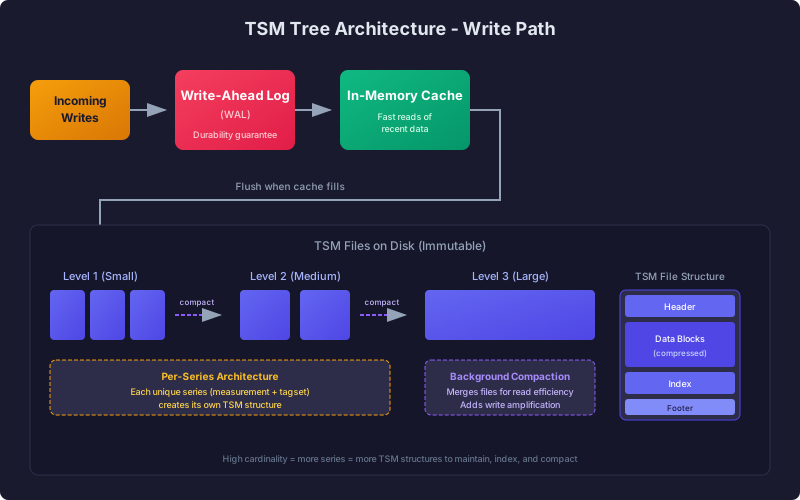
For storage, InfluxDB uses Time-Structured Merge (TSM) Trees, an LSM-tree variant optimized for time-series data. Writes first go to a write-ahead log (WAL) for durability, then into an in-memory cache that serves fast reads of recent data. When the cache fills, data is flushed to immutable TSM files on disk. Background compaction continuously merges smaller TSM files into larger ones to improve read efficiency, though this adds write amplification overhead.
Critically, each unique series (measurement + tagset combination) creates its own TSM structure. This per-series architecture explains why high-cardinality workloads degrade InfluxDB's performance—more unique series means more TSM structures to maintain, index, and compact.
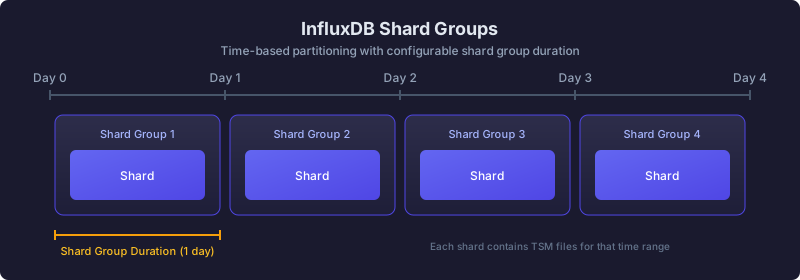
InfluxDB has a shard group concept as a partitioning strategy, allowing for grouping data by time. Users can provide a shard group duration which defines how large a shard will be and can enable common operations such as retention periods for data (deleting data older than X days, for example):
QuestDB: Three-tier columnar storage
QuestDB implements a three-tier storage architecture optimized for both high-throughput ingestion and fast analytical queries:
Tier 1 - Write-Ahead Log (WAL): Incoming writes first land in a write-ahead log, providing durability guarantees. The WAL handles out-of-order data by buffering and sorting before committing to the main storage layer. This design allows QuestDB to sustain millions of rows per second while maintaining data integrity.
Tier 2 - Columnar partitions: Data is organized into time-partitioned columnar files optimized for query performance. Each partition is a directory containing separate files per column, enabling efficient compression and allowing queries to read only the columns they need. This columnar layout combined with time partitioning enables parallel scans with SIMD instructions across multiple CPU cores.
Tier 3 - Cold storage (Parquet): Older partitions can be converted to Parquet format and moved to object storage (S3, Azure Blob, GCS) or local cold storage. This tiered approach keeps frequently queried data on fast local storage while reducing costs for historical data. Queries transparently span all tiers.
Tier One: Hot ingest (WAL), durable by default
Incoming data is appended to the write-ahead log (WAL) with ultra-low latency. Writes are made durable before any processing, preserving order and surviving failures without data loss. The WAL is asynchronously shipped to object storage, so new replicas can bootstrap quickly and read the same history.
Tier Two: Real-time SQL on live data
Data is time-ordered and de-duplicated into QuestDB's native, time-partitioned columnar format and becomes immediately queryable. Power real-time analysis with vectorized, multi-core execution, streaming materialized views, and time-series SQL (e.g., ASOF JOIN, SAMPLE BY). The query planner spans tiers seamlessly.
Tier Three: Cold storage, open and queryable
Older data is automatically tiered to object storage in Apache Parquet. Query it in-place through QuestDB or use any tool that reads Parquet. This delivers predictable costs, interoperability with AI/ML tooling, and zero lock-in.
Unlike InfluxDB's per-series TSM architecture, QuestDB stores all time series in a single table structure. This means adding new series (high cardinality) doesn't create additional storage overhead—the same columnar files simply contain more rows. This architectural difference explains why QuestDB maintains consistent performance as cardinality scales.
Query languages: SQL vs Flux
InfluxDB has gone through multiple query languages: InfluxQL (SQL-like), then Flux (functional), and now SQL again in InfluxDB 3. This journey validates what QuestDB has maintained from the start—SQL is the right choice for time-series data.
Why SQL matters
- Universal skill: SQL is consistently among the top 3 languages in developer surveys. Most engineers already know it.
- Tooling ecosystem: SQL integrates with BI tools, notebooks, ORMs, and drivers without custom adapters.
- Transferable knowledge: Skills learned querying QuestDB apply to PostgreSQL, analytics platforms, and data warehouses.
Flux vs SQL comparison
Flux uses a functional pipeline syntax that requires learning new concepts:
from(bucket: "metrics")|> range(start: -1h)|> filter(fn: (r) => r._measurement == "cpu" and r.host == "server1")|> aggregateWindow(every: 1m, fn: mean)
The equivalent in QuestDB SQL:
SELECT timestamp, avg(usage)FROM cpuWHERE host = 'server1' AND timestamp > dateadd('h', -1, now())SAMPLE BY 1m;
QuestDB's time-series SQL extensions
QuestDB extends standard SQL with purpose-built functions for time-series analysis:
| Extension | Purpose | Example |
|---|---|---|
SAMPLE BY | Time-based aggregation | SELECT avg(price) FROM trades SAMPLE BY 1h |
LATEST ON | Last value per group | SELECT * FROM trades LATEST ON timestamp PARTITION BY symbol |
ASOF JOIN | Time-aligned joins | Join trades with quotes at exact timestamps |
WHERE IN (ts, ts) | Time range filtering | Optimized partition pruning |
These extensions maintain SQL compatibility while providing the expressiveness needed for time-series workloads.
Ecosystem and integrations
Both databases offer solid integration options, though with different strengths:
| Integration | QuestDB | InfluxDB |
|---|---|---|
| Grafana | Native data source | Native data source |
| Telegraf | Via ILP | Native |
| PostgreSQL tools | Full compatibility (psql, any PG driver) | Not supported |
| Client libraries | Python, Java, Go, Node.js, Rust, C/C++, .NET | Python, Java, Go, Node.js, and more |
| Kafka | Official Kafka connector | Native Kafka consumer |
| Pandas/Polars | Native integration | Via client library |
QuestDB's advantage: PostgreSQL wire protocol compatibility means PostgreSQL client libraries work with QuestDB—including psql, SQLAlchemy, and any PostgreSQL driver.
InfluxDB's advantage: As the older and more widely deployed database, InfluxDB has broader native integrations with monitoring tools and a larger collection of community Telegraf plugins.
Conclusion
Performance summary
| Workload | QuestDB | InfluxDB v2 | Advantage |
|---|---|---|---|
| Ingestion (1M hosts) | 7.33M rows/sec | 241K rows/sec | 30x faster |
| Ingestion (100K hosts) | 11.36M rows/sec | 402K rows/sec | 28x faster |
| Double-groupby | 40-58ms | 935ms-7.5s | 23-130x faster |
| Heavy aggregations | 994ms | 16.6s | 17x faster |
Key takeaways:
- QuestDB ingests data 3x to 36x faster than InfluxDB, with the advantage growing at scale
- QuestDB dominates analytical queries: 21x to 130x faster on double-groupby, 16x faster on heavy scans
- InfluxDB v1 has a slight edge on two simple aggregation queries
When to choose QuestDB
Market data and trading infrastructure:
- Tick data capture and analytics at millions of events per second
- Order book reconstruction and market depth analysis
- Post-trade analytics and markouts (ASOF, CROSS, Window JOIN)
- Materialized OHLCV candlestick charts automatically maintained
Quantitative finance:
- Backtesting strategies across historical tick data
- Real-time P&L and risk calculations
- Correlate market data and trades with ASOF JOIN
High cardinality and heavy ingestion workloads:
- Industrial IoT with millions of unique sensors and devices
- Physical AI and robotics telemetry at scale
- Fleet management and vehicle tracking with high device counts
- Energy grid monitoring with dense sensor networks
SQL-first teams:
- Standard SQL with time-series extensions (SAMPLE BY, LATEST ON)
- PostgreSQL compatibility for existing quant tools and workflows
- Integration with Python, pandas, and Jupyter notebooks
When to consider InfluxDB
- Simple monitoring dashboards with low cardinality
- Single-series lookups where sub-millisecond latency is critical
- Existing Telegraf-based collection pipelines
- Teams already invested in the InfluxDB/Flux ecosystem
Ready to try QuestDB? Get started with the quickstart guide or join our Slack community to ask questions.