From 3 Seconds to 38 Milliseconds: Why SAMPLE BY Order Matters


I was recently working on new cookbook recipes for computing
realized volatility,
one of the key inputs for options strategies like
gamma scalping.
Realized volatility measures how much a market is actually moving, and gamma scalpers need it to
decide whether the market is moving enough to justify the cost of constantly
rebalancing their positions. The queries combined SAMPLE BY with window
functions, which is a common pattern in time-series analytics: aggregate raw data
into regular intervals, then compute rolling statistics over the result.
My first version of the query worked. It returned correct results. It also took 3 seconds on a dataset I was expecting QuestDB to handle in milliseconds.
After restructuring the query without changing the logic, it ran in 38 milliseconds. An 80x improvement from reordering the same SQL operations.
This post walks through what went wrong, why it matters, and the simple rule that prevents it.
The setup
All queries run against QuestDB's public demo at
demo.questdb.io. The table we're working with is
market_data, which contains FX order book snapshots for 30 currency pairs.
It has best_bid and best_ask columns for top-of-book prices, plus full
depth arrays. The table receives about 160 million rows per day across all 30
pairs. Filtering for a single popular symbol like EURUSD brings that down to roughly
5.3 million rows per day, which is what the queries below operate on.
The goal: compute annualized realized volatility from one-minute log returns, rolled up over a one-hour window. This means:
- Get the closing mid-price for each one-minute interval
- Compute the log return between consecutive intervals
- Calculate the rolling standard deviation over 60 intervals (one hour)
- Annualize
Annualizing just means multiplying by a scaling constant (√(intervals_per_year))
so the result is expressed in yearly terms. This is a convention that makes the
number comparable to implied volatility quotes on options. It does not require a
year of data; even a single hour is enough.
This is a textbook SAMPLE BY plus window function workflow.
The slow query: window functions first
My first attempt computed log returns at tick level, then aggregated:
WITH returns AS (SELECTtimestamp,symbol,LN(mid_price / prev_mid) AS log_retFROM (SELECTtimestamp,symbol,(best_bid + best_ask) / 2 AS mid_price,LAG((best_bid + best_ask) / 2) OVER (ORDER BY timestamp) AS prev_midFROM market_dataWHERE timestamp IN '$yesterday'AND symbol = 'EURUSD')WHERE prev_mid IS NOT NULL),sampled AS (SELECTtimestamp,symbol,stddev_samp(log_ret) AS rv_1mFROM returnsSAMPLE BY 1m ALIGN TO CALENDAR)SELECTtimestamp,symbol,AVG(rv_1m) OVER (ORDER BY timestampROWS 59 PRECEDING) * SQRT(1440 * 252) AS realized_vol_1hFROM sampled;
The logic is: for every tick, get the previous tick's mid-price using a window
function, compute the log return, then aggregate those tick-level returns into
one-minute buckets using stddev_samp, then smooth with a rolling average.
It's correct. It's also doing the expensive work on the wrong number of rows.
Here's the query plan (simplified):
Async JIT Filter (symbol = 'EURUSD', interval scan)→ Window: LAG over ALL filtered rows (millions)→ Filter: prev_mid IS NOT NULL→ SAMPLE BY: collapse to ~ 1,440 rows→ Window: AVG over 1,440 rows
The LAG window function runs over every tick in the day. For EURUSD,
that's millions of rows. Only after that does SAMPLE BY reduce the dataset to
1,440 one-minute bars.
The fast query: SAMPLE BY first
The restructured version flips the order. Aggregate into one-minute bars first, then compute returns and rolling statistics on the small result:
WITH sampled AS (SELECTtimestamp,symbol,last((best_bid + best_ask) / 2) AS close_midFROM market_dataWHERE timestamp IN '$yesterday'AND symbol = 'EURUSD'SAMPLE BY 1m ALIGN TO CALENDAR),returns AS (SELECTtimestamp,symbol,LN(close_mid / LAG(close_mid)OVER (ORDER BY timestamp)) AS log_retFROM sampled)SELECTtimestamp,symbol,SQRT((AVG(log_ret * log_ret) OVER w -AVG(log_ret) OVER w * AVG(log_ret) OVER w) * 1440 * 252) AS realized_vol_1h_annFROM returnsWHERE log_ret IS NOT NULLWINDOW w AS (ORDER BY timestamp ROWS 59 PRECEDING);
Same result. The query plan tells a different story:
Async JIT Group By (SAMPLE BY + filter, 46 workers)→ Radix sort→ Window: LAG over ~ 1,440 rows→ Window: AVG over ~ 1,440 rows
The key difference is Async JIT Group By. QuestDB fuses the filter
(symbol = 'EURUSD'), the interval scan, and the SAMPLE BY aggregation into
a single parallel pass over the data. By the time anything reaches the window
functions, millions of rows have already been collapsed to ~1,440 one-minute
bars.
Why 80x
The window functions in both queries do essentially the same work. The difference is what they work on. The diagram below shows the data flow through each query plan side by side:
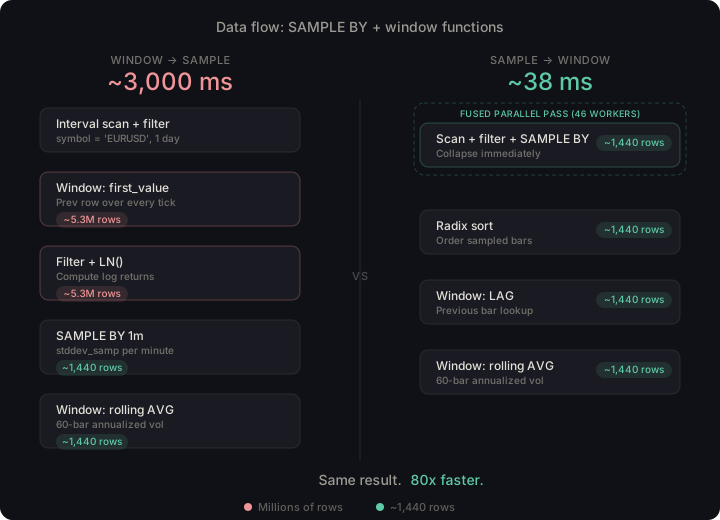
The fast query is also nearly constant regardless of how much raw data backs the interval. A full day and a single hour produce approximately the same number of one-minute bars per hour, so the window function cost barely changes. The slow query scales linearly with tick count.
This becomes even more apparent if you narrow the time range. Replacing
WHERE timestamp IN '$yesterday' with WHERE timestamp IN '$now - 1h..$now'
scans roughly one hour of data instead of a full day:
| Slow query | Fast query | |
|---|---|---|
| Rows entering window functions | Millions (raw ticks) | ~1,440 (sampled bars) |
| Full day | ~3,000 ms | ~38 ms |
| Last hour only | ~140 ms | ~3 ms |
The slow query improves proportionally with less data to scan. The fast query is near-instant in both cases because the window functions always run over the same number of sampled bars, not raw ticks. In a real-time dashboard refreshing every few seconds, 3 milliseconds vs 140 milliseconds is the difference between feeling instant and feeling sluggish.
The rule
When combining SAMPLE BY with window functions, always aggregate first.
Put SAMPLE BY in a CTE or subquery, then apply window functions to the result:
-- Pattern: SAMPLE BY first, window functions secondWITH sampled AS (SELECT timestamp, symbol, last(price) AS close_priceFROM my_tableWHERE timestamp IN '$yesterday' AND symbol = 'X'SAMPLE BY 1m ALIGN TO CALENDAR)SELECTtimestamp,some_window_function(...) OVER (...)FROM sampled;
This matters most with high-frequency data. If your source table has millions of rows per day, the difference between windowing before and after aggregation can be one or two orders of magnitude.
Two things worth noting
While the SAMPLE BY ordering was the performance lever, there are two other changes
in my query rewrite:
Named WINDOW clause for reuse. The fast query defines
WINDOW w AS (ORDER BY timestamp ROWS 59 PRECEDING)
once and references it three times. This is purely a readability win, but
readability matters when you're debugging a query that takes 3 seconds and trying
to figure out why.
Variance without stddev_samp. Since stddev_samp is not currently
available as a window function in QuestDB, the fast query uses the mathematical
identity Var(X) = E[X²] - E[X]² with AVG window functions. This is
the same approach used in the
rolling standard deviation cookbook recipe.
Try it yourself
Both queries run on the public demo at
demo.questdb.io. The $yesterday filter always
resolves to yesterday's data. Swap in '$today' or a specific date like
'2026-03-15' to experiment.
The QuestDB cookbook now includes recipes for log returns, realized volatility, and gamma scalping signals, along with other capital markets recipes covering markout analysis, slippage, VWAP, and Bollinger Bands.
Want to try QuestDB? The open-source version is available at github.com/questdb/questdb, and you can explore a live demo at demo.questdb.io. For enterprise features like replication, RBAC, TLS, cold storage, and Kubernetes operator support, visit questdb.com/enterprise.