Building a real-time multi-exchange charting platform with QuestDB


INFO
We'd like to thank David Do from Arden Charts for this blog post.
If you also want to contribute a community post, please reach out via the QuestDB Community Forum or the QuestDB Slack Channel.
Most charting platforms available today, including TradingView, do a solid job for standard market hours. But once you need 24/5 coverage across extended trading sessions and multiple exchanges, you quickly run into gaps. That need for continuous, multi-exchange market data is what led me to build Arden Charts from scratch.
In this post, I will walk through the architecture, explain why each component exists, and share how QuestDB and its materialized views turned out to be the ideal backbone for the platform.
Architecture overview
The platform is built as a set of microservices. This is probably the best argument for microservices I have come across, because you can distribute load horizontally across multiple exchanges. Each exchange has unique WebSocket APIs, different data formats, and varying throughput requirements. With independent services, each exchange connector scales on its own, and adding a new exchange is just a matter of deploying another container.
At a high level, the data flows through four stages: ingestion, processing, storage, and querying.
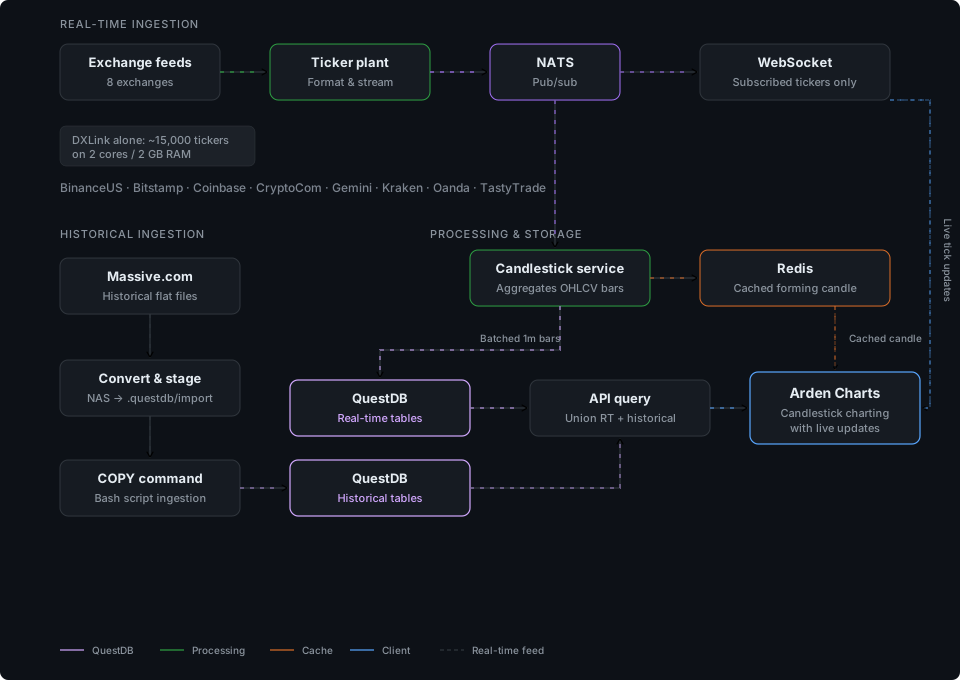
Right now I run connectors for BinanceUS, Bitstamp, Coinbase, CryptoCom, Gemini, Kraken, Oanda, and TastyTrade (via DXLink). As an example of how lightweight this is, DXLink alone streams around 15,000 tickers, and the container I allocated for it has just 2 CPU cores and 2 GB of RAM. It handles the load comfortably at around 10% resource utilization.
The ticker plant and NATS
For each exchange, I run a ticker plant, a microservice that connects to the exchange WebSocket, normalizes the incoming quotes or trades into a common format, and publishes the normalized messages to NATS.
I chose NATS as the pub/sub layer because it is lightweight, fast, and consumes very few resources. Every downstream service subscribes to the NATS topics it cares about, which keeps the architecture decoupled. The ticker plant does not need to know who is listening; it just publishes.
Real-time candlestick aggregation
A dedicated candlestick service subscribes to the ticker plant stream through NATS and aggregates incoming quotes and trades into OHLCV candlesticks. I work with the following timeframes in minutes: 1, 5, 15, 30, 60, 120, 240, 360, 480, 720, and 1440 (one day).
The currently forming candlestick is cached in Redis at all times. If a container fails and needs to restart, it picks up from something close to the actual forming bar rather than losing the in-progress data. This simple resilience pattern has saved me more than once.
As each 1-minute candlestick completes, it gets written into QuestDB. I batch the writes for speed, since QuestDB handles high-throughput ingestion well when you send data in batches rather than one row at a time.
Why QuestDB
When I was first designing the system, I evaluated several time-series databases. I even considered learning KDB+, and I am genuinely glad I did not go down that path. QuestDB is free and open source, it has a great team behind it, and the feature set keeps growing in directions that matter for exactly this kind of workload.
One design consideration that shaped my schema is that QuestDB is most efficient
when data is append-only and sorted by timestamp. Because of this, I store each
exchange's data in a separate table. This means I have tables like
binanceus_candlesticks_1, kraken_candlesticks_1, and so on. It keeps
ingestion fast and avoids contention across exchanges.
Historical data pipeline
Real-time data is only half the picture. To make the charting useful, I also need deep historical data for each exchange. I source this from Massive.com (formerly known as Polygon.io), which provides historical market data as flat files.
The ingestion pipeline for historical data is straightforward:
- Download flat files from Massive.com
- Convert them into a format QuestDB can ingest using a bash script (which, for what it is worth, ChatGPT generated for me)
- Stage the converted files in QuestDB's
.questdb/importdirectory - Run the
COPYcommand via another bash script to load the data into the historical tables
It is not the most glamorous pipeline, but it is reliable and fast.
Materialized views: the star of the show
This is where QuestDB really shines.
With 1-minute candlesticks flowing into QuestDB in real time, I need sampled
data for every higher timeframe (5m, 15m, 30m, 1h, and so on). Running a full
SAMPLE BY query over the raw 1-minute data every time a user requests a 4-hour
chart would be wasteful and slow.
Instead, I use QuestDB's materialized views to pre-compute each timeframe, and I set them up in a cascading pattern. The 5-minute view reads from the 1-minute table. The 15-minute view reads from the 5-minute view. The 30-minute reads from the 15-minute, and so on. Each materialized view only needs to aggregate a small multiple of its source rather than going all the way back to the raw data.
Here is the SQL that each view uses:
CREATE MATERIALIZED VIEW IF NOT EXISTS binanceus_candlesticks_5REFRESH PERIOD (SAMPLE BY INTERVAL) ASSELECTtimestamp,first(open) open,max(high) high,min(low) low,last(close) close,sum(volume) volumeFROM binanceus_candlesticks_1SAMPLE BY 5mALIGN TO CALENDAR;
The REFRESH PERIOD (SAMPLE BY INTERVAL) option means QuestDB refreshes the
materialized view automatically at the same cadence as the sample interval.
A 5-minute view refreshes every 5 minutes, a 1-hour view every hour, and so on.
And because I run this across multiple exchanges and both real-time and historical table types, I automated the creation with a bash script:
#!/usr/bin/env bashHOST="localhost"PORT="9000"USER="admin"PASSWORD="quest"BASE_URL="http://${HOST}:${PORT}/exec"DELAY="${DELAY:-5}"EXCHANGES=("binanceus" "bitstamp" "coinbase" "cryptocom" "gemini" "kraken")TYPES=("candlesticks" "historical")TIMEFRAMES=(1 5 15 30 60 120 240 360 480 720 1440)BASE_TIMEFRAME=1exec_sql () {curl -sG \-u "${USER}:${PASSWORD}" \--data-urlencode "query=${1}" \"${BASE_URL}" > /dev/null}get_source_timeframe () {case "$1" in5) echo "1" ;;15) echo "5" ;;30) echo "15" ;;60) echo "30" ;;120) echo "60" ;;240) echo "120" ;;360) echo "120" ;;480) echo "240" ;;720) echo "360" ;;1440) echo "720" ;;*) echo "$BASE_TIMEFRAME" ;;esac}create_view () {local exchange=$1 type=$2 tf=$3[ "$tf" -eq "$BASE_TIMEFRAME" ] && returnlocal source_tf=$(get_source_timeframe "$tf")local source="${exchange}_${type}_${source_tf}"local view="${exchange}_${type}_${tf}"echo "Creating ${view} from ${source}"exec_sql "DROP VIEW IF EXISTS ${view};CREATE MATERIALIZED VIEW IF NOT EXISTS ${view}REFRESH PERIOD (SAMPLE BY INTERVAL) ASSELECTtimestamp,first(open) open,max(high) high,min(low) low,last(close) close,sum(volume) volumeFROM ${source}SAMPLE BY ${tf}mALIGN TO CALENDAR;"sleep "$DELAY"}for exchange in "${EXCHANGES[@]}"; dofor type in "${TYPES[@]}"; dofor tf in "${TIMEFRAMES[@]}"; docreate_view "$exchange" "$type" "$tf"donedonedoneecho "Done creating materialized views."
Note the cascading logic in get_source_timeframe. The 360-minute (6-hour)
view sources from the 120-minute (2-hour) view rather than jumping all the way
to 1 minute. This keeps each aggregation step small and efficient.
Putting it all together: the charting layer
With all the data organized into timeframe-specific materialized views, the charting layer becomes straightforward. When a user opens a chart and selects a timeframe, the system:
- Queries the appropriate materialized view for completed historical bars
- Runs a
UNIONwith the real-time table for the most recent bars that the view has not yet refreshed - Combines the result with the currently forming candlestick cached in Redis
- Plots the full series and continues updating via the WebSocket connection as new ticks arrive from NATS
The result is a seamless, real-time charting experience across all eight exchanges, with full historical depth and live-updating candles.
Final thoughts
Building this platform has been a good exercise in combining the right tools for each layer. NATS handles the message routing with near-zero overhead. Redis provides fault tolerance for in-progress data. And QuestDB ties the storage and query layer together with fast ingestion, SQL, and materialized views that eliminate the need for expensive on-the-fly aggregation.
It has been fun working with the QuestDB team and seeing the product evolve over the months. Features like materialized views keep making architectures like this simpler and more efficient, and I am curious to see where it goes next.